

Skype

1,000,000,000+
Installs
Skype
Developer
-
Social
Category
-
Rated for 12+
Content Rating
-
skypeuploader@googlemail.com
Developer Email
-
http://www.skype.com/go/privacy
Privacy Policy
Screenshots

editor reviews
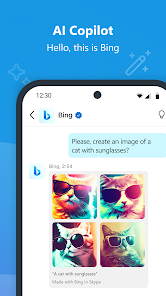
I remember installing Skype years ago, back when it was pretty much the only game in town for video calling. It's a communication app, plain and simple, letting you make voice and video calls, send instant messages, and share files with other users. You download it from Google Play or the App Store, and it's still free to install and use for basic calls, though you can buy credits to call actual phone numbers or get a subscription. The first time you open it, the interface feels a bit cluttered compared to modern apps like WhatsApp or FaceTime. You're greeted with a contacts list, a recent calls tab, and a bunch of options that can feel overwhelming if you just want to call your mom. Still, the fact that it works on almost any device—Windows, Mac, Android, iOS, even older Linux systems—makes it useful for people who need to connect with others across different platforms.
After using Skype for a while, the hands-on experience is a mixed bag. Onboarding is straightforward: you sign in with a Microsoft account, sync your contacts, and you're ready to call. The main actions like starting a call or sending a message are fairly simple, but the app sometimes lags when switching between chats and calls. I often find myself accidentally opening the "Highlights" tab, which is basically a Stories feature nobody asked for. During calls, audio quality is decent most of the time, but video can get blurry if your internet isn't rock solid. One practical tip: mute notifications during a call, because Skype loves to spam you with group chat pings while you're talking. The app also lets you share your screen, which is handy for work stuff, but getting it started takes a few extra taps compared to Google Meet.
After using it for weeks, I think Skype is still okay for certain situations, but it's not my go-to anymore. People who work in large organizations that still rely on Skype for Business might need it, or older relatives who refuse to switch to something newer might stick with it. For me, that makes it feel outdated compared to the slick, fast experience on Discord for gaming groups or FaceTime for Apple users. The app also has a weird habit of running in the background and draining battery, and the amount of promotional notifications for Skype credits is annoying. I ended up uninstalling it from my phone because the constant pings and the clunky interface were more hassle than they were worth. It still has its place for specific use cases, but I wouldn't recommend it for daily personal use.
features
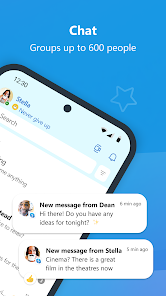
- 🎥 Skype lets you make group video calls with up to 100 participants for free, while Zoom's free tier only allows 40-minute meetings for groups of three or more. That's a big deal if you're hosting a family reunion or a casual catch-up session that runs long.
- 📞 It includes a call-to-phone feature that WhatsApp and FaceTime lack. You can buy Skype credit to call actual landlines or mobile numbers around the world at cheap rates, making it great for reaching people who don't use smartphones.
- 💬 Real-time translation is baked into Skype for voice and text chats, something neither Zoom nor FaceTime offer natively. If you're talking to a friend who speaks a different language, Skype can transcribe or interpret on the fly, which is surprisingly practical.
pros
- 🔄 Cross-platform compatibility is Skype's biggest strength. It works on everything from Windows and macOS to Linux, Android, iOS, and even older smart TVs. Zoom and FaceTime are more restricted, with FaceTime being Apple-only by default, and Zoom lacking broad Linux support out of the box.
- 📁 File sharing is more straightforward on Skype. You can drag and drop files up to 300 MB directly into a chat without needing to upload to a cloud service first, unlike WhatsApp or Telegram which have smaller limits or require third-party links.
- 🎙️ Skype offers hardware integration like support for Xbox consoles and Amazon Echo devices. If you want to make calls from your living room without picking up a phone, Skype works seamlessly with these, while most other apps don't offer that level of device compatibility.
cons
- 🔄 Skypes interface feels outdated and bloated compared to Discord or Telegram. The app shoves features like "Highlights" and "Skype for Business" options into your face, making it harder to find the simple chat or call button you actually want.
- 📶 Video quality often degrades more than Zoom on the same internet connection. I've had clear calls on Zoom while Skype turned into a pixelated mess, which is frustrating when you're relying on it for a scheduled chat.
- 📱 Mobile performance is laggy. On both Android and iOS, Skype drains battery faster than Signal or WhatsApp, and the app takes a few seconds just to load messages when you open it. For a messaging app, that slowness kills the experience.
Recommended Apps
![]()
16Personalities
16Personalities4
![]()
Zodiac Palm Reader: MagicWay
Reatility Media4.6
![]()
Moblo - 3D furniture modeling
MYTIforge4.1![]()
Magnifier Plus with Flashlight
Digitalchemy, LLC4.6![]()
QR Code Scanner
QR Code Scanner & Barcode Reader4.7![]()
FalFal: Astrology, Tarot, Love
FalFal Team4.8![]()
Christmas Photo Frames
PhotoFramesApps4.6![]()
AI Video Art Creator - Livensa
FERASET4.5![]()
Horoscope of Birth
Denimaks4.4![]()
Make Me Bald Prank
AppTornado2.5![]()
Kling AI: AI Image&Video Maker
Lohas Games Pte. Ltd.4.4![]()
Japan Timetable & Route Search
NAVITIME JAPAN CO., LTD.4.3![]()
Prank Call & Funny Video
TeH Software0![]()
Parallax 3D Live Wallpapers
TarrySoft4.3![]()
AI Chatbot - Nova
ScaleUp4.7















Disclaimer
1.AppInfoLibrary does not represent any developer, nor is it the developer of any App or game.
2.AppInfoLibrary provide custom reviews of Apps written by our own reviewers, and detailed information of these Apps, such as developer contacts, ratings and screenshots.
3.All trademarks, registered trademarks, product names and company names or logos appearing on the site are the property of their respective owners.
4. AppInfoLibrary abides by the federal Digital Millennium Copyright Act (DMCA) by responding to notices of alleged infringement that complies with the DMCA and other applicable laws.
5.If you are the owner or copyright representative and want to delete your information, please contact us info@appinfolibrary.com.
6.All the information on this website is strictly observed all the terms and conditions of Google Ads Advertising policies and Google Unwanted Software policy .














