

Moblo - 3D furniture modeling

1M+
Installs
MYTIforge
Developer
-
Art & Design
Category
-
Everyone
Content Rating
-
support@moblo3d.app
Developer Email
-
https://www.moblo3d.app/
Privacy Policy
Screenshots
editor reviews
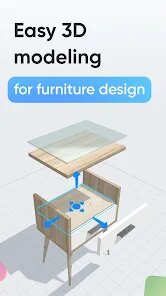
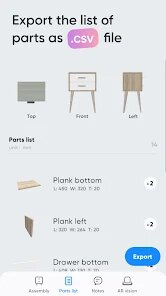
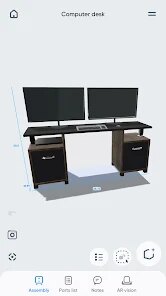
Moblo is a 3D furniture modeling app that lets you design and visualize rooms right on your phone. It belongs to the interior design and home planning category, but it focuses more on building your own furniture pieces rather than just dragging pre-made items around. I found it on the Google Play Store, and while I didn't check the exact install count, it seems to have a modest but dedicated user base. The first impression after launching was pretty positive — the 3D rendering looks clean, and the interface doesn't feel cluttered. You don't need to create an account to start messing around, which I appreciated. There are no forced ads either, though some advanced export features might be locked behind a one-time purchase. I downloaded it because I wanted to plan a custom bookshelf for my small apartment, and the idea of actually modeling it in 3D sounded more satisfying than using a flat floor plan app.
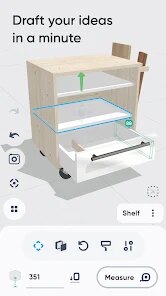
Once you open the app, the onboarding is short — basically a quick tutorial that shows you how to push, pull, and rotate shapes. The main action is building furniture from primitive shapes like cubes, cylinders, and planes, then snapping them together. I started with a simple coffee table, and the touch controls felt intuitive after a few tries. You can adjust dimensions by tapping and dragging, which is smooth, but occasionally the snap points don't align the way you'd expect, and you have to nudge things manually. A practical tip: use the undo button often because accidental moves happen. The app also lets you apply materials and colors, though the texture library is a bit limited compared to something like SketchUp's mobile version. I spent about 20 minutes building a chair, and the real-time 3D view made it easy to see how the legs looked from every angle. There's no walkthrough mode, so you're just orbiting around your model, which works fine for small projects.
After using Moblo for a couple of weeks, I think it's great for hobbyists who enjoy DIY furniture design or need quick visual mockups for personal projects. The biggest strength is how straightforward it feels — you don't need any CAD experience to get a decent result. But if you're a professional looking for precise measurements or advanced rendering, this isn't the tool for you. Compared to apps like HomeByMe or Planner 5D, Moblo feels more like a 3D sketchpad than a full interior design suite. It lacks room templates and a large furniture library, so you're building everything from scratch. That might be a pro or a con depending on what you need. I can see myself keeping it installed for small custom builds, but I probably won't use it for entire room designs. The lack of cloud saving is a bit annoying — if I switch phones, my models are gone unless I manually export them. Overall, it's a neat niche app that does one thing well, but it won't replace bigger tools for serious work.
features
- 📐 Direct modeling: Unlike apps like MagicPlan that focus on scanning existing rooms, Moblo lets you build furniture piece by piece from scratch. You push and pull simple shapes like blocks and cylinders to create your own designs. This is great if you enjoy a LEGO-like building process, but it lacks the pre-made catalog that apps like IKEA Place offer.
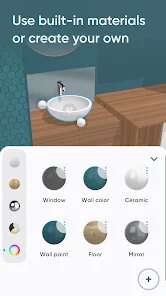
- 🎨 Material editing: The app includes a basic set of textures and colors for your models. It's not as extensive as what you'd see in SketchUp Viewer, but it's enough to visualize wood grains or paint finishes on your furniture. The material application feels responsive, though blending different finishes on the same object can be tricky.
- 📏 Precision adjustments: You can fine-tune dimensions down to the millimeter, which is a step up from simpler design tools. This is useful if you're planning a shelf that needs to fit a specific wall niche, but the interface for typing exact numbers isn't as clean as TapPainter's measurement tools.
pros
- 🔧 Easy undo and redo system: Moblo's history-based undo is smoother than what I've seen in Room Planner, where accidental moves sometimes can't be reversed. It lets you experiment freely without worrying about ruining your model.
- 📱 No sign-up clutter: Unlike MagicPlan or Planner 5D that push account creation early, Moblo lets you start modeling immediately after downloading. This lowers the barrier to entry for casual users who just want to test the app quickly.
- 🆓 Free core features: Compared to apps like SketchUp Mobile Viewer that hide export options behind a subscription, Moblo keeps the basics free. You can build, texture, and export basic 3D files without paying upfront.
cons
- 🚫 No cloud sync: Unlike MagicPlan which syncs projects across devices, Moblo saves everything locally. If you lose your phone or switch devices, your work disappears unless you manually export each file. This feels outdated in 2024.
- 🎯 Limited object library: Apps like IKEA Place or Planner 5D have thousands of pre-modeled furniture pieces to drag and drop. Moblo leaves you with empty shapes, so you have to build everything from scratch — which is tedious if you just want to arrange furniture quickly.
- 📐 Precision input issues: Room Planner lets you type exact dimensions with a numeric keypad. Moblo relies mostly on manual dragging, and the text input fields feel poorly designed — they sometimes don't register decimal values correctly, which is frustrating for detailed work.
Recommended Apps
![]()
16Personalities
16Personalities4
![]()
Zodiac Palm Reader: MagicWay
Reatility Media4.6
![]()
Moblo - 3D furniture modeling
MYTIforge4.1![]()
Magnifier Plus with Flashlight
Digitalchemy, LLC4.6![]()
QR Code Scanner
QR Code Scanner & Barcode Reader4.7![]()
FalFal: Astrology, Tarot, Love
FalFal Team4.8![]()
Christmas Photo Frames
PhotoFramesApps4.6![]()
AI Video Art Creator - Livensa
FERASET4.5![]()
Horoscope of Birth
Denimaks4.4![]()
Make Me Bald Prank
AppTornado2.5![]()
Kling AI: AI Image&Video Maker
Lohas Games Pte. Ltd.4.4![]()
Japan Timetable & Route Search
NAVITIME JAPAN CO., LTD.4.3![]()
Prank Call & Funny Video
TeH Software0![]()
Parallax 3D Live Wallpapers
TarrySoft4.3![]()
AI Chatbot - Nova
ScaleUp4.7














Disclaimer
1.AppInfoLibrary does not represent any developer, nor is it the developer of any App or game.
2.AppInfoLibrary provide custom reviews of Apps written by our own reviewers, and detailed information of these Apps, such as developer contacts, ratings and screenshots.
3.All trademarks, registered trademarks, product names and company names or logos appearing on the site are the property of their respective owners.
4. AppInfoLibrary abides by the federal Digital Millennium Copyright Act (DMCA) by responding to notices of alleged infringement that complies with the DMCA and other applicable laws.
5.If you are the owner or copyright representative and want to delete your information, please contact us info@appinfolibrary.com.
6.All the information on this website is strictly observed all the terms and conditions of Google Ads Advertising policies and Google Unwanted Software policy .














