

Christmas Photo Frames

1M+
Installs
PhotoFramesApps
Developer
-
Video Players & Editors
Category
-
Rated for 12+
Content Rating
-
z.awesome.995@gmail.com
Developer Email
-
https://docs.google.com/document/d/1tcQYc-r-IdjV_15L2ilYLybN-hbUPzAVlrf8bcZmBKg/edit?usp=sharing
Privacy Policy
Screenshots
editor reviews
Christmas Photo Frames is exactly what it sounds like—a themed photo editing app that lets you slap festive borders, stickers, and decorations onto your pictures. It's one of those seasonal tools you might grab just before the holidays when you want to make a quick card or spice up a family photo for social media. I stumbled across it on Google Play, and with over a million downloads, it's clearly not some obscure side project. The app is free to download, though you run into ads and prompts for in-app purchases pretty early on. First impression was a little mixed—on one hand, the preview images show some genuinely cute designs, but on the other, the interface looks a bit dated, like something from a few Android versions ago. Still, for a no-cost download, I figured it was worth a try to see how well it actually works.
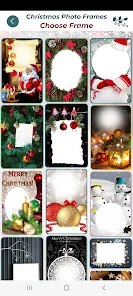
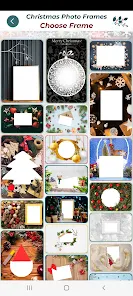
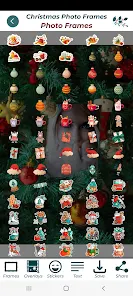
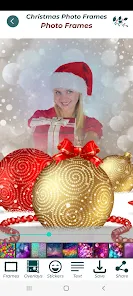
Once you launch the app, you're greeted with a grid of frame categories—stuff like “Santa's Workshop” or “Snowy Scenes.” You pick one, then either snap a new photo or pull one from your gallery. The editing screen is straightforward: tap on your image to adjust its size or position within the frame, then hit save. That's pretty much the entire workflow. There's no complex layering or manual alignment tools, which keeps things simple but also means you're stuck with whatever crop the frame forces. I noticed that some frames don't sit well on portrait shots—they tend to stretch or awkwardly cut off faces. One practical tip: use square or landscape photos for the smoothest results. The app also includes a handful of extra stickers and text options, but those are locked behind a paywall. For basic use, you can still get a decent-looking holiday image in under a minute, which honestly beats opening a full editor like Photoshop just to add a wreath border.
After playing around with it for a week, I think Christmas Photo Frames serves its purpose if you just want something fast and festive. It's great for casual users who don't mind a few ads and aren't looking for creative control. Kids or older relatives might love it because it's dead simple—no learning curve. But if you're someone who edits photos regularly, you'll probably feel cramped. Compared to something like Canva, which also has holiday templates but offers layered edits, typography, and export options, this app feels like a toy. That's not necessarily a bad thing—it's just a different tool. What stands out is how specific it is: no clutter, just frames. That focus might make you keep it installed for next December, though I can't see myself opening it outside of Christmas season. Uninstalling feels inevitable once January rolls around, unless you're the type who likes snowflakes in July.
features
- 🎄 Frame Library: The app offers a solid collection of Christmas-themed frames, from traditional nativity scenes to modern minimalist snowflakes. Compared to something like YouCam Perfect—which has a much broader but less holiday-focused set—this app feels more curated. You won't have to dig through irrelevant filters to find a decent Santa border. The selection isn't huge, but each frame has a distinct look, and new ones get added with updates.
- 📸 One-Tap Editing: You open a frame, pick your photo, adjust it, and save. There's no confusing toolbar or hidden menus. That's the whole flow. In contrast, apps like PicsArt bury Christmas effects under layers and blending modes, which can overwhelm someone who just wants a quick holiday card. Christmas Photo Frames strips that complexity away completely.
- 💰 Accessible Price Point: The core frame pack is free, which is rare among seasonal photo tools. Many similar apps, like Christmas Photo Editor, lock all decent frames behind a premium version right from the start. Here, you get a fair number of free options, and the paid frames cost less than a coffee. That makes it easy to try without commitment.
pros
- ✨ Focused Design: This app doesn't try to be a jack-of-all-trades editor. It's built strictly for Christmas frames, which means no distractions. Canva offers loads of templates, but you might waste time hunting for the right holiday one. Christmas Photo Frames gets you straight to the point.
- 📱 Lightweight and Quick: The app installs fast and doesn't hog storage or drain battery during edits. Apps like Adobe Express feel heavier and might lag on older phones. This one runs smoothly even on budget devices.
- 🎯 No Learning Curve: My grandmother could use this without help. That's not true of more feature-rich apps like Snapseed, where you need to understand layers or masks. For its target audience—casual users—this simplicity is a strength.
cons
- ❗ Stale Interface: The design looks old, like it hasn't been updated since Android KitKat. Compared to modern apps like PicsArt or Canva, which have sleek, customizable UIs, this one feels abandoned. Navigation icons are small and dated, which can be off-putting.
- 📏 Cropping Issues: Many frames force a specific aspect ratio that doesn't fit standard phone photos. You'll often need to crop your image before importing, or you end up with a weirdly stretched face. Other apps, like PhotoDirector, handle frame resizing more intelligently.
- 🎁 Limited Free Content: While the base frames are free, additional stickers and text options are locked behind a paywall. Apps like YouCam Perfect offer more free customization without pressuring you to upgrade. The ads between every save also interrupt the flow—something competitors often manage better with less intrusive ad placement.
Recommended Apps
![]()
16Personalities
16Personalities4
![]()
Zodiac Palm Reader: MagicWay
Reatility Media4.6
![]()
Moblo - 3D furniture modeling
MYTIforge4.1![]()
Magnifier Plus with Flashlight
Digitalchemy, LLC4.6![]()
QR Code Scanner
QR Code Scanner & Barcode Reader4.7![]()
FalFal: Astrology, Tarot, Love
FalFal Team4.8![]()
Christmas Photo Frames
PhotoFramesApps4.6![]()
AI Video Art Creator - Livensa
FERASET4.5![]()
Horoscope of Birth
Denimaks4.4![]()
Make Me Bald Prank
AppTornado2.5![]()
Kling AI: AI Image&Video Maker
Lohas Games Pte. Ltd.4.4![]()
Japan Timetable & Route Search
NAVITIME JAPAN CO., LTD.4.3![]()
Prank Call & Funny Video
TeH Software0![]()
Parallax 3D Live Wallpapers
TarrySoft4.3![]()
AI Chatbot - Nova
ScaleUp4.7














Disclaimer
1.AppInfoLibrary does not represent any developer, nor is it the developer of any App or game.
2.AppInfoLibrary provide custom reviews of Apps written by our own reviewers, and detailed information of these Apps, such as developer contacts, ratings and screenshots.
3.All trademarks, registered trademarks, product names and company names or logos appearing on the site are the property of their respective owners.
4. AppInfoLibrary abides by the federal Digital Millennium Copyright Act (DMCA) by responding to notices of alleged infringement that complies with the DMCA and other applicable laws.
5.If you are the owner or copyright representative and want to delete your information, please contact us info@appinfolibrary.com.
6.All the information on this website is strictly observed all the terms and conditions of Google Ads Advertising policies and Google Unwanted Software policy .














