

Photo Editor - Lumii

50M+
Installs
InShot Video Editor
Developer
-
Video Players & Editors
Category
-
Rated for 3+
Content Rating
-
lumii@inshot.com
Developer Email
-
http://inshotapp.com/lumii/website/privacypolicy.html
Privacy Policy
Screenshots
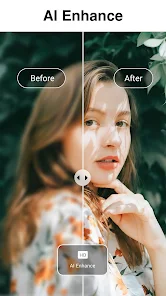
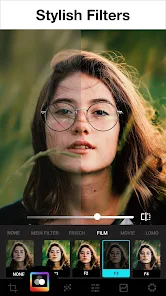
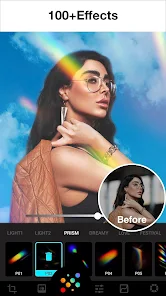
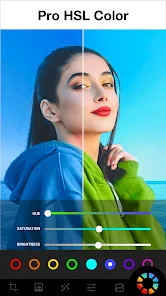
editor reviews
Photo Editor - Lumii is a photo editing app from InShot, the same folks behind that popular video editor. It's basically a one-stop shop for fixing up your pictures, slapping on filters, and adding text or stickers. You'd grab it off Google Play or the App Store if you want something more than your phone's basic editor but aren't ready for desktop software. After downloading and launching it for the first time, it feels pretty straightforward—there's no forced sign-up, which is nice. It's free to download with in-app purchases and the occasional ad, and install counts are in the millions, so it's got a solid user base.
Actually using Lumii is where it shines for everyday quick edits. The interface is clean: you pick a photo, and then you're hit with a toolbar at the bottom. Sliders for brightness, contrast, and saturation are right there, and you can adjust them without digging through menus. The filters are decent—nothing revolutionary, but they work. A small tip: the "Auto" button actually does a good job balancing exposure on tricky shots. I found the text tool a bit clunky since you have to tap through layers to reposition it, but removing backgrounds with the cutout feature is surprisingly smooth. For a casual user snapping selfies or food pics, it's easy to get a passable result in under a minute.
After spending a few weeks with it, I think Lumii hits a sweet spot for people who edit photos on the go but don't need heavy stuff like masking layers. It's better than your default gallery editor but simpler than something like Snapseed or Lightroom Mobile. What sets it apart is how fast it loads and how little it bogs down on older phones. That said, if you're after advanced tools like curves or healing brushes, you'll hit a wall fast. I could see myself keeping it installed for quick tweaks, but power users might uninstall it once they hit the paywall for certain premium filters or export options.
features
- 📸 Real-time preview sliders – Unlike VSCO where you often apply a filter and then tweak, Lumii lets you see exposure, contrast, and saturation changes live as you drag the sliders. It makes fine-tuning feel more tactile, especially for beginners who want instant feedback without switching modes.
- 🖼️ One-tap background removal – While Photoshop Express offers a similar tool, Lumii's cutout feature is less finicky for basic subjects like people or pets against simple backgrounds. It doesn't require manual edge refinement, which saves time for casual users.
- ✨ Auto-enhance with scene detection – Snapseed has auto-adjust too, but Lumii's version analyzes whether you're shooting a landscape or a close-up and tweaks the white balance and sharpness accordingly. It's not perfect, but it guesses right more often than not.
- 🔤 Flexible text overlays – Adding text in Lumii lets you pick from dozens of fonts and apply shadows or outlines without needing a separate layering app. PicsArt has more options, but Lumii's interface keeps it simpler for quick typography.
pros
- ⚡ Fast load time – The app opens almost instantly on mid-range phones, while Lightroom Mobile can take a few seconds to sync your library. This matters when you're quickly editing a photo before sharing it.
- 📦 No account needed – You can start editing straight away without signing up, unlike Adobe products that nag you for an Adobe ID. It removes friction for one-time users.
- 🎨 Genuine "curated" presets – The filter packs are actually tested on different lighting conditions, so they don't blow out highlights as often. VSCO's filters are artistic, but Lumii's tend to be more usable for everyday snapshots without extra tweaking.
cons
- ❌ Limited advanced tools – There's no curve adjustment or selective color editing, so if you need to dodge shadows like in Lightroom Mobile, you're out of luck. Serious photographers will feel constrained.
- 💰 Premium filter packs aren't cheap – While the base app is free, some of the best effect bundles cost as much as a coffee. Snapseed gives you all that for free, so value seekers might prefer that route.
- 🔋 Export resolution cap – Free version only exports at up to 2000x2000 pixels, which can be limiting if you want to print. Google Photos' built-in editor doesn't have that restriction.
Recommended Apps
![]()
16Personalities
16Personalities4
![]()
Zodiac Palm Reader: MagicWay
Reatility Media4.6
![]()
Moblo - 3D furniture modeling
MYTIforge4.1![]()
Magnifier Plus with Flashlight
Digitalchemy, LLC4.6![]()
QR Code Scanner
QR Code Scanner & Barcode Reader4.7![]()
FalFal: Astrology, Tarot, Love
FalFal Team4.8![]()
Christmas Photo Frames
PhotoFramesApps4.6![]()
AI Video Art Creator - Livensa
FERASET4.5![]()
Horoscope of Birth
Denimaks4.4![]()
Make Me Bald Prank
AppTornado2.5![]()
Kling AI: AI Image&Video Maker
Lohas Games Pte. Ltd.4.4![]()
Japan Timetable & Route Search
NAVITIME JAPAN CO., LTD.4.3![]()
Prank Call & Funny Video
TeH Software0![]()
Parallax 3D Live Wallpapers
TarrySoft4.3![]()
AI Chatbot - Nova
ScaleUp4.7















Disclaimer
1.AppInfoLibrary does not represent any developer, nor is it the developer of any App or game.
2.AppInfoLibrary provide custom reviews of Apps written by our own reviewers, and detailed information of these Apps, such as developer contacts, ratings and screenshots.
3.All trademarks, registered trademarks, product names and company names or logos appearing on the site are the property of their respective owners.
4. AppInfoLibrary abides by the federal Digital Millennium Copyright Act (DMCA) by responding to notices of alleged infringement that complies with the DMCA and other applicable laws.
5.If you are the owner or copyright representative and want to delete your information, please contact us info@appinfolibrary.com.
6.All the information on this website is strictly observed all the terms and conditions of Google Ads Advertising policies and Google Unwanted Software policy .













