

Magnifier Plus with Flashlight

10M+
Installs
Digitalchemy, LLC
Developer
-
Video Players & Editors
Category
-
Rated for 3+
Content Rating
-
magnifierplus@digitalchemy.us
Developer Email
-
https://www.digitalchemy.us/magnifier-plus/privacy-policy
Privacy Policy
Screenshots
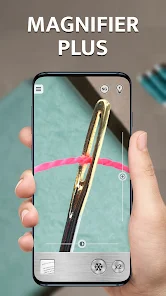
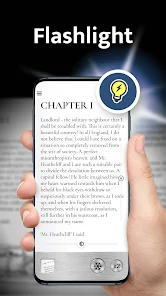
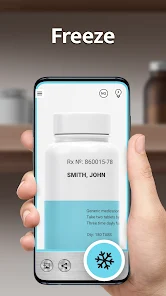
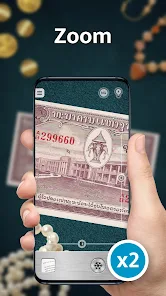
editor reviews
Magnifier Plus with Flashlight is a utility app that turns your phone into a digital magnifying glass, perfect for reading fine print, examining small objects, or checking details in low light. Made by Digitalchemy, LLC, it's been downloaded over 10 million times on Google Play and sits in a niche where practicality meets simplicity. Most people would grab it for everyday tasks like reading medicine labels, inspecting jewelry, or helping aging family members see tiny text. The first impression after launching is pretty straightforward: you get a clean viewfinder with a slider to zoom in and a torch icon to toggle the flashlight. There's no registration, no clutter, just a tool that feels ready to use right away. It's free to download, but you'll hit a few ads unless you opt for the in-app purchase to remove them. The design isn't flashy, but that's not really the point here.
Once you start using it, the experience is mostly smooth, though there are some quirks. Opening the app shows a camera feed with a zoom slider at the bottom, and you can pinch to adjust. The onboarding basically doesn't exist, which is fine since the controls are intuitive. In daily use, you'd point the camera at what you want, pull the slider up to 10x zoom, and maybe tap the flashlight icon to brighten things up. A nice touch is the freeze frame button, letting you capture a still image and then zoom further without shaky hands. The color filters, like negative or grayscale, help if you're reading text on a tricky background. But there are confusing moments too, like when the auto-focus struggles with close-up objects, and you have to tap the screen a few times to get it sharp. A small tip: steady your phone against a surface for the best results, especially at max zoom.
After using it for a while, I'd say this app shines for anyone who frequently deals with small details, like crafters, electricians, or seniors. It might feel unnecessary if you only rarely need magnification, since your phone's camera can zoom a bit already. Compared to something like the built-in Magnifier on iPhones, this one adds the flashlight integration and color filters, but feels less polished on Android. The free version's ads are a bit annoying, popping up after every freeze frame or zoom change, which makes you consider the paid upgrade. What makes it stand out is its simplicity and focused nature, no extra fluff like file management or AR gimmicks. I'd keep it installed for quick tasks, but might uninstall if storage gets tight, since there are lighter alternatives like “Magnifier” by Netigen that do the same job with fewer ads. Overall, it's a solid niche tool that does what it promises, no more, no less.
features
- 🔍 Real-time zoom up to 10x with smooth pinch control, unlike many free magnifier apps that cap at 4x or 5x, giving you better detail on tiny text or intricate patterns without needing to snap a photo first.
- 💡 Built-in flashlight integration that syncs with the camera exposure, so you get consistent brightness even in dark corners or at night, something apps like “Magnifier & Microscope” often lack with their separate toggle.
- 🖼️ Color filter presets including grayscale, inverted, and high contrast, which help when reading on glossy surfaces or spotting scratches, a feature that sets it apart from the basic “Magnifying Glass” app that offers no such adjustments.
- 📷 Freeze frame capture to lock an image and keep zooming, which reduces shakiness compared to live view, making it ideal for comparing small serial numbers or inspecting coins.
pros
- 💡 The flashlight automatically adjusts brightness based on zoom level, so close-ups don't get washed out, while similar apps like “Magnifier Lite” just blast full brightness without any smarts.
- 🔍 Zoom stays smooth even on lower-end phones without major lag, which is a win over “Handy Magnifier” that often stutters on older models or throws up buffering delays.
- 📱 No account setup or permissions beyond the camera, so you can use it instantly without sharing data, unlike some alternatives that nag you to sign in or access storage.
cons
- 📵 The free version shows ads after almost every action, locking the screen for 5 seconds, which gets frustrating compared to “Magnifier Glass” that only shows a banner at the bottom without interrupting your flow.
- 🔍 Auto-focus is slow and sometimes misses at close range, forcing you to tap repeatedly, whereas the default camera app on most phones handles macro shots more reliably for the same task.
- 🎨 Color filters are hidden in a submenu with no quick toggle, so switching from grayscale back to normal takes extra taps, unlike “Simple Magnifier” that places them right on the main screen.
- 💾 No save option for frozen frames unless you screenshot manually, which adds clutter to your gallery, while competitors like “Magnifier Plus” at least offer a gallery shortcut to keep things organized.
Recommended Apps
![]()
16Personalities
16Personalities4
![]()
Zodiac Palm Reader: MagicWay
Reatility Media4.6
![]()
Moblo - 3D furniture modeling
MYTIforge4.1![]()
Magnifier Plus with Flashlight
Digitalchemy, LLC4.6![]()
QR Code Scanner
QR Code Scanner & Barcode Reader4.7![]()
FalFal: Astrology, Tarot, Love
FalFal Team4.8![]()
Christmas Photo Frames
PhotoFramesApps4.6![]()
AI Video Art Creator - Livensa
FERASET4.5![]()
Horoscope of Birth
Denimaks4.4![]()
Make Me Bald Prank
AppTornado2.5![]()
Kling AI: AI Image&Video Maker
Lohas Games Pte. Ltd.4.4![]()
Japan Timetable & Route Search
NAVITIME JAPAN CO., LTD.4.3![]()
Prank Call & Funny Video
TeH Software0![]()
Parallax 3D Live Wallpapers
TarrySoft4.3![]()
AI Chatbot - Nova
ScaleUp4.7














Disclaimer
1.AppInfoLibrary does not represent any developer, nor is it the developer of any App or game.
2.AppInfoLibrary provide custom reviews of Apps written by our own reviewers, and detailed information of these Apps, such as developer contacts, ratings and screenshots.
3.All trademarks, registered trademarks, product names and company names or logos appearing on the site are the property of their respective owners.
4. AppInfoLibrary abides by the federal Digital Millennium Copyright Act (DMCA) by responding to notices of alleged infringement that complies with the DMCA and other applicable laws.
5.If you are the owner or copyright representative and want to delete your information, please contact us info@appinfolibrary.com.
6.All the information on this website is strictly observed all the terms and conditions of Google Ads Advertising policies and Google Unwanted Software policy .














