

FaceArt: Filters for Pictures

50M+
Installs
Lyrebird Studio
Developer
-
Video Players & Editors
Category
-
Rated for 3+
Content Rating
-
lyrebirdstudio@gmail.com
Developer Email
-
https://lyrebirdstudio.net/privacy_policy.htm
Privacy Policy
Screenshots
editor reviews
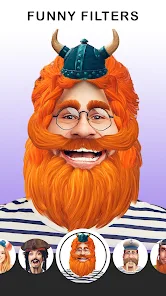
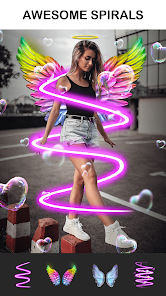
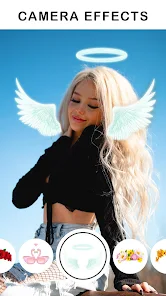
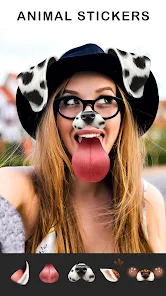
FaceArt: Filters for Pictures is a photo editing app that focuses specifically on transforming selfies and portraits into stylized artwork. Lyrebird Studio designed it for users who want quick, one-tap filters that turn a regular face shot into something that looks like a painting, a cartoon, or a sketch. A lot of people download these kinds of apps to make fun profile pictures or surprise friends with a polished version of a casual photo. When you first open FaceArt, a small popup asks you to choose a photo from your gallery or take a new one right there. The screen feels simple and not too cluttered, which is a good start. You don't need to create an account to try the basic filters, which makes the first impression feel fast and direct. The app is free to download from Google Play or the App Store, but you will notice small banner ads sitting at the bottom right away.
Once you pick a photo, the main action begins. The interface shows your picture in the middle, and below it a row of filter thumbnails waits for you to scroll through. Tapping any thumbnail applies the effect instantly. Some filters like "Oil Painting" or "Pencil Sketch" take about two or three seconds to process, while lighter ones like "Cartoon" or "Comic" appear almost immediately. The tool feels okay for casual use, but if you tap too fast or switch filters before one finishes loading, the app sometimes freezes for a moment. There is no slider to adjust the intensity of the filter. You either get the full effect or nothing. After you apply a filter, the app offers a small "Enhance" button that brightens the colors slightly, and a "Save" button that exports the result directly to your camera roll. A smooth moment happens when you find a filter that really works with the lighting in your original photo. A confusing moment happens when you try to undo a filter. There is no clear back button. You have to reload the original image from your gallery again.
After using FaceArt for a little while, it becomes clear that this app suits people who enjoy instant, no-fuss artistic transformations. It does not offer the fine control you get in something like Picsart or the deep learning detail of FaceApp. But if you just want to see what you look like as a cartoon character or in the style of a classical painter, this app delivers that in two taps. The difference here is the focus on stylized art filters rather than basic beauty retouching. That said, the ads do get annoying if you edit more than a few pictures in one session. You might keep it installed if you take fun selfies every week and want a quick way to share something creative. On the other hand, you would uninstall it if you realize you can get similar filters inside Snapchat or Instagram for free without the ads and the waiting time.
features
- 😊 One-tap art filter style: FaceArt stands out because its filters are aimed specifically at stylized art looks like charcoal sketches, watercolor, and mosaic. For example, Adobe Photoshop Express offers detailed editing tools but lacks ready-made art filters that work instantly on a face. FaceArt skips all the sliders and gives you a finished look in seconds.
- 😊 Real-time preview before saving: While you scroll through the filters, the app shows the effect on your actual photo inside a small thumbnail. In contrast, apps like Remini require you to apply and then wait for the result. FaceArt lets you see what you will get before you tap.
- 😊 No registration required: You can open FaceArt, pick a photo, apply a filter, and save it without ever signing up. A lot of similar photo apps like Facetune or YouCam Perfect push you to create an account first or limit basic features. FaceArt keeps that barrier low.
- 😊 Simple sharing flow: After saving, the app offers a direct "Share" button that opens your phone's standard sharing menu. Other apps like Picsart often open their own social feed first, which slows down the sharing process. FaceArt keeps it quick and clean.
pros
- 👍 Fewer ads than some rivals: Compared to apps like BeautyPlus, which shows a full-screen video ad after every single edit, FaceArt only places a small banner at the bottom. This lets you work without constant interruptions.
- 👍 Clear and uncluttered layout: The main screen has only the photo area and the filter row. There are no floating buttons or popups asking you to try a premium version every few minutes. This makes it feel calmer than Candy Camera, which buries tools behind multiple tabs.
- 👍 Decent filter variety for free: You get around 30 filters without paying. Snapseed and Lightroom focus on photo correction, not stylized filters, so FaceArt fills that gap nicely for users who just want artistic options.
cons
- 👎 No filter intensity control: Once you tap a filter, you cannot adjust how strong or subtle it looks. Picsart's "Art" section lets you slide between the original and the effect, which gives you more control. FaceArt forces you to take the full effect every time.
- 👎 Occasional lag and freezes: The app sometimes hangs for a few seconds when loading a high-resolution photo or applying a heavy filter. FaceApp processes similar effects faster and more smoothly, which makes FaceArt feel less reliable for batch editing.
- 👎 No undo button: If you decide to remove a filter, you have to go back and choose your original photo again. Apps like Instagram's editing tools let you tap "Undo" or revert a specific step. FaceArt does not offer that flexibility.
- 👎 Ads still present in the free version: While the banner ads stay small, they still take up space. Some free apps like VSCO provide an ad-free experience for basic edits. The presence of any ad in FaceArt feels unnecessary when other alternatives have none.
Recommended Apps
![]()
16Personalities
16Personalities4
![]()
Zodiac Palm Reader: MagicWay
Reatility Media4.6
![]()
Moblo - 3D furniture modeling
MYTIforge4.1![]()
Magnifier Plus with Flashlight
Digitalchemy, LLC4.6![]()
QR Code Scanner
QR Code Scanner & Barcode Reader4.7![]()
FalFal: Astrology, Tarot, Love
FalFal Team4.8![]()
Christmas Photo Frames
PhotoFramesApps4.6![]()
AI Video Art Creator - Livensa
FERASET4.5![]()
Horoscope of Birth
Denimaks4.4![]()
Make Me Bald Prank
AppTornado2.5![]()
Kling AI: AI Image&Video Maker
Lohas Games Pte. Ltd.4.4![]()
Japan Timetable & Route Search
NAVITIME JAPAN CO., LTD.4.3![]()
Prank Call & Funny Video
TeH Software0![]()
Parallax 3D Live Wallpapers
TarrySoft4.3![]()
AI Chatbot - Nova
ScaleUp4.7















Disclaimer
1.AppInfoLibrary does not represent any developer, nor is it the developer of any App or game.
2.AppInfoLibrary provide custom reviews of Apps written by our own reviewers, and detailed information of these Apps, such as developer contacts, ratings and screenshots.
3.All trademarks, registered trademarks, product names and company names or logos appearing on the site are the property of their respective owners.
4. AppInfoLibrary abides by the federal Digital Millennium Copyright Act (DMCA) by responding to notices of alleged infringement that complies with the DMCA and other applicable laws.
5.If you are the owner or copyright representative and want to delete your information, please contact us info@appinfolibrary.com.
6.All the information on this website is strictly observed all the terms and conditions of Google Ads Advertising policies and Google Unwanted Software policy .













