

TIME WARP SCAN: Face Scanner

10M+
Installs
ZipoApps
Developer
-
Video Players & Editors
Category
-
Rated for 3+
Content Rating
-
support.twarp@zipoapps.com
Developer Email
-
https://zipoapps.com/twarp/privacy
Privacy Policy
Screenshots

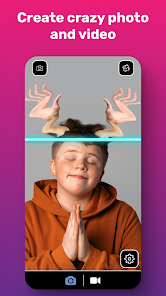
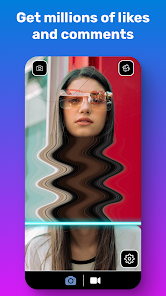
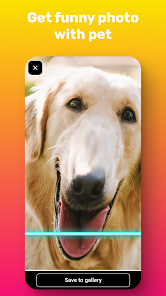
editor reviews
Time Warp Scan is a mobile utility app that uses your phone's camera to simulate what you'd look like at different ages. You'll find it on both Google Play and the App Store, where it's free to download and install. The app has been downloaded over 10 million times, which gives you an idea of how curious people are about this kind of thing. When you first launch it, you're hit with a simple screen asking you to take a photo or pick one from your gallery. There's no registration required, so you can jump right in without any hassle. My first impression was that it felt like a fun party trick more than a serious tool, but the interface is clean and the loading times are quick, which I appreciate.
After snapping a photo, the app processes it in a few seconds and then shows you aging and de-aging results. You can slide a bar to adjust the age from childhood up to old age, and the changes appear in real time on your face. I tried it with a selfie I had on hand, and the app managed to smooth out my wrinkles for the younger version and add some gray hair for the older one. The controls are pretty intuitive — just drag the slider left or right. There's also a portrait mode that focuses on your face, which helps avoid weird distortions around the edges. One thing I noticed is that bright lighting gives better results, so take your photo near a window if you can. The app doesn't bombard you with ads every few seconds, which is a nice change from other free apps. For a quick laugh with friends, this does the job without any complicated steps.
After using it for a while, I'd say Time Warp Scan is perfect for casual fun, like showing your friends what they'll look like at 70 or sending a silly screenshot to the family group chat. It's not something you'd use daily, but it's fun to keep around for parties or just killing time. Compared to apps like FaceApp, this one feels less polished — FaceApp has more editing tools and doesn't crash as often — but Time Warp Scan wins on simplicity and being completely free. You might uninstall it once the novelty wears off, but if you enjoy quick, lighthearted photo tricks, it's worth a download. I kept it on my phone because it's harmless fun and reminds me of those old age filters on social media.
features
- 🎭 Aging simulation: This app focuses purely on aging and de-aging your face using AI, while apps like FaceApp offer a full suite of filters from beard styles to background changes. Time Warp Scan nails the specific task without overwhelming you with options, which some users might prefer.
- 🎛 Live slider adjustment: You can drag a slider to see yourself at any age between a child and an elderly person, and the change happens instantly. Other apps like Remini require you to process each age separately, so this real-time preview feels much more interactive.
- 📸 No sign-up needed: You don't need to create an account or share your email to use the core feature. Many similar apps, including AgingBooth, ask for registration before letting you try anything, so this feels less intrusive.
- 🎨 Minimalist interface: The app throws you straight into the camera with only the essential buttons. Apps like Meitu have cluttered menus and sponsored content, while Time Warp Scan keeps it distraction-free.
pros
- 🌟 Free with no watermark: Even the free version doesn't slap a logo on your final image, which is rare. Apps like FaceApp leave a watermark unless you pay, and AgingBooth adds text too.
- 🌟 Instant processing: The AI works within seconds on most phones, so you're not waiting around. Other apps like YouCam often take 10–15 seconds per edit, which can get annoying.
- 🌟 Low storage footprint: The app is small and doesn't eat up your phone's memory. Some alternatives like Snapseed are heavier and include tons of unnecessary bloatware.
- 🌟 Simple sharing options: After generating an image, you can save it or share directly to social media in one tap. Apps like PicsArt require extra steps like cropping or exporting before sharing.
cons
- ⚠️ Limited accuracy: While it's fun, the aging effects can look cartoonish if your photo has poor lighting or an unusual angle. FaceApp tends to produce more realistic results because it uses a larger dataset.
- ⚠️ No undo button: If you slide too far and want to go back, there's no redo option — you have to start with a fresh photo. Apps like Remini offer a history feature so you can revert changes.
- ⚠️ Occasional crashes: On older phones, the app sometimes freezes or closes unexpectedly, especially after processing a few images. FaceApp is more stable across different devices.
- ⚠️ Single-purpose focus: You can't edit anything else like skin tone, hair color, or background. If you want more versatility, apps like YouCam or BeautyPlus offer a wider range of tools in one place.
Recommended Apps
![]()
16Personalities
16Personalities4
![]()
Zodiac Palm Reader: MagicWay
Reatility Media4.6
![]()
Moblo - 3D furniture modeling
MYTIforge4.1![]()
Magnifier Plus with Flashlight
Digitalchemy, LLC4.6![]()
QR Code Scanner
QR Code Scanner & Barcode Reader4.7![]()
FalFal: Astrology, Tarot, Love
FalFal Team4.8![]()
Christmas Photo Frames
PhotoFramesApps4.6![]()
AI Video Art Creator - Livensa
FERASET4.5![]()
Horoscope of Birth
Denimaks4.4![]()
Make Me Bald Prank
AppTornado2.5![]()
Kling AI: AI Image&Video Maker
Lohas Games Pte. Ltd.4.4![]()
Japan Timetable & Route Search
NAVITIME JAPAN CO., LTD.4.3![]()
Prank Call & Funny Video
TeH Software0![]()
Parallax 3D Live Wallpapers
TarrySoft4.3![]()
AI Chatbot - Nova
ScaleUp4.7















Disclaimer
1.AppInfoLibrary does not represent any developer, nor is it the developer of any App or game.
2.AppInfoLibrary provide custom reviews of Apps written by our own reviewers, and detailed information of these Apps, such as developer contacts, ratings and screenshots.
3.All trademarks, registered trademarks, product names and company names or logos appearing on the site are the property of their respective owners.
4. AppInfoLibrary abides by the federal Digital Millennium Copyright Act (DMCA) by responding to notices of alleged infringement that complies with the DMCA and other applicable laws.
5.If you are the owner or copyright representative and want to delete your information, please contact us info@appinfolibrary.com.
6.All the information on this website is strictly observed all the terms and conditions of Google Ads Advertising policies and Google Unwanted Software policy .













