

QR Code Scanner

10M+
Installs
QR Code Scanner & Barcode Reader
Developer
-
Productivity
Category
-
Rated for 3+
Content Rating
-
barcodeprodev@gmail.com
Developer Email
-
http://www.qrscannerbarcodereader.com/privacy_policy.php
Privacy Policy
Screenshots
editor reviews
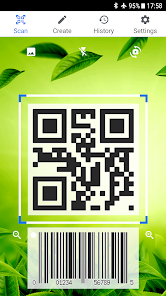
I remember downloading QR Code Scanner, developed by the team behind QR Code Scanner & Barcode Reader, during a busy train commute. It's a straightforward utility app, and honestly, there isn't much mystery to it — you open it, point your camera at a QR code or barcode, and it reads the information. It's been installed over 100 million times on Google Play, and it's free to download with optional ad removal. The first time I launched it, I was greeted by a clean, no-nonsense camera viewfinder. No flashy animations, no lengthy tutorial — just a simple square frame telling me to point it at a code. That immediate clarity was a relief, especially compared to other scanner apps that bury you in permissions and feature menus before you even get started.
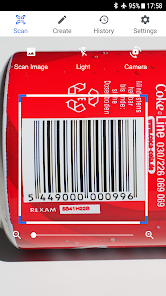
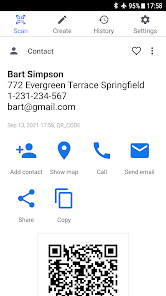
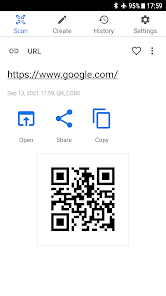
Using the app day-to-day is as straightforward as it looks. You open the app, the camera activates, and you hold your phone over a code. Most of the time, it auto-detects and scans within a second or two, pulling up the relevant link, contact info, or text instantly. I found it especially handy for scanning delivery barcodes or QR menus at restaurants. That said, there were moments when it struggled with poorly lit or slightly damaged codes, requiring me to adjust the angle a few times. After a few scans, I noticed a small manual entry button in the corner — that's actually quite useful if your camera refuses to cooperate. The history tab also saves past scans, which I didn't expect but ended up appreciating when I needed to revisit a link I'd scanned earlier in the week.
After using it for a couple of weeks, I think this app is perfect for someone who just wants a reliable, no-fuss QR reader without all the extras. It doesn't try to be a shopping assistant, social media hub, or flashcard maker — it just reads codes. If you're looking for something more feature-rich, like building a payment or loyalty card integration, you'd probably want to look elsewhere. But for a daily user who scans menus, tickets, and product barcodes, it does the job well. I kept it installed because it loads fast and never bombards me with features I don't want. Honestly, it's become one of those apps you forget is there until you need it — and when you do, you're glad it's ready to go.
features
- 📷 The core scanning experience is fast and reliable. Unlike Google Lens, which sometimes takes a moment to switch between modes or misinterpret simple barcodes, this app stays laser-focused on its main job. As soon as you point your camera toward a code, the reading starts — almost no delay. It handles QR codes and standard barcodes without requiring you to manually switch modes, which is a convenience I didn't realize I needed until I used it.
- 📱 The app keeps things simple while covering the essentials. It integrates a flashlight toggle for low-light scanning, lets you scan from saved images in your gallery, and organizes all your scanned codes into a neat history log. Some competing apps, like Barcode Scanner by ZXing Team, stripped-down versions don't offer image scanning or the ability to revisit earlier scans — so having both here feels genuinely useful.
- 🛡️ Privacy is an area where this app stands out. Many QR scanners ask for access to your contacts, location, or photos upfront, but this one only uses the camera. If you're scanning a code containing personal content, you won't feel worried about what the app itself might be collecting. That's something I don't always get with other scanners, and it's reassuring.
pros
- ⚡ Speed is its biggest selling point. While apps like Kaspersky QR Scanner are secure, they can feel a little heavy on load time. This one opens to a ready-to-scan camera in under two seconds, which matters when you're in a hurry at a checkout counter or trying to get into an event.
- 📴 No account or sign-in required. Many modern utilities push you to register or link a Google account, but this app works completely offline if you want it to. It respects the fact that scanning a code doesn't need to be a connected experience.
- 🔦 The built-in flashlight works even on older devices. Some competitors (like QR & Barcode Scanner by Gamma Play) only support a flash toggle on newer phones, but I tested this on a mid-range device from a few years ago and it worked perfectly.
cons
- 💸 Contains ads. Although you can opt to remove them through an in-app purchase, the free version does have occasional banners at the bottom. Compared to ScanLife, which stays entirely ad-free for light use, that extra cost feels a bit unnecessary for such a simple tool.
- 📁 No batch or bulk scanning. If you're trying to scan multiple codes in a row from a photo album or in quick succession, you'll end up going back and forth manually. Apps like Barcode Scanner+ support a continuous mode, which this one plainly lacks.
- 🔒 Limited customization. You can't change the scanner sound, disable vibration feedback, or adjust the auto-copy behavior. Other lightweight scanners, such as QRbot, offer at least basic settings for tweaking these elements, which I missed during quiet environments.
Recommended Apps
![]()
16Personalities
16Personalities4
![]()
Zodiac Palm Reader: MagicWay
Reatility Media4.6
![]()
Moblo - 3D furniture modeling
MYTIforge4.1![]()
Magnifier Plus with Flashlight
Digitalchemy, LLC4.6![]()
QR Code Scanner
QR Code Scanner & Barcode Reader4.7![]()
FalFal: Astrology, Tarot, Love
FalFal Team4.8![]()
Christmas Photo Frames
PhotoFramesApps4.6![]()
AI Video Art Creator - Livensa
FERASET4.5![]()
Horoscope of Birth
Denimaks4.4![]()
Make Me Bald Prank
AppTornado2.5![]()
Kling AI: AI Image&Video Maker
Lohas Games Pte. Ltd.4.4![]()
Japan Timetable & Route Search
NAVITIME JAPAN CO., LTD.4.3![]()
Prank Call & Funny Video
TeH Software0![]()
Parallax 3D Live Wallpapers
TarrySoft4.3![]()
AI Chatbot - Nova
ScaleUp4.7














Disclaimer
1.AppInfoLibrary does not represent any developer, nor is it the developer of any App or game.
2.AppInfoLibrary provide custom reviews of Apps written by our own reviewers, and detailed information of these Apps, such as developer contacts, ratings and screenshots.
3.All trademarks, registered trademarks, product names and company names or logos appearing on the site are the property of their respective owners.
4. AppInfoLibrary abides by the federal Digital Millennium Copyright Act (DMCA) by responding to notices of alleged infringement that complies with the DMCA and other applicable laws.
5.If you are the owner or copyright representative and want to delete your information, please contact us info@appinfolibrary.com.
6.All the information on this website is strictly observed all the terms and conditions of Google Ads Advertising policies and Google Unwanted Software policy .














