

Volume Control Sound Launcher

500K+
Installs
AtomApplications
Developer
-
Productivity
Category
-
Everyone
Content Rating
-
support@phonevolumecontrol.com
Developer Email
-
https://phonevolumecontrol.com/privacy-policy
Privacy Policy
Screenshots
editor reviews
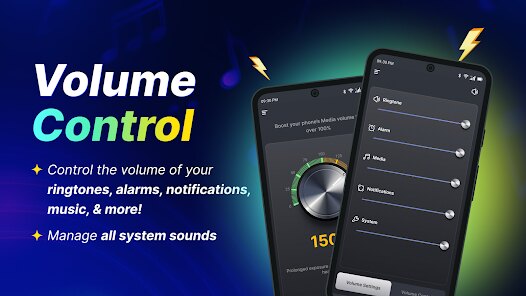
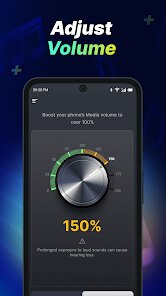
Volume Control Sound Launcher is a utility app that essentially takes over the way you adjust sound levels on your Android device. Instead of relying on the standard system sliders, it gives you a highly customizable pop-up panel for controlling media, alarm, ringtone, and notification volumes. A typical user would download this from Google Play to get more granular control over their audio presets or to replace a clunky default interface. The moment you launch the app, the first impression is that it's surprisingly lightweight and unobtrusive. There is no heavy registration process, and it runs quietly in the background. The install count suggests a modest but dedicated user base, and the app is free to download, though there are some in-app purchases for advanced theme packs and to remove ads that occasionally appear at the bottom of the settings menu.
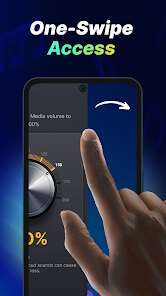
After using Volume Control Sound Launcher for a few days, the real-world experience is mostly about convenience and speed. The interface treats you to a clean, material-design panel that pops up when you press your physical volume button. This panel lets you toggle between different audio streams and even set a timer for sound profiles, which is fantastic for falling asleep to music. The onboarding is pretty straightforward: you grant a few permissions, pick a theme from the built-in collection, and you're done. In daily use, you simply adjust a slider and it saves your preference instantly. One small tip I discovered is that you can drag the panel to different edges of the screen, which helps when using the phone one-handed. It feels smooth most of the time, though occasionally the pop-up lags by half a second, which can be a tiny annoyance when you are trying to quickly mute a ringing phone.
After a while, my personal take is that this app is best suited for power users who love tweaking every aspect of their phone, or for people who often switch between sound profiles like silent, vibrate, and full volume. Casual users might find it unnecessary since your phone already does the job. What sets it apart from other sound tools on Play Store is how it doesn't clutter your notification bar or drain your battery noticeably. I can see someone keeping it installed for the quick-access panel and the scheduling feature, but I might uninstall it if the ads become too pushy after an update. Honestly, compared to something like "Precise Volume," this one feels more complete in design but slightly less feature-rich in fine-tuning individual app volumes. It's a fair trade-off if you value ease of use over raw customization.
features
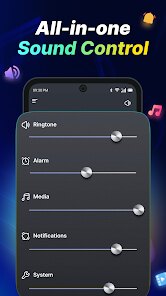
- 🎛️ Customizable Volume Panel: Unlike the stock Android volume controls that only show three sliders, Volume Control Sound Launcher lets you add or remove any audio stream. You can even change the panel's size, transparency, and position on the screen. This is far more versatile compared to "Sound Assistant" by Samsung, which is limited to Samsung devices.
- ⏲️ Sound Profile Scheduler: A standout feature is the ability to schedule sound profiles. For example, you can set your phone to automatically go silent at 10 PM and return to full volume at 7 AM. Competing apps like "Volume Butler" offer similar features, but this one integrates it directly into the volume panel instead of requiring a separate widget.
- 🎨 Built-in Theme Store: Instead of being stuck with one boring panel, you can download community-made themes to change the look and feel. Some themes change the buttons, colors, or even add animated backgrounds. Most other volume apps only offer a few dark or light presets.
pros
- 👍 Very Lightweight Resource Usage: Compared to bigger apps like "Equalizer FX," Volume Control Sound Launcher barely uses any RAM or battery. It runs as a small service and pops up only when needed.
- 👍 Granular Control Over Individual Streams: You can independently adjust ringtone, notification, media, alarm, and system volumes without diving into settings. This is something even "Precise Volume" complicates with too many tabs.
- 👍 Good Compatibility: It works on almost all Android devices, from old versions to Android 13, without needing root access. Many similar apps fail on newer OS versions due to permission restrictions.
cons
- 👎 Persistent Ad Banners: The free version shows small ads within the settings panel, which can be distracting when you're trying to tweak themes. Competitors like "Volume Slider Widget" keep the ads less intrusive, or offer a cheaper premium unlock.
- 👎 Occasional Lag on Launch: When the phone has been idle for a while, pressing the volume button shows a noticeable delay of 0.5 to 1 second before the panel appears. Apps like "Sound Assistant" react instantly.
- 👎 Limited Per-App Volume Control: Unlike "Precise Volume" which lets you set separate volume levels for YouTube, Spotify, or games, this app only controls system-wide streams. Power users will find this limiting.
Recommended Apps
![]()
16Personalities
16Personalities4
![]()
Zodiac Palm Reader: MagicWay
Reatility Media4.6
![]()
Moblo - 3D furniture modeling
MYTIforge4.1![]()
Magnifier Plus with Flashlight
Digitalchemy, LLC4.6![]()
QR Code Scanner
QR Code Scanner & Barcode Reader4.7![]()
FalFal: Astrology, Tarot, Love
FalFal Team4.8![]()
Christmas Photo Frames
PhotoFramesApps4.6![]()
AI Video Art Creator - Livensa
FERASET4.5![]()
Horoscope of Birth
Denimaks4.4![]()
Make Me Bald Prank
AppTornado2.5![]()
Kling AI: AI Image&Video Maker
Lohas Games Pte. Ltd.4.4![]()
Japan Timetable & Route Search
NAVITIME JAPAN CO., LTD.4.3![]()
Prank Call & Funny Video
TeH Software0![]()
Parallax 3D Live Wallpapers
TarrySoft4.3![]()
AI Chatbot - Nova
ScaleUp4.7















Disclaimer
1.AppInfoLibrary does not represent any developer, nor is it the developer of any App or game.
2.AppInfoLibrary provide custom reviews of Apps written by our own reviewers, and detailed information of these Apps, such as developer contacts, ratings and screenshots.
3.All trademarks, registered trademarks, product names and company names or logos appearing on the site are the property of their respective owners.
4. AppInfoLibrary abides by the federal Digital Millennium Copyright Act (DMCA) by responding to notices of alleged infringement that complies with the DMCA and other applicable laws.
5.If you are the owner or copyright representative and want to delete your information, please contact us info@appinfolibrary.com.
6.All the information on this website is strictly observed all the terms and conditions of Google Ads Advertising policies and Google Unwanted Software policy .













