

Face Swap

10M+
Installs
Wombatica Software
Developer
-
Entertainment
Category
-
Rated for 7+
Content Rating
-
apps@wombatica.app
Developer Email
-
https://wombatica.app/android-app-privacy-policy/
Privacy Policy
Screenshots
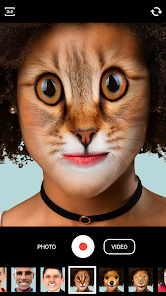

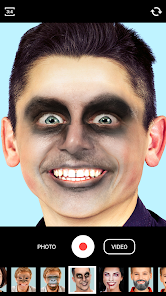
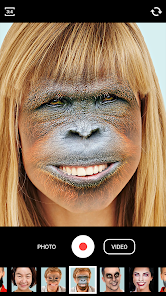
editor reviews
Face Swap is one of those playful photo-editing apps that lets you swap faces between two people in a picture, or even put your face onto a celebrity or movie still. It's a straightforward utility app, not a full-blown editing suite, so you download it when you're in the mood for a laugh or want to prank a friend. On Google Play, it's been installed over a million times and is free to download, though you'll find ads and optional in-app purchases for removing them or unlocking extra face packs. The first time you launch it, the interface feels a bit dated—think early 2010s design—but it's functional enough. You're immediately prompted to pick a photo or snap one, which sets the tone for quick, no-fuss fun.
Once you start using it, the experience is mostly point-and-click. You select a source face and a target face by tapping the screen, and the app does the blending automatically. For a normal user, the main actions are: choose a photo, adjust the face alignment if the auto-detect misses the mark, and then save or share the result. The onboarding is minimal—just a few swipe tips—so you're editing within seconds. I found the auto-detect worked fine with well-lit, front-facing shots, but it struggled with side profiles or group photos where faces overlapped. A small tip: after the swap, you can tweak the opacity slider to make the blend look less jarring, which many new users might miss. The flow is simple, but the app occasionally forces you to watch a full-screen ad before saving, which breaks the rhythm.
After playing around for a while, I'd say this app is best for casual users who want quick, silly results without fussing over layers or masks. It's not for anyone expecting polished, realistic swaps—the edges can look rough, and skin tones sometimes mismatch badly. Compared to something like Snapchat's face swap lens, this app feels clunkier and less integrated, but it offers more control over specific photos from your gallery. You might keep it installed for party tricks or making memes, but the ads and limited export options could drive you to uninstall after a few uses. It's a decent tool for a laugh, but it doesn't have the staying power of more versatile editors.
features
- 😄 One-click face swap: Unlike Reface, which often requires an internet connection for its AI-driven swaps, Face Swap handles everything offline with a simple tap. You just select faces, and it blends them instantly—no waiting for server processing.
- 😄 Opacity and alignment controls: While Reface focuses on automated videos, Face Swap gives you manual sliders to tweak the transparency and position of the swapped face. This lets you fix awkward overlaps or harsh edges, something you can't easily do in Reface's preset outputs.
- 😄 Photo library import: You can use any picture from your gallery, not just templates. Reface limits you to its own library of celebrities or scenes, but here you can swap faces in old family photos or random snapshots, making it more flexible for personal projects.
- 😄 Lightweight and fast: The app is under 20MB and runs smoothly on older phones. Reface, by contrast, can be resource-heavy and drain battery during video processing. For quick static swaps, this app feels snappier and less demanding.
pros
- 👍 Quick setup: You can complete a swap in under 30 seconds compared to Sketch Swap, where you need to outline areas manually. The auto-detect saves time for casual users who just want a laugh.
- 👍 Offline functionality: Works without Wi-Fi, unlike many cloud-based swap tools like FaceApp. This is handy when you're on a subway or traveling with spotty signal.
- 👍 No account required: You don't have to sign up or log in, which is a big plus versus apps that push registration before even letting you try. This lowers the barrier to entry significantly.
- 👍 Fun for group jokes: The app handles multi-face swaps decently in well-lit photos, making it a hit at parties. Other apps like PicsArt require more steps to achieve similar chaotic results.
cons
- 👎 Aggressive ads: Every few swaps trigger a full-screen video ad, and there's a banner at the bottom constantly. Snapchat's face lenses have no ads at all, making for a smoother experience.
- 👎 Inconsistent detection: It often fails with glasses, hats, or shadows, requiring manual adjustment. Reface's AI handles accessories better, automatically masking them out.
- 👎 No video support: You can only swap faces in static images, while apps like Reface and Zao let you swap into short video clips or GIFs. This limits creative possibilities for social media posts.
- 👎 Low-resolution exports: Saved images compress noticeably, especially on older devices. VSCO or Snapseed maintain higher quality when you later edit swapped photos, but this app reduces sharpness by default.
Recommended Apps
![]()
16Personalities
16Personalities4
![]()
Zodiac Palm Reader: MagicWay
Reatility Media4.6
![]()
Moblo - 3D furniture modeling
MYTIforge4.1![]()
Magnifier Plus with Flashlight
Digitalchemy, LLC4.6![]()
QR Code Scanner
QR Code Scanner & Barcode Reader4.7![]()
FalFal: Astrology, Tarot, Love
FalFal Team4.8![]()
Christmas Photo Frames
PhotoFramesApps4.6![]()
AI Video Art Creator - Livensa
FERASET4.5![]()
Horoscope of Birth
Denimaks4.4![]()
Make Me Bald Prank
AppTornado2.5![]()
Kling AI: AI Image&Video Maker
Lohas Games Pte. Ltd.4.4![]()
Japan Timetable & Route Search
NAVITIME JAPAN CO., LTD.4.3![]()
Prank Call & Funny Video
TeH Software0![]()
Parallax 3D Live Wallpapers
TarrySoft4.3![]()
AI Chatbot - Nova
ScaleUp4.7















Disclaimer
1.AppInfoLibrary does not represent any developer, nor is it the developer of any App or game.
2.AppInfoLibrary provide custom reviews of Apps written by our own reviewers, and detailed information of these Apps, such as developer contacts, ratings and screenshots.
3.All trademarks, registered trademarks, product names and company names or logos appearing on the site are the property of their respective owners.
4. AppInfoLibrary abides by the federal Digital Millennium Copyright Act (DMCA) by responding to notices of alleged infringement that complies with the DMCA and other applicable laws.
5.If you are the owner or copyright representative and want to delete your information, please contact us info@appinfolibrary.com.
6.All the information on this website is strictly observed all the terms and conditions of Google Ads Advertising policies and Google Unwanted Software policy .













