

AI Video Art Creator - Livensa

500K+
Installs
FERASET
Developer
-
Video Players & Editors
Category
-
Rated for 3+
Content Rating
-
info@feraset.co
Developer Email
-
https://www.feraset.co/privacy.html
Privacy Policy
Screenshots
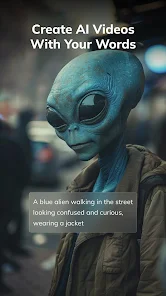
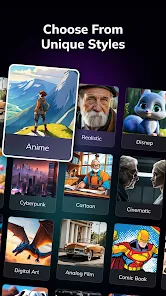
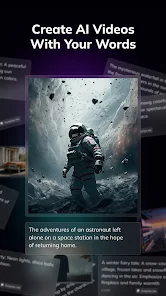

editor reviews
Livensa is an AI-powered video creation tool that sits somewhere between a creative playground and a practical editing suite. It's designed for people who want to turn text prompts or simple ideas into short video clips, animations, or artistic visual pieces without needing to learn complex editing software. I downloaded it from the Play Store after seeing some interesting sample videos online, and the install was quick and free. The first impression after launching it was actually a bit overwhelming — there's a lot of buttons and options on the main screen, and it doesn't hold your hand much. You're kind of thrown in, which can be exciting if you like exploring, but a little confusing if you just want to get started right away.
When I actually sat down to use it, the main workflow starts with picking a creation mode. There's text-to-video, image-to-video, and a few style transfer options. I tried text-to-video first, typed a short description like “sunset over a calm lake with birds,” and waited. The first result took maybe 30 seconds to generate, and the output was decent — not crazy realistic, but kind of dreamy and artistic, which fits the app's vibe. The interface is clean once you get used to it, with sliders for motion intensity and style presets. One thing I noticed is that the app can feel a bit laggy on older phones, and there's no proper tutorial, so you might end up tapping around to figure things out. A small tip: keep your prompts short and vivid for better results.
After using it for a week or two, I think Livensa is best for casual creators, social media content makers, or anyone who enjoys experimenting with visual art. It's not going to replace proper video editors like CapCut or Adobe Premiere Rush for polished projects, because the output quality and resolution are limited, and there are in-app purchases for higher quality exports and more styles. What makes it different from similar tools like Pika Labs or RunwayML is that it feels more toy-like and less corporate — it's fun to play with, but not something you'd rely on for serious work. I kept it installed because it's nice for quick creative bursts, but I can see someone uninstalling it if they need more control or better output quality.
features
- 🎨 Text-to-video generation works fairly well for short clips, though it doesn't match the realism of RunwayML's outputs in my tests. The style tends to be more artistic and abstract, which is great for experimental videos or social media intros.
- 🎨 Style transfer is a standout feature here. You can take a regular photo or video and apply painterly or cartoonish filters that actually look cohesive. In comparison, Pika Labs requires more manual prompt tweaking to get similar results.
- 🎨 Motion intensity sliders let you control how much movement happens in the generated video. This is something I haven't seen done as smoothly in other mobile AI video tools, and it gives you a bit more creative freedom without cluttering the interface.
- 🎨 The app runs entirely on-device for basic generation, so you don't need a constant internet connection. This is more convenient than cloud-dependent tools like Kaiber, which can stall if your connection is spotty.
pros
- ✅ It's completely free to download and try out. You can generate a decent number of clips without paying anything, unlike RunwayML which limits you heavily on the free tier.
- ✅ The interface, while cluttered at first, becomes pretty intuitive after a few sessions. Compared to CapCut's AI tools which are buried in menus, Livensa puts everything on the main screen.
- ✅ On-device processing means faster initial results and less waiting for uploads. This is a clear win over cloud-based apps like Pika Labs where generation can take minutes.
- ✅ It feels more playful and less serious than professional tools. If you want to experiment without pressure, this app is a good pick.
cons
- ❌ Output resolution is capped at a relatively low setting unless you pay. In contrast, RunwayML offers higher resolution even on its free tier, which makes a big difference for sharing on bigger screens.
- ❌ There's no proper undo or revision history. If you mess up a setting or want to tweak a prompt slightly, you often have to start over from scratch, which is frustrating compared to Pika Labs' versioning system.
- ❌ The app can be unstable on older devices, with occasional crashes when processing longer prompts. CapCut's AI tools are more stable across different hardware.
- ❌ The free version contains ads that pop up between generations. It's not a dealbreaker, but it breaks the creative flow more than I'd like.
Recommended Apps
![]()
16Personalities
16Personalities4
![]()
Zodiac Palm Reader: MagicWay
Reatility Media4.6
![]()
Moblo - 3D furniture modeling
MYTIforge4.1![]()
Magnifier Plus with Flashlight
Digitalchemy, LLC4.6![]()
QR Code Scanner
QR Code Scanner & Barcode Reader4.7![]()
FalFal: Astrology, Tarot, Love
FalFal Team4.8![]()
Christmas Photo Frames
PhotoFramesApps4.6![]()
AI Video Art Creator - Livensa
FERASET4.5![]()
Horoscope of Birth
Denimaks4.4![]()
Make Me Bald Prank
AppTornado2.5![]()
Kling AI: AI Image&Video Maker
Lohas Games Pte. Ltd.4.4![]()
Japan Timetable & Route Search
NAVITIME JAPAN CO., LTD.4.3![]()
Prank Call & Funny Video
TeH Software0![]()
Parallax 3D Live Wallpapers
TarrySoft4.3![]()
AI Chatbot - Nova
ScaleUp4.7














Disclaimer
1.AppInfoLibrary does not represent any developer, nor is it the developer of any App or game.
2.AppInfoLibrary provide custom reviews of Apps written by our own reviewers, and detailed information of these Apps, such as developer contacts, ratings and screenshots.
3.All trademarks, registered trademarks, product names and company names or logos appearing on the site are the property of their respective owners.
4. AppInfoLibrary abides by the federal Digital Millennium Copyright Act (DMCA) by responding to notices of alleged infringement that complies with the DMCA and other applicable laws.
5.If you are the owner or copyright representative and want to delete your information, please contact us info@appinfolibrary.com.
6.All the information on this website is strictly observed all the terms and conditions of Google Ads Advertising policies and Google Unwanted Software policy .














