

Accupedo Pedometer

5M+
Installs
Corusen LLC
Developer
-
Health & Fitness
Category
-
Rated for 3+
Content Rating
-
accupedo@gmail.com
Developer Email
-
https://www.accupedo.com/privacy.html
Privacy Policy
Screenshots
editor reviews
I came across Accupedo Pedometer by Corusen LLC when I was looking for something to track my daily walks without draining my phone's battery like the built-in health apps do. It's a step counter that uses your phone's built-in sensors, so you don't need a smartwatch or any extra gadget. You just download it from the Google Play Store, install it, and it's free to start using, though there are in-app purchases if you want to unlock more features. The first thing I noticed after launching it was how clean and simple the interface looked, no flashy graphics or confusing menus. It immediately started counting steps, which felt reassuring, and at first glance, it seemed like a no-fuss tool for anyone who just wants to know how many steps they've taken each day.
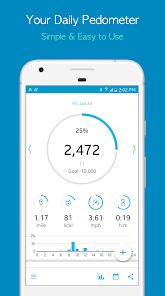
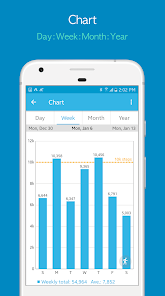
Once I started using Accupedo regularly, I appreciated how little effort it required. The main screen shows your step count in big numbers, with a bar graph that changes throughout the day. You can swipe to see daily, weekly, monthly, or yearly stats, which is really motivating when you want to track your progress over time. Setting it up was straightforward, just enter your height, weight, and stride length, and it calibrates pretty accurately. I did notice that if I carried my phone in a bag instead of a pocket, the step count was sometimes a bit off, but that's common with phone-based pedometers. One small trick I found useful was turning on the "power saving mode" in the app settings, which helped the battery last all day without missing steps. The app also sends a gentle notification if you've been sitting too long, which I found helpful for staying active during work hours.
After using Accupedo for a couple of months, I think it's a solid choice for someone who just wants a simple step tracker without wearing a fitness band. It doesn't overload you with goals or social features like Google Fit or Samsung Health, which can feel a bit heavy sometimes. The accuracy is decent for daily use, though not as precise as a dedicated pedometer like a Fitbit. I can see someone keeping it installed if they just want a quick glance at their movement each day, but if you're into detailed workout tracking or heart rate monitoring, this app probably isn't enough. It stands out because it's lightweight, with minimal ads, and works even in the background without slowing down your phone. For me, it's become a quiet little habit, checking my steps before bed, and I haven't felt the need to uninstall it yet.
features
- 📊 The standout feature for me is the daily and weekly bar graphs that show step count over time with a simple green bar. Unlike Google Fit, which can feel cluttered with multiple metrics, Accupedo keeps it visual and easy to digest at a glance. You can tap on any day to see a breakdown by hour, which is great for spotting when you're most active.
- 🔋 Battery efficiency is a big plus. Most step trackers like Pacer or Stepz drain the battery because they constantly update live data. Accupedo uses the phone's accelerometer in a smart way, so it tracks steps without killing your battery by the afternoon. I often end the day with 60% battery left, which was a relief.
- 👣 The "idle alert" feature is genuinely useful. It vibrates after 30 minutes of inactivity, similar to the move reminders on an Apple Watch. However, unlike Samsung Health's quiet nudges, Accupedo's alert is more noticeable without being annoying. It gently pushes you to stand up and walk for a minute.
pros
- 🎯 Simplicity over complexity. Accupedo focuses purely on step counting and distance, unlike Pacer which throws in weight tracking, meal logs, and social feeds. If you just want to know your daily steps without extra noise, this app feels cleaner and more focused.
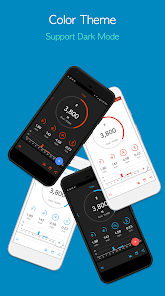
- 🌙 Dark mode support is included out of the box. Many pedometer apps like Step Counter don't have a proper dark mode, which makes them glaring at night. Accupedo's dark theme is comfortable to use before bed without blinding you.
- 📅 Yearly overview is available without a premium subscription. Stepz hides yearly data behind a paywall, but Accupedo gives you access to your full year of step history for free, which is rare and genuinely helpful for long-term tracking.
cons
- 💾 No cloud backup in the free version. If you switch phones, you lose your step history. Google Fit automatically syncs your data to your account, but Accupedo requires a manual backup via CSV export. I learned this the hard way after losing three months of data.
- 📵 The widget occasionally stops updating. Sometimes the home screen widget freezes and shows yesterday's step count until you open the app. Pacer's widget is more reliable in that sense, refreshing every few minutes without glitches.
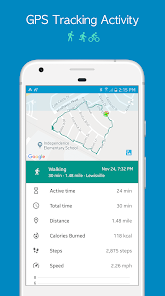
- 📡 Accuracy drops in certain conditions. If you walk while holding your phone still, like keeping it in a bag, it undercounts steps. Runtastic Pedometer (Adidas Running) handles this better by using GPS as a backup, but Accupedo relies solely on the accelerometer.
Recommended Apps
![]()
16Personalities
16Personalities4
![]()
Zodiac Palm Reader: MagicWay
Reatility Media4.6
![]()
Moblo - 3D furniture modeling
MYTIforge4.1![]()
Magnifier Plus with Flashlight
Digitalchemy, LLC4.6![]()
QR Code Scanner
QR Code Scanner & Barcode Reader4.7![]()
FalFal: Astrology, Tarot, Love
FalFal Team4.8![]()
Christmas Photo Frames
PhotoFramesApps4.6![]()
AI Video Art Creator - Livensa
FERASET4.5![]()
Horoscope of Birth
Denimaks4.4![]()
Make Me Bald Prank
AppTornado2.5![]()
Kling AI: AI Image&Video Maker
Lohas Games Pte. Ltd.4.4![]()
Japan Timetable & Route Search
NAVITIME JAPAN CO., LTD.4.3![]()
Prank Call & Funny Video
TeH Software0![]()
Parallax 3D Live Wallpapers
TarrySoft4.3![]()
AI Chatbot - Nova
ScaleUp4.7















Disclaimer
1.AppInfoLibrary does not represent any developer, nor is it the developer of any App or game.
2.AppInfoLibrary provide custom reviews of Apps written by our own reviewers, and detailed information of these Apps, such as developer contacts, ratings and screenshots.
3.All trademarks, registered trademarks, product names and company names or logos appearing on the site are the property of their respective owners.
4. AppInfoLibrary abides by the federal Digital Millennium Copyright Act (DMCA) by responding to notices of alleged infringement that complies with the DMCA and other applicable laws.
5.If you are the owner or copyright representative and want to delete your information, please contact us info@appinfolibrary.com.
6.All the information on this website is strictly observed all the terms and conditions of Google Ads Advertising policies and Google Unwanted Software policy .













