

Subway®

10M+
Installs
SUBWAY Restaurants
Developer
-
Food & Drink
Category
-
Everyone
Content Rating
-
appreviews@subway.com
Developer Email
-
https://www.subway.com/en-US/Legal/PrivacyStatement-FWH
Privacy Policy
Screenshots
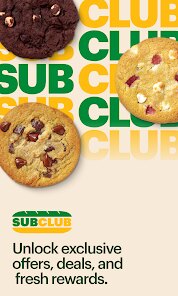
editor reviews
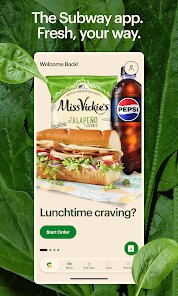
I recently gave the official Subway app a try after walking past one of their stores for the hundredth time. It's basically a loyalty and ordering tool designed to speed things up when you're craving a footlong. You can find it on both the Google Play Store and the Apple App Store, and it's been downloaded over ten million times on Android alone. The download itself is free, but the whole point is to make paying for your sandwich easier and to stack up some rewards. My first impression after launching it was pretty straightforward, it asks you to either sign in or create an account right away. There's no option to browse without logging in, which felt a bit pushy, but I suppose they want you committed to the rewards program from the get-go. Once you're in, you see a clean home screen with your rewards balance, current offers, and a big button to start an order.
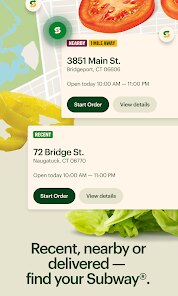
The real test came when I actually used it to buy lunch. The ordering flow walks you through each step of building your sub, and honestly, it's pretty smooth. You pick your bread, your cheese, your veggies, sauces, and whether you want it toasted. The app uses a straightforward tapping system with clear icons, so there's no confusion about what you're selecting. I did notice that the app remembered my previous order, which saved me a solid minute of tapping. Once you hit submit, you choose between in-store pickup or delivery through third-party services. On the downside, the actual checkout process feels a bit clunky because it tries to push you toward adding extra cookies or drinks the whole time. If you're in a rush, those extra screens can get annoying. A small tip, make sure your location services are on, because the app uses them to find the nearest Subway, but if you're near a busy intersection, it might pull up a location that's a few blocks out of the way.
After using the app for a couple of weeks, I've got mixed feelings. If you're someone who eats at Subway regularly, this app is almost a no-brainer because the rewards actually add up, and you can get a free sub after a few visits. But if you only go once in a blue moon, the account creation and the app taking up phone space probably isn't worth it. Compared to something like the McDonald's app, which feels snappier and offers more aggressive daily deals, Subway's app is slower and its deals are less exciting. What really sets Subway apart is that the ordering experience inside the app closely matches the real-world customization, which is nice if you're particular about your toppings. I've kept it installed because I do grab a sub every two weeks, and the free reward every now and then is a nice bonus. But I can easily see someone deleting it after a month if they don't see immediate value.
features
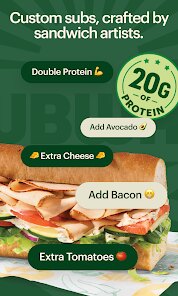
- 🍞 The sandwich builder in the Subway app is surprisingly thorough. You can customize your sub exactly the way you do in-store, down to how many pickles you want. It's not the fastest process, but it's way less awkward than trying to shout your toppings across a noisy counter. Compared to something like the Chipotle app, Subway's builder is more granular, which is a double-edged sword.
- 🥤 Mobile checkout with saved payment info is another big plus. You can order ahead, pay through the app, and just walk in to grab your bag. In theory, it skips the line entirely. In practice, the app's order-ahead queue sometimes gets mixed with walk-in orders, so you might still wait a minute, but it's still faster than ordering from scratch at the register.
- 🎁 The rewards program is straightforward and generous by fast-food standards. Every purchase gives you points, and after spending around $25 or so, you get a free sub. Other apps like Starbucks make you jump through hoops with star multipliers, but Subway keeps it simple: spend money, get points, get a free sandwich. No gimmicks.
pros
- 🫶 The Subway app offers a lot of control over customization, more than you get from most drive-thru apps like Taco Bell's. You can see every topping, every sauce, every type of cheese listed clearly, so nothing gets missed.
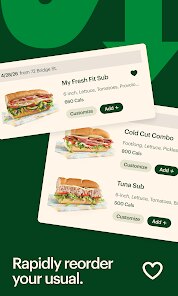
- 👌 The app keeps a solid history of your past orders, which makes reordering a one-tap affair. That's a nice touch that even the McDonald's app sometimes fumbles.
- 💪 It integrates well with multiple delivery partners, so if you don't live near a Subway, you can still get your sub without leaving the app.
cons
- 🐢 The app feels slower than its main competitors. Navigating between menus has noticeable lag, and the checkout flow has too many prompts trying to upsell you on chips and soda. Compared to the Domino's app, it's a less smooth experience.
- 📱 Push notifications are a bit aggressive. You'll get a nudge to order lunch almost every day, which can feel spammy pretty quickly if you're not a regular customer.
- 🛑 Store inventory inaccuracies are a real pain. A few times I've ordered a specific bread or topping that the store was out of, and instead of being notified in the app, I found out when I arrived. No substitution options are built into the ordering flow.
Recommended Apps
![]()
16Personalities
16Personalities4
![]()
Zodiac Palm Reader: MagicWay
Reatility Media4.6
![]()
Moblo - 3D furniture modeling
MYTIforge4.1![]()
Magnifier Plus with Flashlight
Digitalchemy, LLC4.6![]()
QR Code Scanner
QR Code Scanner & Barcode Reader4.7![]()
FalFal: Astrology, Tarot, Love
FalFal Team4.8![]()
Christmas Photo Frames
PhotoFramesApps4.6![]()
AI Video Art Creator - Livensa
FERASET4.5![]()
Horoscope of Birth
Denimaks4.4![]()
Make Me Bald Prank
AppTornado2.5![]()
Kling AI: AI Image&Video Maker
Lohas Games Pte. Ltd.4.4![]()
Japan Timetable & Route Search
NAVITIME JAPAN CO., LTD.4.3![]()
Prank Call & Funny Video
TeH Software0![]()
Parallax 3D Live Wallpapers
TarrySoft4.3![]()
AI Chatbot - Nova
ScaleUp4.7















Disclaimer
1.AppInfoLibrary does not represent any developer, nor is it the developer of any App or game.
2.AppInfoLibrary provide custom reviews of Apps written by our own reviewers, and detailed information of these Apps, such as developer contacts, ratings and screenshots.
3.All trademarks, registered trademarks, product names and company names or logos appearing on the site are the property of their respective owners.
4. AppInfoLibrary abides by the federal Digital Millennium Copyright Act (DMCA) by responding to notices of alleged infringement that complies with the DMCA and other applicable laws.
5.If you are the owner or copyright representative and want to delete your information, please contact us info@appinfolibrary.com.
6.All the information on this website is strictly observed all the terms and conditions of Google Ads Advertising policies and Google Unwanted Software policy .














