

Walgreens

10,000,000+
Installs
Walgreen Co.
Developer
-
Health & Fitness
Category
-
Rated for 3+
Content Rating
-
customerservice@mail2.walgreens.com
Developer Email
-
http://www.walgreens.com/topic/help/generalhelp/privacyandsecurity.jsp
Privacy Policy
Screenshots
editor reviews
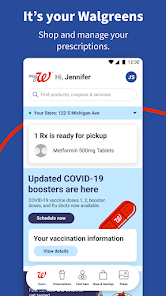
So, the Walgreens app is basically the mobile version of the pharmacy and retail chain you see on every other corner. It's a utility app, not a social or gaming thing. You mainly use it to refill prescriptions, manage your pharmacy stuff, and clip digital coupons before you head into the store. I downloaded it from the Google Play store mainly because I got tired of losing paper receipts and forgetting my Balance Rewards card. My first impression after launching it was honestly a bit cluttered. There's a lot going on on the home screen – ads for flu shots, weekly deals, and store pickup options all competing for your thumb. It feels functional but not exactly designed for a quick glance.
Actually using the app for the first time, I had to create an account by tying it to my phone number, which was straightforward since I already had a store account. The onboarding walks you through scanning your current prescriptions, but the real meat is the refill process. You just scan the barcode on your pill bottle, and it auto-fills the info. That part is slick. For daily use, I mainly scroll through the weekly ad or clip digital coupons – you just tap a coupon to save it, and it links to your Balance Rewards card when you check out. One smooth moment: the app remembered my preferred store location, so I didn't have to re-select it. A confusing moment was finding the pharmacy chat feature; it's buried under "Menu" then "Pharmacy." A small tip: set up push notifications for prescription reminders, or you'll miss refill alerts entirely if you rely on email.
After a few weeks, I'd say the Walgreens app is best for regular prescription users or coupon stackers like my mom who hate clipping paper. Someone who only buys snacks or toiletries probably doesn't need it. Compared to the CVS app, Walgreens feels less polished – CVS syncs ExtraCare rewards more seamlessly, but Walgreens has a better barcode scanner for prescriptions. What keeps me from uninstalling it is the convenience of scanning a bottle and having my prescription ready in 15 minutes. What might push me to delete it is the occasional lag when loading the weekly ad. It's not a game-changer, but for managing health stuff, it does the job without fuss.
features
- 😊 Prescription Refill by Barcode Scan: This is the standout feature. You literally point your camera at the barcode on your current bottle, and the app auto-detects the prescription number and pharmacy location. No typing, no searching. CVS's app makes you manually enter a script number or log in to find past orders, which takes extra steps.
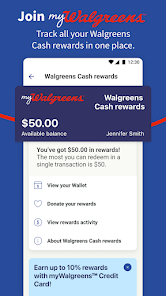
- 😊 Digital Coupon Clipping to Balance Rewards: You tap "Clip Coupon" on any deal, and it automatically attaches to your loyalty card. No printing or presenting at checkout. Rite Aid's app requires you to scan a separate barcode at the register, which I always forget.
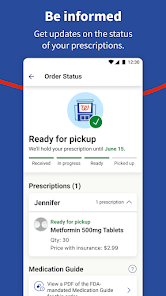
- 😊 Drive-Thru Prescription Pickup Alerts: The app notifies you when your prescription is actually ready, not just when it's being filled. Then you can check in for drive-thru pickup using a QR code, saving about 5 minutes of waiting in line. Target's pharmacy app doesn't have any drive-thru integration at all.
pros
- 👍 Better Barcode Reliability than CVS: When I scan a bottle in the Walgreens app, it almost always works on the first try. The CVS app sometimes fails to focus and makes me retype the Rx number, which is annoying when my hands are full.
- 👍 Faster Store Locator with Real-Time Inventory: Walgreens lets you check if an item is in stock at your local store without leaving the app. CVS's store locator only shows addresses and hours, forcing you to call or guess about stock. That's saved me a few wasted trips.
- 👍 Simpler Coupon Organization: The "Clipped" tab clearly shows all your saved coupons in one list, sorted by expiration date. GoodRx's app buries your saved deals under multiple menus, making it harder to find what you have at checkout.
cons
- 👎 Messy Home Screen Compared to CVS: The Walgreens home screen throws weekly ads, flu shot promos, and store pickup options at you without clear hierarchy. The CVS app has a cleaner layout with larger buttons for "Refill" and "Savings" at the top.
- 👎 Pharmacy Chat Feature Hard to Reach: To message a pharmacist, you have to tap "Menu", then "Pharmacy", then "Chat." Rite Aid's app puts a chat icon directly on the main screen from the start, which feels more intuitive for customer service.
- 👎 Occasional Lag with Weekly Ad Loading: When I try to scroll through the digital circular, it sometimes freezes for a few seconds, especially on older phones. The CVS app loads weekly deals smoothly even on my old Android model.
Recommended Apps
![]()
16Personalities
16Personalities4
![]()
Zodiac Palm Reader: MagicWay
Reatility Media4.6
![]()
Moblo - 3D furniture modeling
MYTIforge4.1![]()
Magnifier Plus with Flashlight
Digitalchemy, LLC4.6![]()
QR Code Scanner
QR Code Scanner & Barcode Reader4.7![]()
FalFal: Astrology, Tarot, Love
FalFal Team4.8![]()
Christmas Photo Frames
PhotoFramesApps4.6![]()
AI Video Art Creator - Livensa
FERASET4.5![]()
Horoscope of Birth
Denimaks4.4![]()
Make Me Bald Prank
AppTornado2.5![]()
Kling AI: AI Image&Video Maker
Lohas Games Pte. Ltd.4.4![]()
Japan Timetable & Route Search
NAVITIME JAPAN CO., LTD.4.3![]()
Prank Call & Funny Video
TeH Software0![]()
Parallax 3D Live Wallpapers
TarrySoft4.3![]()
AI Chatbot - Nova
ScaleUp4.7















Disclaimer
1.AppInfoLibrary does not represent any developer, nor is it the developer of any App or game.
2.AppInfoLibrary provide custom reviews of Apps written by our own reviewers, and detailed information of these Apps, such as developer contacts, ratings and screenshots.
3.All trademarks, registered trademarks, product names and company names or logos appearing on the site are the property of their respective owners.
4. AppInfoLibrary abides by the federal Digital Millennium Copyright Act (DMCA) by responding to notices of alleged infringement that complies with the DMCA and other applicable laws.
5.If you are the owner or copyright representative and want to delete your information, please contact us info@appinfolibrary.com.
6.All the information on this website is strictly observed all the terms and conditions of Google Ads Advertising policies and Google Unwanted Software policy .














