

Hailuo Al: Image&Video Maker

Installs
MiniMax AI
Developer
-
Generative AI
Category
-
Teen
Content Rating
-
contact@hailuoai.com
Developer Email
-
https://hailuoai.video/doc/privacy-policy.html
Privacy Policy
Screenshots



editor reviews
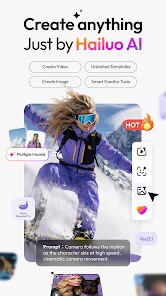
If you're on the hunt for a tool that transforms static images into short, dynamic video clips, Hailuo AI: Image&Video Maker from MiniMax AI is worth a look. Available for download on Google Play, this app focuses on breathing motion into your photos and concepts using generative AI. The install process is straightforward and the base version is free to use, though you'll encounter ads and optional in-app purchases for advanced features or faster processing. It's squarely aimed at casual creators who want quick results without diving into complex editing software.
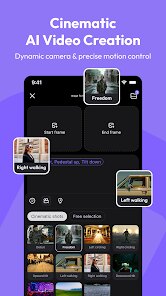
Using the app is relatively intuitive. You start by selecting a still image or typing a text description, and the AI generates a short video based on that input. I found the interface clean with large, clearly labeled buttons, which makes navigating between the image-to-video and text-to-video modes easy. The generation process takes about thirty seconds to a minute for a standard clip, and the output resolution is decent for social media sharing. I tried it with a photo of a beach sunset and was genuinely surprised to see subtle wave movements and drifting clouds appear automatically. The AI handles simple motions well, though complex scenes with multiple moving objects can sometimes look a bit unnatural.
When put next to similar tools like RunwayML or Pika Labs, Hailuo AI feels more beginner-friendly and less resource-intensive. Runway offers more granular control and higher resolution output, but it demands a steeper learning curve and a subscription. Pika Labs, on the other hand, excels at stylized animations but lacks the straightforward image upload workflow that Hailuo provides. MiniMax AI's app strikes a balance: it sacrifices some professional-grade flexibility in favor of immediate, usable results. For someone editing videos for personal projects rather than commercial work, this trade-off feels perfectly reasonable.
features
- One of the most impressive features is the automatic motion detection. Even if your original image has minimal depth, the AI identifies natural movement areas—like water, hair, or tree branches—and animates them convincingly. This spares you from having to manually define motion paths, which I've had to do in tools like CapCut's keyframe editor.
- The text-to-video generator is surprisingly responsive. You can input abstract ideas like “a cat walking in a futuristic city at dusk,” and the results are often coherent and visually interesting. Compared to Stability AI's similar function, Hailuo's output feels more refined but occasionally misses finer details in backgrounds.
- The speed of processing is a clear strength. Most clips render in under a minute on a standard 5G connection, which beats many web-based alternatives that can take several minutes. I did notice that higher resolution requests push that time up, but it's still within a tolerable range for mobile use.
- The integrated gallery and sharing options are well-thought-out. Finished videos save directly to your device, and you can share to Instagram, TikTok, or WhatsApp with just a couple of taps. This streamlined workflow removes friction compared to exporting files manually from desktop tools.
pros
- For quick social media content, Hailuo AI saves a lot of time. I can turn a simple snapshot into a short video post in literally a minute or two.
- It's genuinely helpful for brainstorming visual concepts. I often use it to prototype animation ideas before committing to more intensive software.
- The app works well as a conversation starter or icebreaker. Sharing AI-generated clips with friends feels playful and engaging without requiring any special skills.
- It removes the barrier of technical skill. Even someone with zero editing experience can produce usable video content, which broadens creative possibilities for non-designers.
cons
- The free version includes frequent ads, which can interrupt your workflow when trying to generate multiple clips in a row. Paying for ad removal is an option, but it feels a bit steep for what the app offers.
- Output quality can be inconsistent with highly detailed or cluttered images. In one test, a street market photo resulted in blurry background movement that distracted from the main subject.
- There's a daily generation limit on the free tier, capped at about ten clips. This is fine for occasional use, but power users will quickly hit that wall and need to consider a subscription.
- Export resolution maxes out at 720p, which limits its use for higher-quality projects or printing. Competing apps already offer 1080p in their free versions.
Recommended Apps
![]()
16Personalities
16Personalities4
![]()
Zodiac Palm Reader: MagicWay
Reatility Media4.6
![]()
Moblo - 3D furniture modeling
MYTIforge4.1![]()
Magnifier Plus with Flashlight
Digitalchemy, LLC4.6![]()
QR Code Scanner
QR Code Scanner & Barcode Reader4.7![]()
FalFal: Astrology, Tarot, Love
FalFal Team4.8![]()
Christmas Photo Frames
PhotoFramesApps4.6![]()
AI Video Art Creator - Livensa
FERASET4.5![]()
Horoscope of Birth
Denimaks4.4![]()
Make Me Bald Prank
AppTornado2.5![]()
Kling AI: AI Image&Video Maker
Lohas Games Pte. Ltd.4.4![]()
Japan Timetable & Route Search
NAVITIME JAPAN CO., LTD.4.3![]()
Prank Call & Funny Video
TeH Software0![]()
Parallax 3D Live Wallpapers
TarrySoft4.3![]()
AI Chatbot - Nova
ScaleUp4.7















Disclaimer
1.AppInfoLibrary does not represent any developer, nor is it the developer of any App or game.
2.AppInfoLibrary provide custom reviews of Apps written by our own reviewers, and detailed information of these Apps, such as developer contacts, ratings and screenshots.
3.All trademarks, registered trademarks, product names and company names or logos appearing on the site are the property of their respective owners.
4. AppInfoLibrary abides by the federal Digital Millennium Copyright Act (DMCA) by responding to notices of alleged infringement that complies with the DMCA and other applicable laws.
5.If you are the owner or copyright representative and want to delete your information, please contact us info@appinfolibrary.com.
6.All the information on this website is strictly observed all the terms and conditions of Google Ads Advertising policies and Google Unwanted Software policy .














