
Blood Pressure Log

1M+
Installs
Sharon Evans
Developer
-
Health & Fitness
Category
-
Everyone
Content Rating
-
teamore.wonton@gmail.com
Developer Email
-
https://www.sharon-apps.com/privacy_policy.html
Privacy Policy
Screenshots
editor reviews
Blood Pressure Log is a straightforward health utility app designed for people who need to keep track of their blood pressure readings over time. It's the kind of app a doctor might recommend after a checkup, or something you'd install yourself if you've been told to monitor your numbers at home. When I first downloaded it from Google Play — it's free, though you can remove ads with a small in-app purchase — I was honestly a bit surprised at how no-nonsense it felt. The install count isn't huge compared to some major health brands, but it's solid. Right after launching, you're met with a clean, simple screen to log your first reading. No flashy onboarding, no sign-up required. Just your numbers and a date. That immediate utility is kind of refreshing.
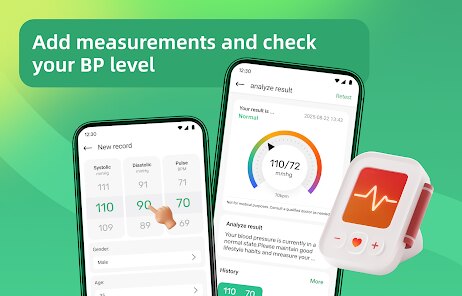
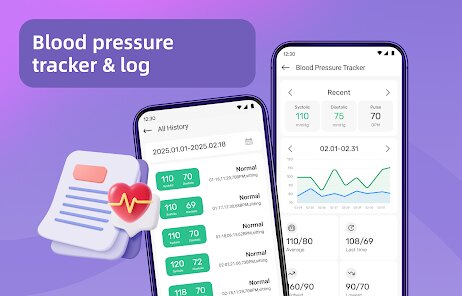
Using the app day to day is about as simple as it gets. You open it, tap the big button to add a new entry, and punch in your systolic and diastolic numbers along with your pulse. It lets you add notes like "after breakfast" or "feeling dizzy," which is actually more useful than I expected. The interface uses big, readable fonts and clear colors — green, yellow, red — to show if your reading falls in a normal or concerning range. There's a graph view that plots your numbers over time, so you can spot trends at a glance without having to stare at a spreadsheet. I did hit a small confusing moment when I tried to edit an old entry; it's not super obvious you have to long-press on the list item. But once you figure that out, it's smooth. A nice touch is the app can export your data as a PDF or CSV, which is perfect for sharing with your doctor during a visit.
After using Blood Pressure Log for a few weeks, I can see why someone would keep it. If you're already checking your blood pressure regularly, this app turns that chore into something manageable and visual. I like that it doesn't try to be a full-featured health dashboard or a social community — it just does one thing. But that's also its limit. If you want deeper insights, trend analysis, or integration with a smart cuff that syncs automatically, something like SmartBP or Qardio gives you more. Blood Pressure Log feels a bit manual, and the design is dated compared to those slicker alternatives. I could see someone uninstalling it if they pick up a Bluetooth-enabled monitor or want reminders pushed to their phone. Still, for a free, no-nonsense logger that respects your privacy (no account needed), it's hard to beat if all you want is to track your numbers and show them to your doctor.
features
- 📊 SmartBP offers automatic sync with Bluetooth cuffs and gives you trend charts with color-coded risk zones. Blood Pressure Log keeps it manual but gives you the same kind of color-coded graphs if you enter your numbers yourself.
- 🔔 The free SmartBP app is limited in how many entries you can log before it pushes you to a subscription. Blood Pressure Log has no such limit on the free version — you can log as many readings as you want without paying.
- 📄 SmartBP lets you share reports with your doctor through a detailed PDF that includes averages and ranges. Blood Pressure Log also exports to PDF and CSV, and the report is clean and straightforward, though it lacks summary stats.
- 💪 The standout feature of Blood Pressure Log is that it's completely offline and doesn't require an account. You can use it without Wi-Fi or cell signal, and your data never leaves your phone unless you choose to export it.
pros
- Blood Pressure Log is dead simple to start using — no sign-up, no permissions, just open and log. That's miles ahead of Health2Sync or mySugr, which both want you to create an account first.
- It's completely free for unlimited entries. SmartBP locks you into a paid tier after a few readings, and Qardio requires their hardware to get the most out of it.
- Your data stays entirely on your device unless you export it. That is a big deal for people who don't want their health data floating around on some company server.
cons
- There are no automatic syncs with any Bluetooth blood pressure monitor. SmartBP and Qardio both let you pair with a cuff and log readings instantly, which is far more convenient.
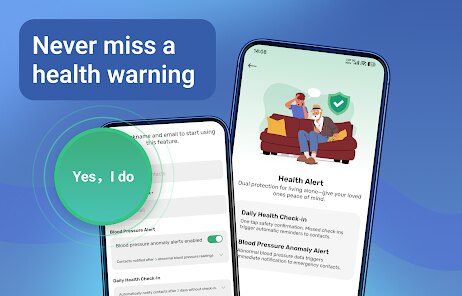
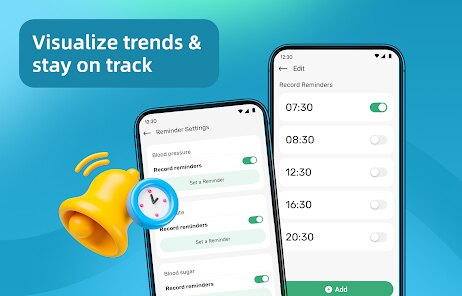
- The app has no reminders or alarms. If you forget to take a reading, it won't nudge you. Other apps like Health2Sync let you set daily reminders to log your numbers.
- The design feels a bit dated and minimal. It works fine, but compared to the polished look of SmartBP or the clean interface of Qardio, it looks like something from a few years ago.
- There is no way to track multiple users or share data with family. If you're monitoring for someone else, you'll need a separate app or just share your phone.
Recommended Apps
![]()
16Personalities
16Personalities4
![]()
Zodiac Palm Reader: MagicWay
Reatility Media4.6
![]()
Moblo - 3D furniture modeling
MYTIforge4.1![]()
Magnifier Plus with Flashlight
Digitalchemy, LLC4.6![]()
QR Code Scanner
QR Code Scanner & Barcode Reader4.7![]()
FalFal: Astrology, Tarot, Love
FalFal Team4.8![]()
Christmas Photo Frames
PhotoFramesApps4.6![]()
AI Video Art Creator - Livensa
FERASET4.5![]()
Horoscope of Birth
Denimaks4.4![]()
Make Me Bald Prank
AppTornado2.5![]()
Kling AI: AI Image&Video Maker
Lohas Games Pte. Ltd.4.4![]()
Japan Timetable & Route Search
NAVITIME JAPAN CO., LTD.4.3![]()
Prank Call & Funny Video
TeH Software0![]()
Parallax 3D Live Wallpapers
TarrySoft4.3![]()
AI Chatbot - Nova
ScaleUp4.7















Disclaimer
1.AppInfoLibrary does not represent any developer, nor is it the developer of any App or game.
2.AppInfoLibrary provide custom reviews of Apps written by our own reviewers, and detailed information of these Apps, such as developer contacts, ratings and screenshots.
3.All trademarks, registered trademarks, product names and company names or logos appearing on the site are the property of their respective owners.
4. AppInfoLibrary abides by the federal Digital Millennium Copyright Act (DMCA) by responding to notices of alleged infringement that complies with the DMCA and other applicable laws.
5.If you are the owner or copyright representative and want to delete your information, please contact us info@appinfolibrary.com.
6.All the information on this website is strictly observed all the terms and conditions of Google Ads Advertising policies and Google Unwanted Software policy .














