

AndrOpen Office

5M+
Installs
Akikazu Yoshikawa
Developer
-
Productivity
Category
-
Everyone
Content Rating
-
support@andropenoffice.com
Developer Email
-
https://www.andropenoffice.com/privacy-policy
Privacy Policy
Screenshots
editor reviews
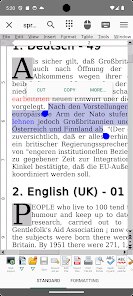
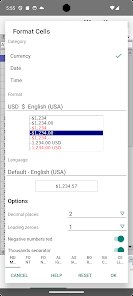
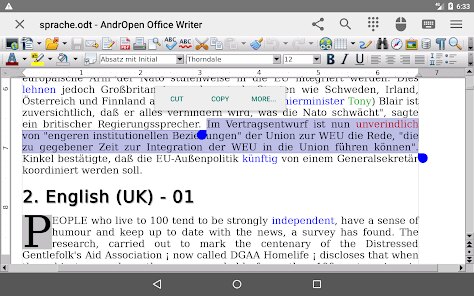
AndrOpen Office is a port of the full OpenOffice suite to Android, essentially packing a desktop-level office productivity package into a mobile app. It covers word processing, spreadsheets, presentations, graphics, databases, and formula editing, so it's really for anyone who needs to create, edit, or manage documents beyond basic notepad stuff. I initially grabbed it from Google Play after searching for a free office app that could handle complex files without a subscription. The first impression is a bit jarring actually because once launched, it hits you with a full desktop-like interface squeezed onto a phone screen, toolbars, menus, and all. You're not getting a touch-friendly makeover here, it's straight OpenOffice. It's been downloaded over a million times and is free with no in-app purchases, though I didn't spot any upsells for extra features. There's no registration required to start typing, which honestly feels freeing compared to something like Microsoft Office that nags you for a sign-in immediately.
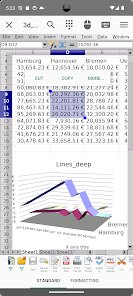
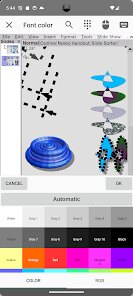
Using AndrOpen Office feels like you're operating a compact workstation rather than a phone app. The interface is laid out similarly to what you'd see on a PC, with a menu bar at the top for file, edit, view, insert, format, tools, window, and help. I started by opening a random .docx file from my downloads, and it handled the formatting surprisingly well for a mobile version, though complex tables took a moment to render. To start a new document, you pick the component you need, say Writer for text or Calc for spreadsheets, and then it's a lot of tapping on small icons if you actually want to change fonts or adjust cell sizes. Honestly, it's not something you'd want to use for heavy typing on the go unless you have a Bluetooth keyboard. One small tip I found useful is to use the 'find and replace' tool (Ctrl + F) from the menu because scrolling through a long document on a 6-inch screen is a pain. The app does feel a bit clunky and loading takes a couple seconds, but once you're inside, buttons respond reliably.
After spending some time with it, I think this app is a lifesaver for specific users but not everyone. If you're a student or a professional who occasionally needs to review or do minor edits on complex documents and you don't want to pay for Microsoft 365, this is a solid pick. It also handles Calc macros better than some mobile alternatives, which surprised me. However, I wouldn't recommend it for someone who just wants to jot down a quick note or edit a grocery list, there are far simpler apps for that. What makes AndrOpen Office stand out is that it's essentially the full OpenOffice suite with no crippled features, unlike the mobile versions of Google Docs or WPS Office which hide certain formatting tools unless you pay. Still, the tiny touch targets and lack of any cloud sync (you have to manually save and share files) made me almost uninstall it a few times. I kept it installed because it's the only free app I've found that opens .odt files without messing them up, but I only really open it when I have no other choice.
features
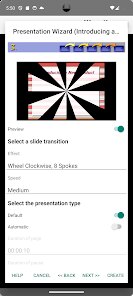
- 📁 AndrOpen Office gives you the full OpenOffice suite on a phone, meaning you get Writer, Calc, Impress, Draw, Base, and Math all in one package. In contrast, apps like WPS Office offer a similar range of features, but often lock advanced tools like PDF editing or table formatting behind a paywall, while AndrOpen keeps everything accessible right away.
- 🔄 One standout feature is its strong compatibility with the Open Document Format (.odt, .ods, etc.), which is the native format of LibreOffice and older OpenOffice files. While Microsoft Office's mobile app stumbles occasionally with these formats, AndrOpen handles them natively, making it a great choice if you're switching from a Linux desktop environment.
- 📐 The app includes a fully functional equation editor (Math component) that allows you to create and edit complex mathematical formulas directly on your phone. Most mobile office suites like Google Docs skip this entirely, leaving users who need scientific notation to rely on clunky workarounds.
- 🔌 It supports macro execution for Calc spreadsheets, which is a rarity in the mobile office world. Apps like Polaris Office and WPS Office either strip macros down to the basics or remove them completely, but AndrOpen retains them for power users who automate repetitive calculations.
pros
- 📋 It's completely free with no sign-up or subscription required, unlike Microsoft Office mobile which asks for a Microsoft 365 plan to enable editing on larger screens or advanced formatting.
- ⏺ AndrOpen allows saving files in nearly a dozen formats including PDF, which is straightforward and doesn't involve extra steps or third-party converters like you'd deal with in some free office apps.
- 🔧 The app runs independently and does not rely on an internet connection for any core editing features, whereas Google Docs essentially forces you to manage offline syncing settings or just plain fails without data.
- 📖 It opens almost any old or obscure office file from the 2000s, including legacy formats like .sdw or .sxw, which even some desktop apps now refuse to touch.
cons
- 📱 The interface is clearly not designed for touch input: buttons and menu items are tiny on a phone screen, making it easy to tap the wrong thing, especially compared to the more finger-friendly layouts in WPS Office or Polaris Office.
- 🚫 There is no built-in cloud storage integration at all. Unlike Google Docs which syncs to Drive automatically or Microsoft Office that connects to OneDrive, you have to manually export and import files, which is tedious for regular use.
- 🐞 Stability can be a concern with larger documents; I've seen the app freeze completely when working on a 100-page Word file, while similar mobile apps like OfficeSuite handle big files more gracefully without crashing.
- ⌨️ Typing and editing text is slow and awkward without an external keyboard, and the on-screen cursor placement is imprecise compared to Docs or Word, making long form editing on the go frustrating.
Recommended Apps
![]()
16Personalities
16Personalities4
![]()
Zodiac Palm Reader: MagicWay
Reatility Media4.6
![]()
Moblo - 3D furniture modeling
MYTIforge4.1![]()
Magnifier Plus with Flashlight
Digitalchemy, LLC4.6![]()
QR Code Scanner
QR Code Scanner & Barcode Reader4.7![]()
FalFal: Astrology, Tarot, Love
FalFal Team4.8![]()
Christmas Photo Frames
PhotoFramesApps4.6![]()
AI Video Art Creator - Livensa
FERASET4.5![]()
Horoscope of Birth
Denimaks4.4![]()
Make Me Bald Prank
AppTornado2.5![]()
Kling AI: AI Image&Video Maker
Lohas Games Pte. Ltd.4.4![]()
Japan Timetable & Route Search
NAVITIME JAPAN CO., LTD.4.3![]()
Prank Call & Funny Video
TeH Software0![]()
Parallax 3D Live Wallpapers
TarrySoft4.3![]()
AI Chatbot - Nova
ScaleUp4.7















Disclaimer
1.AppInfoLibrary does not represent any developer, nor is it the developer of any App or game.
2.AppInfoLibrary provide custom reviews of Apps written by our own reviewers, and detailed information of these Apps, such as developer contacts, ratings and screenshots.
3.All trademarks, registered trademarks, product names and company names or logos appearing on the site are the property of their respective owners.
4. AppInfoLibrary abides by the federal Digital Millennium Copyright Act (DMCA) by responding to notices of alleged infringement that complies with the DMCA and other applicable laws.
5.If you are the owner or copyright representative and want to delete your information, please contact us info@appinfolibrary.com.
6.All the information on this website is strictly observed all the terms and conditions of Google Ads Advertising policies and Google Unwanted Software policy .














