

Rythmix: AI Music & Song Maker

1M+
Installs
PROMINENT FORTUNE PTE. LTD.
Developer
-
Generative AI
Category
-
Everyone
Content Rating
-
rythmix_support@aisongcreate.com
Developer Email
-
https://rc.vllresource.com/web/h5template/81038942-45d0-46d2-aa61-22c671dc2ad2-language=en/dist/index.html
Privacy Policy
Screenshots


editor reviews
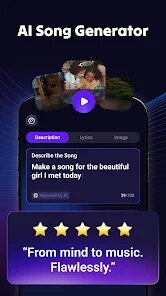
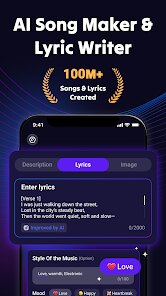
Rythmix is a music creation tool that uses AI to help people make songs and beats right on their phone. It falls under the category of mobile music production apps, but with a strong focus on artificial intelligence handling the heavy lifting. The main use is for someone who wants to make music or practice an instrument without needing to know music theory or play a physical instrument. You might download it if you have a melody stuck in your head but no way to get it out, or if you just want to mess around with sounds for fun. After launching it for the first time, the opening screen feels clean and modern, with a dark theme and big buttons that invite you to tap immediately. There is no account required to start, which removes that annoying barrier, and while it offers free downloads on both Google Play and App Store, you will eventually bump into ads and prompts for in-app purchases once you try to export your finished tracks or unlock more advanced AI models.
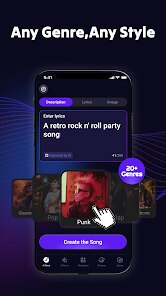
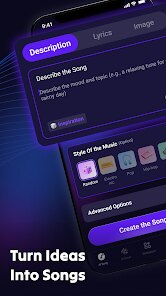
Once you get into the actual hands-on part, the app guides you through a quick tutorial that shows you how to pick a genre first. You choose something like lo-fi, hip-hop, or EDM, then pick a mood such as chill or energetic. After that, the AI generates a backing track based on your choices. You can then record your own voice or import audio samples to layer on top. The interface keeps everything on one screen, with a waveform editor at the bottom and the genre and mood selectors at the top. One smooth moment is how fast the AI responds it generates a full instrumental in about ten seconds, which feels almost too easy. A slightly confusing part is finding the mix settings; they are tucked away in a small icon that looks like a gear, and it took me a few taps to realize that is where you adjust volume levels and add effects like reverb. A practical tip for daily use is to start with the simplest genre first, because jumping into complex orchestral beats tends to sound messy unless you tweak the AI parameters manually.
After spending a few days with Rythmix, I found it genuinely helpful for quick idea generation, but it is not a replacement for a full DAW like FL Studio or GarageBand. The app shines for casual creators or people who want to make background music for videos without spending hours on arrangement. But for serious musicians who want precise control over every note, this will feel restrictive because you cannot edit individual MIDI notes or adjust tempo in fine detail. What makes it different from apps like BandLab is that Rythmix focuses entirely on AI-assisted creation rather than social sharing or collaboration. I ended up keeping it installed because it is fun to open when I am bored and just see what random beat the AI spits out. However, I can see someone else uninstalling it quickly if they expect to export full quality songs without paying, since the free version leaves a watermark and lowers the bitrate on exports.
features
- 🎵 AI-Powered Genre and Mood Selection: Unlike BandLab's manual loop-based arrangement, Rythmix lets you pick a genre like lo-fi and a mood like "dreamy," then instantly generates a full instrumental track that matches both. This saves time for beginners who struggle with choosing sounds, but advanced users may find the output too generic compared to BandLab's flexible loop library.
- 🎵 Real-Time Vocal Recording and Layering: You can record your voice over the AI-generated beat directly in the app, with basic effects like reverb and echo. In comparison, GarageBand offers more advanced vocal processing with pitch correction and multi-track editing, but Rythmix simplifies it down to just recording and layering, which is great for quick demos or casual users who do not want to fiddle with settings.
- 🎵 Instant Export with Watermark: The free version exports songs with a watermark and lower audio quality, similar to how CapCut free exports videos with a logo. This feature differentiates it from BandLab, which allows free full-quality exports but lacks AI generation. The export process itself is fast, taking under five seconds for a three-minute track, which is convenient for social media sharing.
pros
- 👍 Easy Onboarding: No account needed to start creating, unlike Soundtrap which forces sign-up first. This lowers the barrier for first-time users.
- 👍 Fast AI Generation: Generates full beats in seconds, while BandLab requires you to manually drag loops into a timeline. This is ideal for quick inspiration.
- 👍 Good for Non-Musicians: No music theory required, whereas apps like FL Studio Mobile assume you understand tempo bars and MIDI. This makes Rythmix more accessible for casual users.
cons
- 👎 Limited Editing Control: You cannot edit individual notes or adjust tempo precisely, unlike in GarageBand where you have full MIDI control. This frustrates experienced producers.
- 👎 Watermark and Low Bitrate on Free Exports: Similar to CapCut's free export limitation, this makes the app feel less generous compared to BandLab that offers free high-quality exports without watermarks.
- 👎 Frequent Ads: Ads appear between song generations, which breaks creative flow. In comparison, BandLab has fewer ads and a less intrusive free experience, making Rythmix feel more pushy toward premium purchases.
Recommended Apps
![]()
16Personalities
16Personalities4
![]()
Zodiac Palm Reader: MagicWay
Reatility Media4.6
![]()
Moblo - 3D furniture modeling
MYTIforge4.1![]()
Magnifier Plus with Flashlight
Digitalchemy, LLC4.6![]()
QR Code Scanner
QR Code Scanner & Barcode Reader4.7![]()
FalFal: Astrology, Tarot, Love
FalFal Team4.8![]()
Christmas Photo Frames
PhotoFramesApps4.6![]()
AI Video Art Creator - Livensa
FERASET4.5![]()
Horoscope of Birth
Denimaks4.4![]()
Make Me Bald Prank
AppTornado2.5![]()
Kling AI: AI Image&Video Maker
Lohas Games Pte. Ltd.4.4![]()
Japan Timetable & Route Search
NAVITIME JAPAN CO., LTD.4.3![]()
Prank Call & Funny Video
TeH Software0![]()
Parallax 3D Live Wallpapers
TarrySoft4.3![]()
AI Chatbot - Nova
ScaleUp4.7















Disclaimer
1.AppInfoLibrary does not represent any developer, nor is it the developer of any App or game.
2.AppInfoLibrary provide custom reviews of Apps written by our own reviewers, and detailed information of these Apps, such as developer contacts, ratings and screenshots.
3.All trademarks, registered trademarks, product names and company names or logos appearing on the site are the property of their respective owners.
4. AppInfoLibrary abides by the federal Digital Millennium Copyright Act (DMCA) by responding to notices of alleged infringement that complies with the DMCA and other applicable laws.
5.If you are the owner or copyright representative and want to delete your information, please contact us info@appinfolibrary.com.
6.All the information on this website is strictly observed all the terms and conditions of Google Ads Advertising policies and Google Unwanted Software policy .














