

Deepcheck AI Search Assistant

50K+
Installs
rohe.ai
Developer
-
Generative AI
Category
-
Everyone
Content Rating
-
+16503040046
Developer Email
-
https://deepcheck.framer.website/privay-policy
Privacy Policy
Screenshots

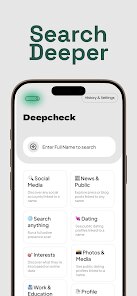
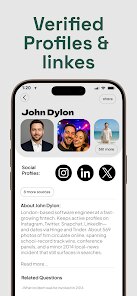


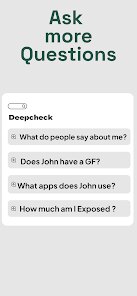
editor reviews
Deepcheck AI Search Assistant is a mobile app that bills itself as an AI-powered search tool, essentially a direct consumer version of what you might expect from a large language model interface. You download it from the App Store or Google Play, and based on the store page, it appears to be free to download with some in-app purchase options for additional features. After installation, the first impression is a clean, minimalist chat interface that looks very familiar if you have used any modern AI chatbot. The welcome screen prompts you with a text bar and a few suggested queries, making it immediately clear that this is a tool for asking questions and receiving synthesized answers. The install count seems modest compared to giants like ChatGPT, and while the app itself is free, you quickly notice prompts for a subscription to unlock faster model access or unlimited queries, which is a typical freemium model.
After using it for a while, the hands-on experience is straightforward. You type a question into the input field, hit send, and the app presents a generated response, complete with cited sources that you can tap to verify. The interface is snappy, and the onboarding is practically non-existent, you just start chatting. A common usage flow might be asking for a summary of a news event or getting a recipe idea, and the app delivers a concise answer. One smooth moment is how it handles follow-up questions without losing context, making a multi-turn conversation feel fluid. However, a confusing moment arises when the app occasionally defaults to a web search result instead of a generated answer, which feels inconsistent. A practical tip is to explicitly ask for a list or a specific format to steer its output. Navigating the settings to adjust the model speed or clarity isn't immediately intuitive, but the core function of asking questions works reliably.
After spending more time with Deepcheck AI Search Assistant, my personal judgment is that it serves a specific purpose well. Users who want a no-frills AI assistant without the hype of a bigger platform like Google Gemini might enjoy its straightforward nature. It feels different because it emphasizes source transparency more than competitors, you can see exactly where information comes from. Someone might keep it installed if they value fact-checking and prefer a lightweight app for quick research. However, users who need a full-featured productivity suite, like document analysis or image generation, will find it lacking. I could see uninstalling it if a better integrated AI like ChatGPT offers similar search capabilities without the subscription push. It competes with Perplexity AI in the search-as-assistant space, but Deepcheck feels more basic and less polished in comparison.
features
- 🌐 Source Transparency: Unlike Google Gemini, which often blends sources into a single answer, Deepcheck AI Search Assistant clearly numbers and links each piece of information in its responses. This makes fact-checking a breeze, especially for research tasks where you need to verify claims quickly.
- ⚡ Context Awareness: The app handles multi-turn conversations with impressive coherence. After asking for a recommendation, you can ask a follow-up like "Explain that in simpler terms" and it remembers the previous topic without resetting, similar to ChatGPT but with a lighter memory footprint on your device.
- 🔍 Dual Output Mode: A standout is the ability to switch between a concise "AI" answer and a more standard web search result. This gives you control over whether you want a synthesized summary or raw links, a feature absent in Perplexity AI's default flow, which always blends both.
- 📱 Minimal Interface: The app avoids clutter by keeping only a text input and output window. This is a breath of fresh air compared to Microsoft Copilot's busy sidebar, letting you focus purely on the query and answer without distractions.
pros
- ✅ Speed: Deepcheck AI Search Assistant delivers responses faster than Perplexity AI for simple queries, often loading within seconds without the extra step of searching through multiple tabs.
- ✅ Source Verification: The explicit citation style is a clear win over ChatGPT, which sometimes hides sources in footnotes. Here, each claim is clickable, making it easier to trust the output.
- ✅ Lightweight Performance: The app runs smoothly on older phones without heavy lag, unlike Google Gemini which can be resource-intensive and drain battery during complex tasks.
- ✅ No Bloat: It avoids unnecessary features like image generation or voice modes that many competitors include, keeping the focus on pure search and answer capabilities.
cons
- ❌ Limited Feature Set: Compared to Microsoft Copilot, Deepcheck lacks integration with documents or spreadsheets, making it less useful for professional productivity tasks like drafting emails from files.
- ❌ Subscription Pressure: The free tier restricts queries per day, unlike Perplexity AI which offers more generous free usage, leading to frequent prompts to upgrade after just a few uses.
- ❌ Inconsistent Mode Switching: The app sometimes defaults to web search instead of AI generation without clear logic, causing confusion versus ChatGPT's always-generate-first approach.
- ❌ Basic Formatting: Output text lacks rich formatting options like bullet points or tables that Google Gemini offers, making long answers harder to scan quickly.
Recommended Apps
![]()
16Personalities
16Personalities4
![]()
Zodiac Palm Reader: MagicWay
Reatility Media4.6
![]()
Moblo - 3D furniture modeling
MYTIforge4.1![]()
Magnifier Plus with Flashlight
Digitalchemy, LLC4.6![]()
QR Code Scanner
QR Code Scanner & Barcode Reader4.7![]()
FalFal: Astrology, Tarot, Love
FalFal Team4.8![]()
Christmas Photo Frames
PhotoFramesApps4.6![]()
AI Video Art Creator - Livensa
FERASET4.5![]()
Horoscope of Birth
Denimaks4.4![]()
Make Me Bald Prank
AppTornado2.5![]()
Kling AI: AI Image&Video Maker
Lohas Games Pte. Ltd.4.4![]()
Japan Timetable & Route Search
NAVITIME JAPAN CO., LTD.4.3![]()
Prank Call & Funny Video
TeH Software0![]()
Parallax 3D Live Wallpapers
TarrySoft4.3![]()
AI Chatbot - Nova
ScaleUp4.7















Disclaimer
1.AppInfoLibrary does not represent any developer, nor is it the developer of any App or game.
2.AppInfoLibrary provide custom reviews of Apps written by our own reviewers, and detailed information of these Apps, such as developer contacts, ratings and screenshots.
3.All trademarks, registered trademarks, product names and company names or logos appearing on the site are the property of their respective owners.
4. AppInfoLibrary abides by the federal Digital Millennium Copyright Act (DMCA) by responding to notices of alleged infringement that complies with the DMCA and other applicable laws.
5.If you are the owner or copyright representative and want to delete your information, please contact us info@appinfolibrary.com.
6.All the information on this website is strictly observed all the terms and conditions of Google Ads Advertising policies and Google Unwanted Software policy .














