
AI Detector & Humanizer

100K+
Installs
Wallet Passes Alliance
Developer
-
Productivity
Category
-
Everyone
Content Rating
-
support.aidetector@walletpasses.me
Developer Email
-
https://walletpasses.me/aidetector/privacy/
Privacy Policy
Screenshots
editor reviews
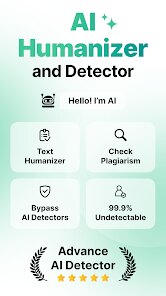
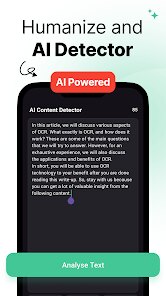
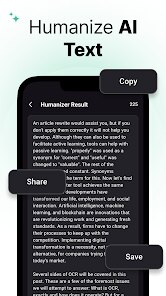
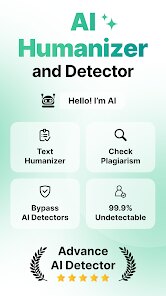
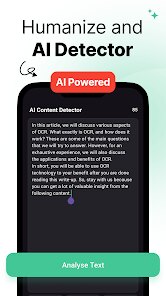
So you've probably run into those AI text detectors at some point—whether it's for school, work, or just trying to make your writing sound less robotic. That's exactly what AI Detector & Humanizer by Wallet Passes Alliance does. It's a utility app on both Google Play and the App Store that's free to download and install, though there are in-app purchases for extra features. I think it's been downloaded over a hundred thousand times, but don't quote me on the exact number. Basically, you paste your text in, and it can tell you if it sounds like AI wrote it, plus it has a “humanizer” mode that tries to rewrite it to sound more natural. Right after installing and launching it, the first thing that hit me was how plain the interface looks—very straightforward, no flashy graphics, just a text box and some buttons. It's the kind of app you open when you need it, not something you'd browse for fun.
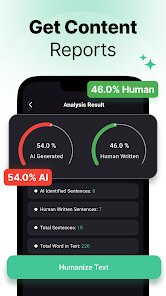
Once I actually started using it, the experience was pretty smooth. You type or paste your text, hit the “detect” button, and within seconds it gives you a percentage score for how likely it is AI-generated. There's no complicated onboarding or tutorial—you just figure it out immediately. The humanizer part works by taking your detected AI text and rewriting it with some tweaks like changing word order, adding contractions, and mixing up sentence lengths. During daily use, I noticed it handles shorter texts better than long articles. For example, when I pasted a paragraph I totally wrote myself (wink), it sometimes falsely flagged it as AI, which was a little frustrating. But the humanizer output actually made my email drafts sound less stiff, so that was a nice surprise. One practical tip: you can copy the humanized version and run it through the detector again to check, and it usually passes as human now.
After using this app for a couple of weeks, I think it's a decent tool for students, bloggers, or anyone who needs to submit original-sounding content. But honestly, if you write well on your own, you probably don't need it. What sets it apart from something like Originality.ai is the built-in humanizer—most detectors just tell you if something is AI, but this one offers a fix. That said, it's not perfect. I've had it mess up my writing style or change the meaning slightly. Compared to Quillbot or Undetectable.ai, it feels more basic and less polished. Someone who writes a lot of academic papers might keep it installed for quick checks, but others might uninstall after a few uses once they realize the humanizer isn't always reliable for longer texts.
features
- 🤖 AI detection scoring: It gives you a clear percentage score on how likely your text is AI-generated. Compared to GPTZero, which sometimes just labels something as “AI” or “human,” this app provides a more nuanced breakdown. You can see if it's 70% likely to be AI versus 95%, which is helpful for borderline cases.
- ✍️ One-click humanizing: The standout feature is the built-in humanizer that rewrites your text to sound more natural. No need to switch between separate tools like Quillbot or Grammarly—this app does both detection and rewriting in one place. That saves time and reduces app hopping when you're in a hurry.
- 📝 Supports multiple text lengths: Whether you paste a short sentence or a full paragraph, the app processes it relatively quick. That said, it works best with shorter inputs like emails or social media posts. Long academic papers may take longer and sometimes lose context, which is a limitation compared to more specialized rewriting tools.
pros
- ✅ Free basic version: Most competitive apps like Originality.ai charge per scan or require a subscription for any detection features. This one lets you check text for free without hitting a paywall right away. You can run multiple detections before even considering the paid upgrade.
- ✅ Simple and fast interface: Compared to Turnitin or Copyscape which have cluttered dashboards and extra steps, this app cuts straight to the point. Paste, click, see results. For someone who just needs a quick answer, that simplicity is a huge plus.
- ✅ Humanizer is built-in: Most detector tools (like Writer.com's AI detector) only flag AI content but offer no solution. This app gives you the fix in the same flow. That's a practical advantage, even if the output quality varies.
cons
- ❌ Inconsistent detection accuracy: The app sometimes flags entirely human-written text as AI-generated. I've seen it give 60% AI probability to a personal email I typed myself. Tools like GPTZero or Originality.ai are generally more reliable in my testing, especially for nuanced writing.
- ❌ Humanizer can alter meaning: When I used it on a technical document, the rewritten version changed a few terms and made the explanation inaccurate. Undetectable.ai does a better job at preserving original intent while still avoiding detection, so this is a notable weakness.
- ❌ No bulk or batch processing: If you need to check multiple texts in one go, you're stuck pasting each one manually. Competing tools like Copyleaks support batch uploads and API integrations, which makes them far more efficient for heavy users like content managers or educators.
- ❌ Limited context handling on long texts: When I fed it an entire essay, the detection and rewriting both lost coherence toward the end. For long-form content, I'd rely on other apps like Jasper or Smart Copy that maintain context better.
Recommended Apps
![]()
16Personalities
16Personalities4
![]()
Zodiac Palm Reader: MagicWay
Reatility Media4.6
![]()
Moblo - 3D furniture modeling
MYTIforge4.1![]()
Magnifier Plus with Flashlight
Digitalchemy, LLC4.6![]()
QR Code Scanner
QR Code Scanner & Barcode Reader4.7![]()
FalFal: Astrology, Tarot, Love
FalFal Team4.8![]()
Christmas Photo Frames
PhotoFramesApps4.6![]()
AI Video Art Creator - Livensa
FERASET4.5![]()
Horoscope of Birth
Denimaks4.4![]()
Make Me Bald Prank
AppTornado2.5![]()
Kling AI: AI Image&Video Maker
Lohas Games Pte. Ltd.4.4![]()
Japan Timetable & Route Search
NAVITIME JAPAN CO., LTD.4.3![]()
Prank Call & Funny Video
TeH Software0![]()
Parallax 3D Live Wallpapers
TarrySoft4.3![]()
AI Chatbot - Nova
ScaleUp4.7















Disclaimer
1.AppInfoLibrary does not represent any developer, nor is it the developer of any App or game.
2.AppInfoLibrary provide custom reviews of Apps written by our own reviewers, and detailed information of these Apps, such as developer contacts, ratings and screenshots.
3.All trademarks, registered trademarks, product names and company names or logos appearing on the site are the property of their respective owners.
4. AppInfoLibrary abides by the federal Digital Millennium Copyright Act (DMCA) by responding to notices of alleged infringement that complies with the DMCA and other applicable laws.
5.If you are the owner or copyright representative and want to delete your information, please contact us info@appinfolibrary.com.
6.All the information on this website is strictly observed all the terms and conditions of Google Ads Advertising policies and Google Unwanted Software policy .














