

Seekee - Ai Search & Assistant

50M+
Installs
Seekee Ltd
Developer
-
Generative AI
Category
-
Teen
Content Rating
-
info@seekee.ai
Developer Email
-
https://h5.seekee.ai/in/art/Seekeeai_Android_Privacy_Policy
Privacy Policy
Screenshots

editor reviews
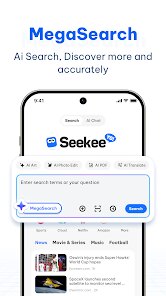
Seekee is an AI-powered search and assistant app that sits somewhere between a standard search engine and a conversational chatbot. You download it from Google Play or the App Store, and it's free to install. The moment you launch it, the first impression is clean and minimal, without a ton of clutter or confusing buttons. It immediately asks for permission to access your location and microphone, which makes sense for voice-based queries, but can feel slightly intrusive on a fresh install. The main value proposition is pretty straightforward: instead of typing a bunch of keywords into a search bar, you can either speak naturally or type a complete question, and Seekee tries to fetch accurate, summarized results from the web. For a normal user, that sounds convenient, especially when you want quick answers without scrolling through pages of links.
Once you start using Seekee, the onboard experience feels smooth. The interface consists of a simple search bar at the bottom, a voice input button, and a chat-like display where previous queries and answers stack up. On your first search, you might type something like “best running shoes for flat feet,” and instead of giving you a list of links, Seekee formats a concise answer with bullet points, sourcing them from real websites. That's pretty handy when you're in a hurry. Navigating through daily use, you can ask follow-up questions naturally, like “Actually, I need something under $100,” and it remembers the context, similar to how ChatGPT works. There are minor moments where the response time lags if your internet connection is weak, and occasionally the summary might skip important details a user would expect from a manual search. A small tip: using voice input feels more natural than typing, but make sure you're in a quiet spot because background noise confuses it a bit.
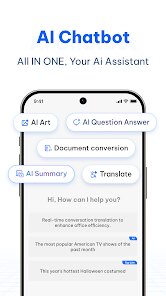
After a few days with Seekee, my honest take is that it's a neat tool for quick, fact-based queries but not a total replacement for a standard search engine. If you're someone who just wants fast answers without digging through articles, this app is solid. But if you prefer reading full articles or comparing products side by side yourself, you might find the summaries a bit thin. Compared to Google's AI Overviews or Bing's AI search, Seekee is less cluttered and more focused on conversation-like interaction. That said, it doesn't support local results well, like finding a nearby coffee shop, which Google handles instantly. I'd keep it installed for checking facts or getting quick definitions, but for complex research, I'd still open a normal browser. It's a useful companion for casual use, just not a powerhouse.
features
- 📝 Conversational search with memory: Seekee remembers the context of your previous questions, so you can ask follow-ups like “Show me more options” without rephrasing. Google's standard search doesn't do this naturally unless you use its AI mode, and even then, it's not as fluid. For example, after asking for travel tips to Japan, you can say “What about cheaper hotels?” and it ties it back without confusion.
- 📝 Voice-first design: The voice input is the center of the experience, not just an add-on. You can speak a full sentence, and it processes it accurately in most quiet environments. Apple's Siri or Google Assistant also handle voice, but they often return a single short link or a card, not a full summarized answer with sources like Seekee does.
- 📝 Source-backed summaries: Every answer includes clickable citations at the bottom, so you can verify where the info came from. That's something ChatGPT doesn't always offer, and it makes Seekee feel more trustworthy for research or fact-checking. It's not just AI hallucinating; it's pulling from real pages.
pros
- ✚ Faster than traditional browsing: If you need a quick definition, recipe, or explanation, Seekee beats scrolling through article results on Google or Bing. It cuts straight to the point without forcing you to click multiple links.
- ✚ Clean, ad-free interface: Unlike many free search apps that flood you with banner ads or sponsored results, Seekee keeps the design simple. That's a big plus compared to something like Yahoo Search or Baidu, which feel heavy with promotions.
- ✚ No account needed for basics: You can start searching immediately without signing up. Perplexity AI requires an account for some features, but Seekee stays open to anyone who installs it. That lowers the barrier for casual use.
cons
- ⛔ Limited support for local searches: Ask Seekee “Where's the nearest pharmacy?” and it often returns general info instead of precise locations. Google Maps within Google Search completely outclasses it for that purpose, making Seekee frustrating for real-time navigation needs.
- ⛔ Occasional slow responses: On weaker mobile internet, the app can take several seconds to even start generating an answer. Competitors like Ecosia or DuckDuckGo are snappier for basic web searches because they don't rely on heavy AI processing.
- ⛔ No offline functionality: If you're on a subway or airplane without data, Seekee is completely unusable. Standard browsers still let you access cached pages or offline bookmarks, which gives them an edge for travelers or commuters.
Recommended Apps
![]()
16Personalities
16Personalities4
![]()
Zodiac Palm Reader: MagicWay
Reatility Media4.6
![]()
Moblo - 3D furniture modeling
MYTIforge4.1![]()
Magnifier Plus with Flashlight
Digitalchemy, LLC4.6![]()
QR Code Scanner
QR Code Scanner & Barcode Reader4.7![]()
FalFal: Astrology, Tarot, Love
FalFal Team4.8![]()
Christmas Photo Frames
PhotoFramesApps4.6![]()
AI Video Art Creator - Livensa
FERASET4.5![]()
Horoscope of Birth
Denimaks4.4![]()
Make Me Bald Prank
AppTornado2.5![]()
Kling AI: AI Image&Video Maker
Lohas Games Pte. Ltd.4.4![]()
Japan Timetable & Route Search
NAVITIME JAPAN CO., LTD.4.3![]()
Prank Call & Funny Video
TeH Software0![]()
Parallax 3D Live Wallpapers
TarrySoft4.3![]()
AI Chatbot - Nova
ScaleUp4.7















Disclaimer
1.AppInfoLibrary does not represent any developer, nor is it the developer of any App or game.
2.AppInfoLibrary provide custom reviews of Apps written by our own reviewers, and detailed information of these Apps, such as developer contacts, ratings and screenshots.
3.All trademarks, registered trademarks, product names and company names or logos appearing on the site are the property of their respective owners.
4. AppInfoLibrary abides by the federal Digital Millennium Copyright Act (DMCA) by responding to notices of alleged infringement that complies with the DMCA and other applicable laws.
5.If you are the owner or copyright representative and want to delete your information, please contact us info@appinfolibrary.com.
6.All the information on this website is strictly observed all the terms and conditions of Google Ads Advertising policies and Google Unwanted Software policy .














