
GPS Map Camera - Timestamp

5M+
Installs
Sliver AI Photo Editor
Developer
-
Productivity
Category
-
Everyone
Content Rating
-
mega.china2050@gmail.com
Developer Email
-
https://docs.google.com/document/d/e/2PACX-1vQ7Y9FW4r7ixX1mzXahMPH2gEliZwbNP9lmCBaryzyflmmX83TJ96Q8h7VOcuhPtFSOe4g0RuXxk8-l/pub
Privacy Policy
Screenshots


editor reviews
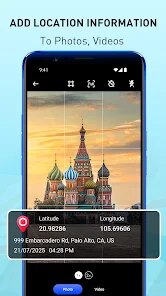
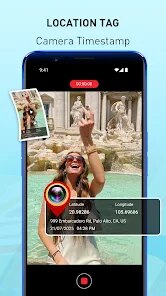
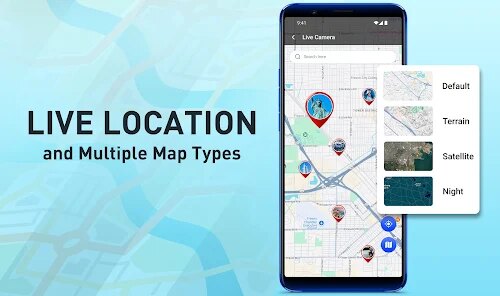
GPS Map Camera - Timestamp is a utility photo app that lets you stamp your pictures with location data like street names, coordinates, and timestamps. It sits in the photography category alongside watermarking and geotagging tools, and the main appeal is how it turns random vacation shots into organized, location-aware memories. I downloaded it from Google Play because I wanted an easy way to log where I took my hiking photos without manually writing everything down. After installing the free version and launching it, the first impression was decent – the layout is clean, with a straightforward camera interface and preset overlay templates. You can snap a photo or pull one from your gallery, and the GPS data pops right on top. There are no registration prompts upfront, which is nice, though you will see occasional ads unless you buy the pro version.
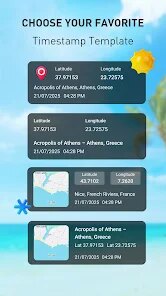
Using the app felt pretty smooth once I got past the initial confusion with the map style options. The onboarding is minimal – just a quick tooltip about how GPS works, then you are let loose. I took a few test shots of a park bench and my coffee mug, and the timestamp and address showed up almost instantly. The process is simple: pick your template, adjust the font or position if you want, and save the photo. One thing that tripped me up was the resolution – the stamped image looked smaller than the original until I tweaked the export settings. A handy tip I found is to turn on the "auto-save" option so you do not lose the original file when overlay mode is active. Navigating between the camera and gallery tabs is intuitive, though the app can lag for a second when searching for GPS in a weak signal area.
After spending a couple of weeks with it, I think this app is perfect for travelers, hikers, or real estate agents who need location proof on their images. If you are someone who just wants a quick filter for social media, it might feel like overkill. Compared to apps like Timestamp Camera Pro, this one feels a bit more basic but also less cluttered – you trade fancy editing options for a no-fuss stamping tool. The GPS data is accurate in open areas, but it struggled inside buildings. I kept it installed because it saves me time organizing photos from road trips, but I could see someone uninstalling it if they do not care about precise location logs. The free version's ads are present but not obnoxious, making it a fair trade-off.
features
- 📍 GPS Map Camera stamps photos with real-time location data like street address and coordinates, similar to Timestamp Camera Pro, but its unique selling point is the ability to edit the layout and remove the logo in the free version without a watermark.
- 📍 It supports both real-time capture and batch stamping from the gallery, which sets it apart – most similar apps only allow live stamping or charge extra for bulk processing.
- 📍 The app includes a customizable overlay for font size, color, and date format, so you can match the stamp to your photo's style, unlike some rivals that lock templates behind a paywall.
pros
- ✅ The accuracy of GPS data is impressive in open areas – I tested it against Timestamp Camera Pro, and it picked up street names faster even in rural spots.
- ✅ Batch processing works smoothly for up to 10 photos at once, which is a huge time saver when you are organizing a trip album.
- ✅ The free version is genuinely usable without feeling crippled, unlike GeoStamp where you can barely choose a font unless you pay.
cons
- ❌ GPS search is slow inside buildings or tunnels – Timestamp Camera Pro has a better fallback mode that lets you manually enter location data.
- ❌ Export resolution gets compressed compared to the original, which is annoying for print-quality photos that GeoStamp apparently does not degrade.
- ❌ Occasional ads pop up after saving, and they can cover the back button if you tap too fast – something I did not experience with the ad-free version of Timestamp Camera.
Recommended Apps
![]()
16Personalities
16Personalities4
![]()
Zodiac Palm Reader: MagicWay
Reatility Media4.6
![]()
Moblo - 3D furniture modeling
MYTIforge4.1![]()
Magnifier Plus with Flashlight
Digitalchemy, LLC4.6![]()
QR Code Scanner
QR Code Scanner & Barcode Reader4.7![]()
FalFal: Astrology, Tarot, Love
FalFal Team4.8![]()
Christmas Photo Frames
PhotoFramesApps4.6![]()
AI Video Art Creator - Livensa
FERASET4.5![]()
Horoscope of Birth
Denimaks4.4![]()
Make Me Bald Prank
AppTornado2.5![]()
Kling AI: AI Image&Video Maker
Lohas Games Pte. Ltd.4.4![]()
Japan Timetable & Route Search
NAVITIME JAPAN CO., LTD.4.3![]()
Prank Call & Funny Video
TeH Software0![]()
Parallax 3D Live Wallpapers
TarrySoft4.3![]()
AI Chatbot - Nova
ScaleUp4.7















Disclaimer
1.AppInfoLibrary does not represent any developer, nor is it the developer of any App or game.
2.AppInfoLibrary provide custom reviews of Apps written by our own reviewers, and detailed information of these Apps, such as developer contacts, ratings and screenshots.
3.All trademarks, registered trademarks, product names and company names or logos appearing on the site are the property of their respective owners.
4. AppInfoLibrary abides by the federal Digital Millennium Copyright Act (DMCA) by responding to notices of alleged infringement that complies with the DMCA and other applicable laws.
5.If you are the owner or copyright representative and want to delete your information, please contact us info@appinfolibrary.com.
6.All the information on this website is strictly observed all the terms and conditions of Google Ads Advertising policies and Google Unwanted Software policy .














