
GPS Camera Timestamp & Geotag

10K+
Installs
Betasoft Mobile
Developer
-
Productivity
Category
-
Everyone
Content Rating
-
admin@betasoftmobile.com
Developer Email
-
https://sites.google.com/betasoftmobile.com/policy-remote-control-for-tv
Privacy Policy
Screenshots
editor reviews
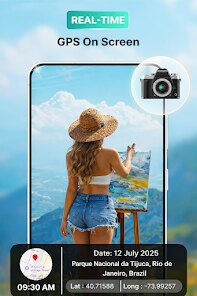
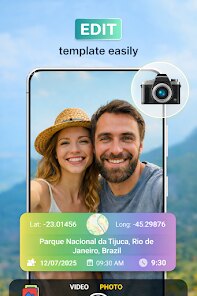
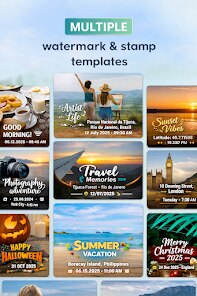
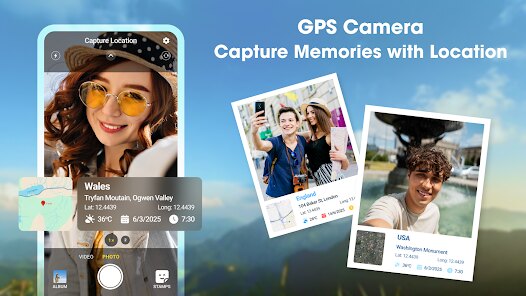
GPS Camera Timestamp & Geotag is a utility app from Betasoft Mobile that overlays location data, timestamps, and other info directly onto photos. It's basically a digital stamp tool, perfect for people who need proof of when and where a shot was taken — fieldwork, real estate listings, insurance documentation, or travel logs. I grabbed it from Google Play (over a million downloads show it's fairly popular) and it's free to install, though there are in-app purchases for extra features. Right after launching, the interface felt a bit cluttered, like a toolbox where everything is visible at once. Not exactly beginner-friendly, but not impossible to figure out either — you can see the main intent right away: point, shoot, and get your stamped photo.
Using the app daily feels a bit like wrestling with an old camera that has too many buttons. The home screen shows a live viewfinder with GPS status, battery level, and a bunch of adjustable tags like address, altitude, and coordinates. The first time I opened it, I had to allow location permissions — no way around that. After that, tapping the shutter button saves a photo with the stamp burned in. What I found nice: you can customize the stamp position and format, like moving the text to the bottom right or switching between 12-hour and 24-hour time. But sometimes the GPS takes a few seconds to lock, especially indoors, and the app doesn't give a clear warning if the location is off. The gallery built into the app is basic — you can view stamped photos, but there's no easy way to batch edit or remove stamps later. So be careful: once the stamp is on, it's there to stay.
After a few weeks of using it on job sites and weekend hikes, I think this app works best for specific, practical needs. If you're a contractor snapping proof-of-work photos or a traveler keeping a visual diary with location info, this is super handy. But for casual users who just want a clean photo — no, this isn't for you. What sets it apart from alternatives like Timestamp Camera Free is the amount of customisation: font size, color, decimal places for coordinates. But the trade-off is speed — simpler apps process quicker. I'll probably keep it installed because I genuinely need location stamps for work, but I can see someone uninstalling if the GPS lag or stamp burnout gets annoying.
features
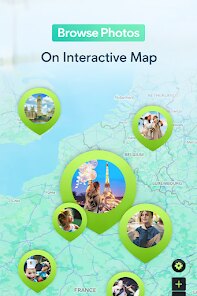
- 🗺️ Precise location embedding — unlike Open Camera or standard phone cameras, this app lets you choose which geodata to include: coordinates, address, altitude, even magnetic direction. You can set the format (like DMS vs decimal degrees) and it updates in real-time as you move.
- ⌚ Timestamp flexibility — supports manual or automatic timestamps, with custom date formats and time zones. Timestamp Camera Free offers similar stamping but GPS Camera gives more control over font and position, like placing the stamp anywhere on the frame.
- 🏷️ Custom text overlays — you're not locked into just location and time. Add job IDs, notes, or custom labels right in the app interface. This beats Photo Exif Editor because GPS Camera burns the text into the image itself, no need for post-processing.
- 📷 Offline stamping — once GPS lock is acquired, you can stamp photos even without network coverage. Handy for backcountry trips where signal drops but you still need proof of location. Open Camera needs a network for reverse geocoding, but GPS Camera handles this offline after initial lock.
pros
- 🎯 Direct-to-image stamping — the biggest win over Timestamp Camera Free is that GPS Camera never blurs or shrinks the stamp if you change battery or close the app. It's physically burned onto the photo, so no metadata tampering after the fact.
- 🛠️ Granular format control — unlike most timestamp apps that offer only preset templates, GPS Camera lets you adjust text size, opacity, color, and alignment. That means you can match the stamp to your company branding or project codes without extra software.
- 🧭 On-screen feedback — the camera viewfinder shows your exact GPS accuracy (like 3m vs 20m), which is absent in alternatives like Open Camera. Saves time because you can wait for a better lock before pressing the shutter.
cons
- ⚠️ Bad GPS handling — the app doesn't clearly alert you if location is inaccurate or missing. Timestamp Camera Free shows a visible “No GPS” warning in the viewfinder, but GPS Camera sometimes stamps a wrong address or just shows empty fields without explaining why.
- 🔄 Clunky batch management — there's no way to remove or adjust stamps on photos after they're saved. If you take a batch and later want them without the overlay, you're out of luck. Photo Exif Editor lets you edit metadata separately instead of burning it in.
- 🪫 Battery drain — keeping GPS constantly searching while the app runs drains the battery noticeably faster than standard camera apps. Open Camera uses less power because it doesn't actively poll for location updates unless you press the shutter.
- 🧩 Limited export sharing — sharing stamped photos from the app only sends the final image, but the original location data (like EXIF) is often stripped or incomplete. Other apps like Timestamp Camera Free preserve EXIF alongside the stamp, so you can still verify the original metadata later.
Recommended Apps
![]()
16Personalities
16Personalities4
![]()
Zodiac Palm Reader: MagicWay
Reatility Media4.6
![]()
Moblo - 3D furniture modeling
MYTIforge4.1![]()
Magnifier Plus with Flashlight
Digitalchemy, LLC4.6![]()
QR Code Scanner
QR Code Scanner & Barcode Reader4.7![]()
FalFal: Astrology, Tarot, Love
FalFal Team4.8![]()
Christmas Photo Frames
PhotoFramesApps4.6![]()
AI Video Art Creator - Livensa
FERASET4.5![]()
Horoscope of Birth
Denimaks4.4![]()
Make Me Bald Prank
AppTornado2.5![]()
Kling AI: AI Image&Video Maker
Lohas Games Pte. Ltd.4.4![]()
Japan Timetable & Route Search
NAVITIME JAPAN CO., LTD.4.3![]()
Prank Call & Funny Video
TeH Software0![]()
Parallax 3D Live Wallpapers
TarrySoft4.3![]()
AI Chatbot - Nova
ScaleUp4.7















Disclaimer
1.AppInfoLibrary does not represent any developer, nor is it the developer of any App or game.
2.AppInfoLibrary provide custom reviews of Apps written by our own reviewers, and detailed information of these Apps, such as developer contacts, ratings and screenshots.
3.All trademarks, registered trademarks, product names and company names or logos appearing on the site are the property of their respective owners.
4. AppInfoLibrary abides by the federal Digital Millennium Copyright Act (DMCA) by responding to notices of alleged infringement that complies with the DMCA and other applicable laws.
5.If you are the owner or copyright representative and want to delete your information, please contact us info@appinfolibrary.com.
6.All the information on this website is strictly observed all the terms and conditions of Google Ads Advertising policies and Google Unwanted Software policy .














