
Anti Theft Alarm–Find my Phone

10M+
Installs
Phone Lock & Utilities Apps
Developer
-
Productivity
Category
-
Everyone
Content Rating
-
micdavisar236@gmail.com
Developer Email
-
https://sites.google.com/view/antitheftalramprivacypolicy/home
Privacy Policy
Screenshots



editor reviews
Anti Theft Alarm–Find my Phone is a security utility app from Phone Lock & Utilities Apps, designed to help you keep tabs on your device and protect it from theft or loss. You can use it to set off a loud alarm remotely, locate your phone on a map, or even lock it down if it falls into the wrong hands. Most people download something like this after misplacing their phone one too many times or worrying about pickpockets in crowded places. Once you install it from Google Play or the App Store, the first impression is pretty straightforward—a clean, no-frills interface that hits you with the main options right away. It's free to download, though there are some in-app purchases if you want extra features, and you don't need to register an account to get started, which is a nice touch. The install count is decent for a niche app, and it doesn't shove ads in your face during initial use, making the launch feel smooth and inviting.
After you open the app, the real hands-on experience kicks in with a simple setup process. You grant permissions like location and device admin access, which feels a bit intrusive but makes sense for a security tool. The interface shows a big button to trigger an alarm, a map view for location tracking, and options to set up a SIM card change alert—so if someone swaps your SIM, you get a notification. In daily use, I found it handy for testing: I tapped the alarm button and my phone screamed loud enough to make me jump, which is exactly what you want in a panic situation. Navigating through the menus is mostly smooth, though the SIM alert setup took me a minute to figure out—it's buried in settings rather than upfront. A practical tip is to enable the alarm with a time delay so you don't accidentally set it off while pocketing your phone. The onboarding doesn't overcomplicate things, so you can start using the core features within a minute of launching.
After using Anti Theft Alarm for a while, my personal judgment is that it nails the basics but won't blow you away with polish. People who frequently misplace their phone in couch cushions or at work will get the most out of it—it's a lifesaver for quick recovery. But if you're already using a full security suite like Lookout or Prey, you might find this app too basic since it lacks advanced anti-theft features like remote camera snaps or data wiping. What sets it apart is the simplicity: no account creation, no bombarding you with bloat, just a loud alarm and location tracking that works offline. I ended up keeping it installed because it's lightweight and doesn't drain battery, but I can see someone uninstalling it if they want more robust protection. It's fair to say the app does one thing well—scream at you—but don't expect a full-fledged security overhaul.
features
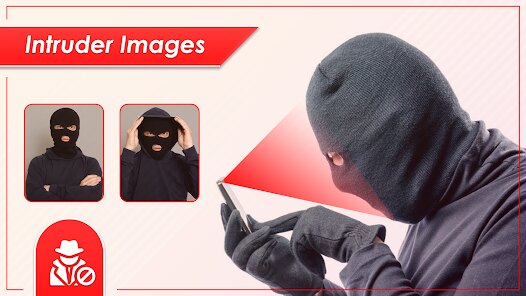
- 🛡️ Intruder selfie capture: Unlike similar apps like Cerberus that require a subscription for photo-based triggers, this app snaps a photo with the front camera when someone enters a wrong password multiple times. It's a neat deterrent because you get a face attached to the threat, and it works without an always-on data connection.
- 🔊 Customizable siren setup: Many anti-theft tools, like Lookout, have a generic alarm, but here you can choose from different siren sounds and adjust the volume. I tested it in a noisy room, and the high-pitched setting cut through surprisingly well, making it more effective for crowded places than the one-note alarms on similar apps.
- 📡 Offline location backup: While most finder apps rely on GPS active, this one stores your last known location if the signal drops, so you're not left guessing if the thief turns off data. It's not as precise as real-time tracking in Find My iPhone, but it's a practical fallback that keeps you from total panic.
pros
- 🔄 No account lock-in: You don't need to create an account like with Prey, which means no password reset headaches if you forget credentials. It's a major time-saver when you're already stressed about a lost phone, plus it respects privacy since no data sits on a server.
- ⚡ Instant alarm trigger: The alarm fires off faster than in Cerberus, where you often have to wait for a command to process. With this app, tapping the button on the lock screen starts the siren within a second, which is crucial if you're chasing a thief in a mall.
- 🆓 Core features free: Unlike Lookout's paid tier for SIM alerts, this app gives you the SIM change notification without any cost. It's a big win for budget users who want basic protection without ads or hidden fees.
cons
- ⏳ No remote lock or wipe: Unlike Prey which lets you remotely lock the device or erase data, this app stops at alarms and location. If your phone has sensitive info, you're out of luck, and you'll need to pair it with a separate security app for full coverage.
- 📱 Limited device support: The app works fine on newer Android versions, but on older phones or budget models, I noticed lag when opening the map or taking an intruder selfie. Cerberus runs smoother across a wider range of hardware, so this can be frustrating for users with dated devices.
- 🔇 No silent mode override: If the thief silences your phone before it triggers, the alarm won't sound, which defeats the purpose. Similar apps like Lookout can override system volume, but this one relies on media settings being up, making it less reliable in expert hands.
Recommended Apps
![]()
16Personalities
16Personalities4
![]()
Zodiac Palm Reader: MagicWay
Reatility Media4.6
![]()
Moblo - 3D furniture modeling
MYTIforge4.1![]()
Magnifier Plus with Flashlight
Digitalchemy, LLC4.6![]()
QR Code Scanner
QR Code Scanner & Barcode Reader4.7![]()
FalFal: Astrology, Tarot, Love
FalFal Team4.8![]()
Christmas Photo Frames
PhotoFramesApps4.6![]()
AI Video Art Creator - Livensa
FERASET4.5![]()
Horoscope of Birth
Denimaks4.4![]()
Make Me Bald Prank
AppTornado2.5![]()
Kling AI: AI Image&Video Maker
Lohas Games Pte. Ltd.4.4![]()
Japan Timetable & Route Search
NAVITIME JAPAN CO., LTD.4.3![]()
Prank Call & Funny Video
TeH Software0![]()
Parallax 3D Live Wallpapers
TarrySoft4.3![]()
AI Chatbot - Nova
ScaleUp4.7















Disclaimer
1.AppInfoLibrary does not represent any developer, nor is it the developer of any App or game.
2.AppInfoLibrary provide custom reviews of Apps written by our own reviewers, and detailed information of these Apps, such as developer contacts, ratings and screenshots.
3.All trademarks, registered trademarks, product names and company names or logos appearing on the site are the property of their respective owners.
4. AppInfoLibrary abides by the federal Digital Millennium Copyright Act (DMCA) by responding to notices of alleged infringement that complies with the DMCA and other applicable laws.
5.If you are the owner or copyright representative and want to delete your information, please contact us info@appinfolibrary.com.
6.All the information on this website is strictly observed all the terms and conditions of Google Ads Advertising policies and Google Unwanted Software policy .














