
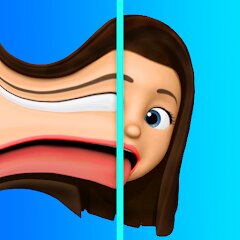
Time Warp Scan : Face Scanner

10M+
Installs
Apps Resort - Daily Tool Apps
Developer
-
Entertainment
Category
-
Everyone
Content Rating
-
appsresort5@gmail.com
Developer Email
-
https://sites.google.com/view/time-warp-scanner-policy/home
Privacy Policy
Screenshots

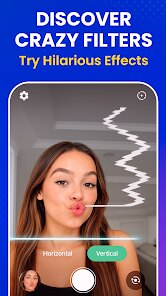
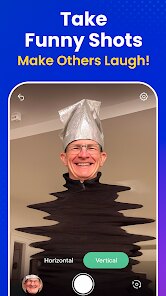
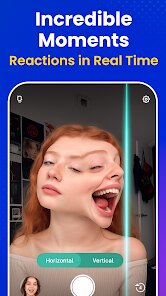

editor reviews
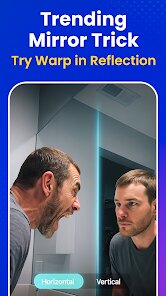
Time Warp Scan: Face Scanner is one of those quirky camera apps that you might stumble upon while browsing the Google Play Store. It's essentially a face distortion tool that creates that trippy, morphing effect you've probably seen in viral videos—where someone's face gets stretched or warped as a moving scan line passes over it. You download it for free, and the first impression after launching it is pretty straightforward: a clean camera interface with a slider button at the bottom. There's no lengthy registration or confusing setup, which is nice. The app has crossed over a million installs, which makes sense given how many people love playing with face filters these days. You just point your phone at your face, hit the button, and watch the magic happen. It does contain ads, which is expected for a free app, and there's an option to remove them through an in-app purchase if you find them annoying.
When you actually start using it, the experience is surprisingly simple. You tap the big button in the middle, and a horizontal line appears on the screen. As the line moves down, it freezes whatever part of your face it just passed over, creating that weird stretched-out effect. The most common way to use it is to start from your forehead and let it scan down to your chin—this gives you that classic elongated face look. One practical tip I picked up is to hold your phone steady and keep a straight face, because any sudden movement or expression change breaks the scan and you have to start over. The interface isn't cluttered with tons of buttons or settings, which makes it easy to figure out in a few seconds, though I did wish there were a few more control options, like being able to adjust the scan speed.
After playing around with it for a while, I'd say this app is perfect for people who just want a quick laugh with friends or need some funny content for social media. It's not something you'd use every day, but it's great for parties or when you're bored and want to see your face turned into something ridiculous. Compared to more complex face apps like Snapchat or FaceApp, this one is much more focused—it does one thing and does it well. The main reason someone might keep it installed is that it's small, doesn't eat up storage, and works offline. But honestly, you might uninstall it after a few days because the novelty wears off fast. Still, for a free tool that delivers exactly what it promises, it's hard to complain.
features
- 😜 The standout feature is the real-time face warping effect itself. Unlike apps like Snapchat that offer dozens of filters, Time Warp Scan focuses entirely on this one trippy effect, making it feel more like a dedicated tool rather than a social media gimmick.
- 📱 The app works completely offline after installation. This is a huge plus compared to apps like FaceApp or YouCam Perfect that require constant internet connection for their features. You can use it on a plane, in a subway tunnel, or anywhere without worrying about data.
- ⚡ The interface is incredibly lightweight and responsive. It launches in under two seconds and uses minimal battery power, unlike more resource-heavy apps like Instagram filters that drain your phone. The scan also happens instantly without lag, which makes the whole experience feel snappy and satisfying.
pros
- 📸 It's completely free with no hidden subscription fees. Unlike FaceApp or Meitu that try to push premium subscriptions after your first few uses, Time Warp Scan gives you full access to its main feature right away.
- 🔄 The app is much simpler to use than complicated editing tools like PicsArt or YouCam Perfect. There's just one button and one action, making it perfect for older users or kids who just want to have fun without any learning curve.
- 💾 It takes up very little space on your phone. At around 10MB, it's far smaller than apps like Snapchat or TikTok, which can take up several hundred megabytes after cache builds up.
cons
- 🎭 The app lacks any video recording capability. You can only capture still images of the warped face, while apps like Snapchat and Instagram allow you to record the entire scanning process as a video clip, which is far more shareable.
- 🔧 There are very few customization options. Unlike FaceApp which lets you choose between dozens of different effects and filters, Time Warp Scan only offers the single scan line effect. You can't even adjust the direction or speed of the scan.
- 📤 The sharing options are quite limited. The app doesn't have built-in sharing to social media platforms, forcing you to manually save photos and then open other apps to post them. It feels outdated compared to apps that have one-tap sharing.
- 🖼️ The saved image quality is noticeably lower than what your phone's camera normally produces. The warped photos often look pixelated or slightly blurry, which makes them less impressive when viewed on larger screens.
Recommended Apps
![]()
16Personalities
16Personalities4
![]()
Zodiac Palm Reader: MagicWay
Reatility Media4.6
![]()
Moblo - 3D furniture modeling
MYTIforge4.1![]()
Magnifier Plus with Flashlight
Digitalchemy, LLC4.6![]()
QR Code Scanner
QR Code Scanner & Barcode Reader4.7![]()
FalFal: Astrology, Tarot, Love
FalFal Team4.8![]()
Christmas Photo Frames
PhotoFramesApps4.6![]()
AI Video Art Creator - Livensa
FERASET4.5![]()
Horoscope of Birth
Denimaks4.4![]()
Make Me Bald Prank
AppTornado2.5![]()
Kling AI: AI Image&Video Maker
Lohas Games Pte. Ltd.4.4![]()
Japan Timetable & Route Search
NAVITIME JAPAN CO., LTD.4.3![]()
Prank Call & Funny Video
TeH Software0![]()
Parallax 3D Live Wallpapers
TarrySoft4.3![]()
AI Chatbot - Nova
ScaleUp4.7















Disclaimer
1.AppInfoLibrary does not represent any developer, nor is it the developer of any App or game.
2.AppInfoLibrary provide custom reviews of Apps written by our own reviewers, and detailed information of these Apps, such as developer contacts, ratings and screenshots.
3.All trademarks, registered trademarks, product names and company names or logos appearing on the site are the property of their respective owners.
4. AppInfoLibrary abides by the federal Digital Millennium Copyright Act (DMCA) by responding to notices of alleged infringement that complies with the DMCA and other applicable laws.
5.If you are the owner or copyright representative and want to delete your information, please contact us info@appinfolibrary.com.
6.All the information on this website is strictly observed all the terms and conditions of Google Ads Advertising policies and Google Unwanted Software policy .














