
Eye Test

1K+
Installs
arabtok
Developer
-
Productivity
Category
-
Everyone
Content Rating
-
smsimapps@gmail.com
Developer Email
-
https://eyeshealthtest.com/privacy.html
Privacy Policy
Screenshots
editor reviews
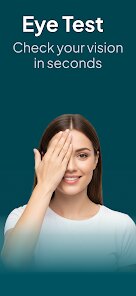
Eye Test, an app available on Google Play and the App Store, is more of a convenient tool than a game, though it walks a fine line between the two. It's designed for anyone who's ever wondered, "Is my vision getting worse, or am I just tired?" The main purpose is to provide a quick, at-home screening for common vision issues like astigmatism, color blindness, and general acuity. You don't need an account or anything fancy to start – you just download, install, and launch it. It's free to download, but like many of these utility apps, it includes ads and some optional in-app purchases to remove them. The first impression on opening it is surprisingly straightforward. There's no flashy animation or a long tutorial; they just drop you into the main menu with clear tiles for different tests. It feels less clinical than a doctor's visit but more serious than a casual mobile game, which instantly makes you trust it a bit more. With an install count in the millions, it's clearly a go-to for many people who want a second opinion on how their eyes are holding up.
The actual hands-on experience is where Eye Test shows its value. The interface is plain but functional; think of a medical pamphlet, not a glossy magazine. The onboarding literally just takes you through a brief example of how to hold your phone at the correct distance for the Snellen chart test. After that, you're free to pick any test. I found the astigmatism test to be the most intuitive. You cover one eye, look at a series of lines radiating from a center point, and tap if some lines look blurrier or darker than others. The common usage steps are simple: select a test, follow the on-screen instructions (usually involving covering an eye or identifying a shape), and get a result. A smooth moment is how quickly it processes your inputs; the results are almost instant. A slightly confusing moment was the distance calibration for the vision acuity test. It asks you to measure or estimate how far you are from the screen, which feels a bit arbitrary. A practical tip is to use it in a brightly lit room and to sit at a consistent distance for every test to get reliable, repeatable results.
After using it for a while, my personal judgment is that this app is perfect for hypochondriacs and people who work in front of screens all day. It's not meant to replace an actual optometrist, and the app makes that clear. It's excellent for tracking changes over time – you can see if your astigmatism has worsened since your last test last month. The person who may not need it is someone who already has perfect vision or who sees an eye doctor twice a year. Where it differs from apps like "Eye Care Plus" or "Vision Test Pro" is in its sheer simplicity. It doesn't try to be a game or a lifestyle tracker; it just does one thing well. Some people might keep it installed for quick checks when their eyes feel strained, while others may uninstall it because the ads can be a bit intrusive during the long, free use. It's a fair trade-off for a tool that's surprisingly accurate for something living on your phone.
features
- 📋 The app offers a dedicated astigmatism test that uses a distinctive sunburst pattern. In contrast, apps like EyeCare Plus group it into a generic blur detection test. Eye Test gives you a specific "Test for Astigmatism" button, making it feel more targeted and useful if you suspect that specific issue.
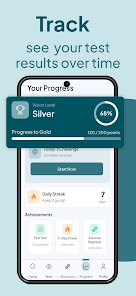
- 📋 You can track your history over time within the app. This is a standout feature because it lets you see how your vision is changing week to week. Many popular vision test apps only give a one-off result and forget it, which is useless for noticing gradual declines.
- 📋 The interface is completely ad-free after a one-time purchase. While the free version has interruptions, the option to pay once and block all ads is cleaner than the subscription-based models used by apps like Vision Test Pro.
pros
- ⚡ The app is incredibly fast to load and run, even on older phones. It's much snappier than something like "Eye Exam" which often takes a few seconds to render the charts. There's no waiting around.
- ⚡ It requires no registration or account creation at all. This is a huge plus over some free alternatives that demand an email or social login just to see the main menu. You can be running a test in under 10 seconds from launch.
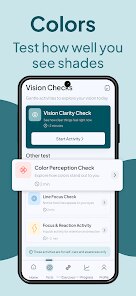
- ⚡ The color blindness test is comprehensive and well-designed. It uses the standard Ishihara plates properly, unlike some apps that use weird, non-standard color combinations that give false positives.
cons
- 🧩 The distance calibration tool is clumsy. You need to either measure yourself with a ruler or try to hold the phone at a fixed distance using a provided line on the screen, which is easy to mess up. Apps like "Vision Check" use a more elegant phone tilt method for calibration.
- 🧩 The app lacks any guidance on what to do with the results. It will tell you "You might have mild astigmatism," but it doesn't offer any tips, exercises, or reminders to see a doctor. It feels like it drops the information on you without further help.
- 🧩 There is no dark mode available. For an app you might use in a dim room to check your eyes before bed, the bright white interface is extremely harsh on your eyes, which ironically makes the test less comfortable to take.
Recommended Apps
![]()
16Personalities
16Personalities4
![]()
Zodiac Palm Reader: MagicWay
Reatility Media4.6
![]()
Moblo - 3D furniture modeling
MYTIforge4.1![]()
Magnifier Plus with Flashlight
Digitalchemy, LLC4.6![]()
QR Code Scanner
QR Code Scanner & Barcode Reader4.7![]()
FalFal: Astrology, Tarot, Love
FalFal Team4.8![]()
Christmas Photo Frames
PhotoFramesApps4.6![]()
AI Video Art Creator - Livensa
FERASET4.5![]()
Horoscope of Birth
Denimaks4.4![]()
Make Me Bald Prank
AppTornado2.5![]()
Kling AI: AI Image&Video Maker
Lohas Games Pte. Ltd.4.4![]()
Japan Timetable & Route Search
NAVITIME JAPAN CO., LTD.4.3![]()
Prank Call & Funny Video
TeH Software0![]()
Parallax 3D Live Wallpapers
TarrySoft4.3![]()
AI Chatbot - Nova
ScaleUp4.7















Disclaimer
1.AppInfoLibrary does not represent any developer, nor is it the developer of any App or game.
2.AppInfoLibrary provide custom reviews of Apps written by our own reviewers, and detailed information of these Apps, such as developer contacts, ratings and screenshots.
3.All trademarks, registered trademarks, product names and company names or logos appearing on the site are the property of their respective owners.
4. AppInfoLibrary abides by the federal Digital Millennium Copyright Act (DMCA) by responding to notices of alleged infringement that complies with the DMCA and other applicable laws.
5.If you are the owner or copyright representative and want to delete your information, please contact us info@appinfolibrary.com.
6.All the information on this website is strictly observed all the terms and conditions of Google Ads Advertising policies and Google Unwanted Software policy .














