
Notes - Notepad, Secure Notes

100K+
Installs
PANCHHI SOLUTION
Developer
-
Productivity
Category
-
Everyone
Content Rating
-
support@panchhisolution.com
Developer Email
-
https://sites.google.com/view/panchhisolution-notes
Privacy Policy
Screenshots
editor reviews
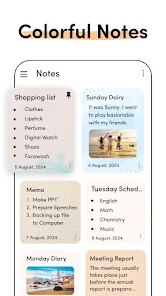
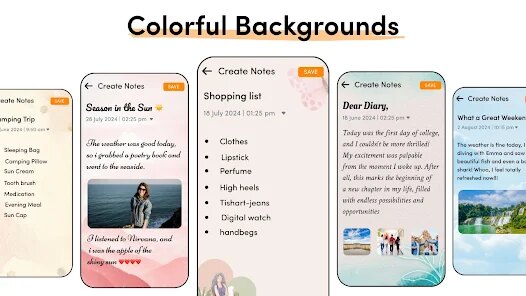
Notes - Notepad, Secure Notes is a straightforward note-taking app from PANCHHI SOLUTION, designed for people who need a simple place to jot down quick thoughts, to-do lists, or secure personal notes. It falls under the productivity and utility category, similar to basic notepads but with added privacy options. On Google Play, it's been downloaded over 100,000 times and is free to install, though I noticed it does include ads. I downloaded it out of curiosity, wanting something lightweight without the extra fluff of bigger apps. Right after launching, the first impression was clean and minimal — a white screen with a toolbar at the top and a "create new note" button that stood out. There was no forced registration, which was a relief; I just tapped "+" and started typing immediately. The whole setup took maybe ten seconds.
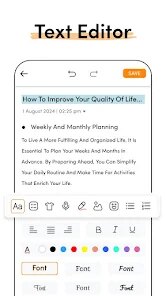
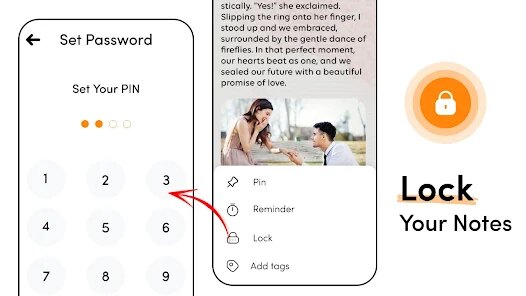
Using the app feels like, well, using a digital notepad. The interface is basic: you get a list view of all your notes, and each one shows a snippet of text plus a timestamp. Tapping a note opens it for editing, and the on-screen keyboard responds quickly. I typed a few lists and quick reminders, and the autosave feature kicked in without any lag. For locking notes, I decided to test the PIN lock option — accessed through a small padlock icon in the toolbar. You set a four-digit passcode, then mark any note as "private." After that, opening that note requires your PIN. It is indeed secure, but the extra step feels clunky for quick editing. One small tip I picked up: the app does not support rich text formatting, so do not expect bold, headers, or bullet points. The search function, which sits at the top, works decently for finding notes by keyword.
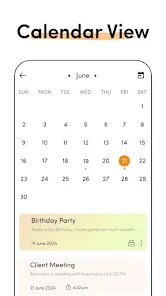
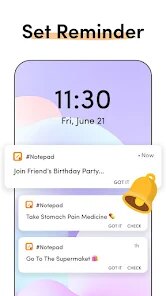
After a few days of casual use, I can see who this app is really for. If you want a dead-simple vault for grocery lists, passwords hints, or random ideas and you do not want to sign into anything, this works. The lock feature is a nice bonus for privacy. However, if you rely on cloud sync, cross-device access, or formatting options, this will feel too limited. Compared to Google Keep which I normally use, this app lacks labels, reminders, voice notes, and automatic backup. You could uninstall it after a week if the lack of sync bothers you. On the other hand, if you are looking for a local-only notebook with no account needed and basic PIN security, it could stay on your phone as a quick scratchpad. But honestly, I might keep it as a secondary app just for secure PIN-protected notes, while my daily driver stays with Keep.
features
- 📝 Local-only PIN lock: You can lock individual notes with a four-digit PIN, which is perfect for hiding passwords or private thoughts. Google Keep does not offer this kind of note-level lock, so this is a standout privacy option.
- 📝 No account required: Unlike Keep or Notion, you never have to sign up or log in. You just open the app and start typing instantly, which feels refreshingly simple for a private note taker.
- 📝 Autosave on the fly: Every change you make is saved automatically without pressing any save button. This is handy when you are just thinking out loud and do not want to risk losing any quick idea.
- 📝 Lightweight performance: The app is small and runs smoothly even on older devices. There are no fancy animations or heavy background services, so it feels snappy compared to heavier competitors like Evernote.
pros
- ✅ Extreme simplicity: It strips note-taking down to plain text and a lock. For someone who just wants a place to store a PIN or a shopping list without distractions, this beats Google Keep's cluttered card design.
- ✅ No data collection worry: Since it doesn't sync to the cloud, there is zero risk of a data breach on someone else's server. In contrast, Evernote and Notion store your notes online, which some users prefer to avoid.
- ✅ Free with no upgrade pressure: You get all the core features without in-app purchases or paid tiers. Apps like ColorNote push premium upgrades, but this one delivers the basics at no cost.
cons
- ❌ No cloud sync at all: If you lose your phone or switch devices, every note is gone. Compared to Google Keep or OneNote that sync seamlessly across platforms, this feels like a huge risk for any important data.
- ❌ No formatting or rich text: You are stuck with pure plain text. No bold, no headings, no checklists — ColorNote and Keep both offer basic formatting that this app just does not have.
- ❌ Ads in the interface: There are banner ads that pop up occasionally, which can be distracting while typing. Most similar apps like Standard Notes offer an ad-free experience for basic use, so this feels a bit intrusive.
- ❌ Limited backup options: You can only export notes as .txt files manually one by one. Apps like Simple Notes allow batch export or automatic backup to SD card, which is more user-friendly.
Recommended Apps
![]()
16Personalities
16Personalities4
![]()
Zodiac Palm Reader: MagicWay
Reatility Media4.6
![]()
Moblo - 3D furniture modeling
MYTIforge4.1![]()
Magnifier Plus with Flashlight
Digitalchemy, LLC4.6![]()
QR Code Scanner
QR Code Scanner & Barcode Reader4.7![]()
FalFal: Astrology, Tarot, Love
FalFal Team4.8![]()
Christmas Photo Frames
PhotoFramesApps4.6![]()
AI Video Art Creator - Livensa
FERASET4.5![]()
Horoscope of Birth
Denimaks4.4![]()
Make Me Bald Prank
AppTornado2.5![]()
Kling AI: AI Image&Video Maker
Lohas Games Pte. Ltd.4.4![]()
Japan Timetable & Route Search
NAVITIME JAPAN CO., LTD.4.3![]()
Prank Call & Funny Video
TeH Software0![]()
Parallax 3D Live Wallpapers
TarrySoft4.3![]()
AI Chatbot - Nova
ScaleUp4.7















Disclaimer
1.AppInfoLibrary does not represent any developer, nor is it the developer of any App or game.
2.AppInfoLibrary provide custom reviews of Apps written by our own reviewers, and detailed information of these Apps, such as developer contacts, ratings and screenshots.
3.All trademarks, registered trademarks, product names and company names or logos appearing on the site are the property of their respective owners.
4. AppInfoLibrary abides by the federal Digital Millennium Copyright Act (DMCA) by responding to notices of alleged infringement that complies with the DMCA and other applicable laws.
5.If you are the owner or copyright representative and want to delete your information, please contact us info@appinfolibrary.com.
6.All the information on this website is strictly observed all the terms and conditions of Google Ads Advertising policies and Google Unwanted Software policy .














