

Meta AI

10M+
Installs
Meta Platforms, Inc.
Developer
-
Productivity
Category
-
Everyone
Content Rating
-
facebook.android@fb.com
Developer Email
-
https://www.facebook.com/privacy/policy/
Privacy Policy
Screenshots
editor reviews
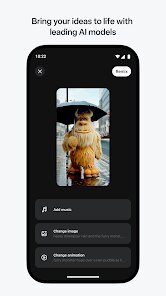
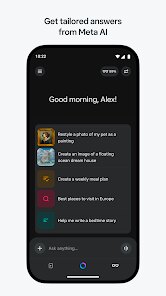
Meta AI, developed by the team at Meta, has been making its way into a lot of the company's apps, but there's a standalone version on both Google Play and the App Store. It's essentially a general-purpose AI assistant, so you can use it to brainstorm ideas, get quick answers, or even generate images when you need some visual inspiration. I downloaded it mostly out of curiosity, having seen the tool integrated into Instagram and WhatsApp, and the first thing that struck me after launching it was how clean and minimal the interface is — just a chat bar and a suggestion bubble. There are no forced sign-up gates or flood of ads, though you may end up linking a Facebook or Instagram account later if you want to save your chats. It's free to download and has seen a decent number of installs, but I wouldn't call it a market leader just yet in terms of downloads compared to other big-name assistants.
Once I started tapping around, the experience felt surprisingly straightforward. The initial onboarding is pretty much nonexistent; you just get a text box and a few suggested prompts staring at you. I tried a couple of queries, like asking for a quick summary of a news event and then requesting a generated image of a cat in a spacesuit. The text responses came back fast, and the image generation, while not as detailed as some dedicated tools, did the job within a few seconds. Navigating the app is basically just scrolling through your conversation history, and you can tap the plus icon to start a fresh thread. One small tip — if you find the replies a bit too verbose, you can prompt it to keep things short. There were moments when it stumbled on more niche questions, but for everyday tasks like drafting a message or explaining a concept, it flowed smoothly.
After spending a few days with it, my take is that Meta AI is great if you are already deep in the Meta ecosystem and want a quick assistant that doesn't feel cluttered. It doesn't have the deep integration with documents or code that something like ChatGPT offers, so power users may find it lacking. What makes it stand out is how lightweight it feels — no heavy settings menus or paywalls begging for a subscription. I could see someone who just wants casual help with writing or casual image fun keeping it installed, but if you rely on assistants for serious research or professional workflows, you'll likely end up uninstalling it in favor of a more robust option. It's a decent tool, but not a game-changer.
features
- 🤖 It delivers strong language understanding for casual conversations. When I asked it to explain a complex topic like quantum entanglement in simple terms, it gave a clear and concise breakdown without overwhelming jargon. Compared to Google Gemini, which sometimes over-explains, Meta AI knows when to keep things short and conversational, making it feel more like chatting with a friend than a machine.
- 🎨 The integrated image generation is impressively fast. I typed a request for "a futuristic city at sunset with neon lights," and the image appeared in under five seconds. Unlike ChatGPT's DALL-E integration, which often requires waiting and sometimes queues, Meta AI generates images almost instantly, though the quality is a step below specialized tools like Midjourney for detailed artistic work.
- 🌐 The zero-friction onboarding is a standout feature. You don't need to create yet another account or verify your email; the app simply works right after installation. In contrast, tools like Microsoft Copilot often push you toward signing in with a Microsoft account immediately, while Meta AI lets you test the waters first without any commitment.
pros
- 👍 Cross-platform consistency is a major plus. If you start a conversation on web and pick it up on mobile, the syncing is seamless. This is smoother than what I experienced with Anthropic's Claude, where mobile and desktop sessions sometimes desync or require manual refresh.
- 👍 The lack of aggressive monetization is refreshing. Unlike many AI apps that hide core features behind a subscription, Meta AI keeps all basic functions freely accessible. ChatGPT imposes usage limits on its free tier, but Meta AI hasn't throttled me yet even after dozens of queries in one session.
- 👍 Its ability to handle multiple languages naturally surprised me. I switched between English and Spanish mid-conversation, and it followed along without missing a beat. Google Gemini handles translation well too, but Meta AI feels more natural in casual bilingual chats rather than formal translation mode.
cons
- 👎 Context retention is weak over long conversations. After about 15 exchanges, it started forgetting details from earlier in the same session. This is frustrating compared to ChatGPT, which can maintain coherent threads spanning dozens of messages while referencing earlier inputs accurately.
- 👎 The app lacks true document processing capabilities. I tried uploading a PDF for summarization, and it simply couldn't handle it. Google Gemini allows document uploads and even analyzes spreadsheets, which makes Meta AI feel limited for any serious research or work-related tasks.
- 👎 Customization options are nearly nonexistent. You cannot adjust the tone, personality, or response length beyond basic prompting. In contrast, Character.ai lets you define entire personas and response styles, giving users much more control over how the AI interacts with them.
- 👎 Offline functionality is completely absent. If you lose internet connection, the app becomes entirely useless. Google Gemini offers some cached offline capabilities, and even basic assistants like Siri can handle offline commands, making Meta AI less reliable when connectivity is spotty.
Recommended Apps
![]()
16Personalities
16Personalities4
![]()
Zodiac Palm Reader: MagicWay
Reatility Media4.6
![]()
Moblo - 3D furniture modeling
MYTIforge4.1![]()
Magnifier Plus with Flashlight
Digitalchemy, LLC4.6![]()
QR Code Scanner
QR Code Scanner & Barcode Reader4.7![]()
FalFal: Astrology, Tarot, Love
FalFal Team4.8![]()
Christmas Photo Frames
PhotoFramesApps4.6![]()
AI Video Art Creator - Livensa
FERASET4.5![]()
Horoscope of Birth
Denimaks4.4![]()
Make Me Bald Prank
AppTornado2.5![]()
Kling AI: AI Image&Video Maker
Lohas Games Pte. Ltd.4.4![]()
Japan Timetable & Route Search
NAVITIME JAPAN CO., LTD.4.3![]()
Prank Call & Funny Video
TeH Software0![]()
Parallax 3D Live Wallpapers
TarrySoft4.3![]()
AI Chatbot - Nova
ScaleUp4.7















Disclaimer
1.AppInfoLibrary does not represent any developer, nor is it the developer of any App or game.
2.AppInfoLibrary provide custom reviews of Apps written by our own reviewers, and detailed information of these Apps, such as developer contacts, ratings and screenshots.
3.All trademarks, registered trademarks, product names and company names or logos appearing on the site are the property of their respective owners.
4. AppInfoLibrary abides by the federal Digital Millennium Copyright Act (DMCA) by responding to notices of alleged infringement that complies with the DMCA and other applicable laws.
5.If you are the owner or copyright representative and want to delete your information, please contact us info@appinfolibrary.com.
6.All the information on this website is strictly observed all the terms and conditions of Google Ads Advertising policies and Google Unwanted Software policy .














