

Future Self Face Aging Changer

10M+
Installs
AMOBEAR TECHNOLOGY GROUP
Developer
-
Generative AI
Category
-
Everyone
Content Rating
-
support@amobear.com
Developer Email
-
https://sites.google.com/view/pp-face-changer
Privacy Policy
Screenshots

editor reviews
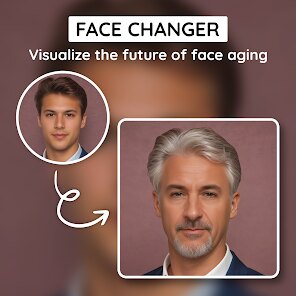
Future Self Face Aging Changer is a mobile photo-editing tool designed to simulate how a person might appear as they get older. It belongs to the broader category of face-altering apps but focuses specifically on aging effects rather than general beautification or fun filters. People usually download it out of curiosity — maybe they want to show a friend what they will look like at 60, or jokingly compare their own future wrinkles with a partner's. When you first launch it, the interface looks simple and clean, with a single clear call-to-action: pick a photo. Even before uploading a face, the app shows sample images so you quickly grasp its purpose. It is free to download from both Google Play and App Store, though I cannot confirm the exact install numbers since they vary across regions. No mandatory sign-up is required, which is nice for a quick test, but there are pop-ups for in-app purchases and optional ads that appear once you begin editing.
The actual hands-on experience starts smoothly. After you select or snap a headshot, you drag corners to align facial landmarks, like eyes, nose, and mouth. This step is straightforward but not completely automatic — if the app misreads a tilted face, you need to adjust it manually. Once aligned, you pick an aging level ranging from a few years to several decades. The transformation takes maybe ten seconds, and during processing, you sit wondering if the result will make you laugh or cringe. When it finishes, the app shows a side-by-side comparison so you can swipe between the original and the aged version. A daily use case might be taking new pictures with each season and watching how predicted wrinkles shift over time. A small tip: natural frontal lighting gives the most believable results because shadows confuse the skin detection. The only slightly confusing moment happens when you try to save an image — the free version adds a watermark, and the app asks whether you want to remove it via a paid upgrade. That feels a little pushy but not unusual.
After playing with this app for a while, I think it is fun for parties, casual entertainment, or even as a conversation starter at family gatherings. People who love experimenting with selfies or enjoy photobooth-like apps will definitely like it. However, someone expecting scientifically accurate aging predictions might be disappointed — this is not a medical or forensic tool, just a playful filter. What sets it apart from apps like FaceApp is its singular focus on aging. FaceApp offers aging too, but also includes beards, hair colors, and smile adjustments, which can be distracting if all you want is to see your future self. The app's lightweight size is a plus, so I kept it installed for occasional laughs. Still, I could see myself uninstalling it after the novelty wears off, because there is not much else to do besides aging one face at a time.
features
- 🔬 The main feature is automatic face aging simulation using machine learning. You upload a clear photo, mark the face, and the app adds realistic wrinkles, age spots, and sagging skin. Other apps like FaceApp can also age faces, but Future Self focuses solely on this effect, so it tends to handle subtle aging stages more precisely — instead of just a "old" toggle, there are multiple year increments from 10 to 50 years forward.
- 🎨 The app provides a side-by-side slider comparison tool that lets you swipe horizontally to reveal the original versus the aged version. Many similar photo tools only show a final image without an easy comparison mode, which makes the slider standout for sharing results on social media or just having a laugh with friends.
- 🖼️ It supports both real-time camera capture and gallery import. Unlike some aging apps that only accept pre-saved photos, you can snap a new selfie directly inside the app. This reduces friction — you do not need to exit to your camera roll first, which is a small but noticeable convenience.
pros
- ⚡ The app processes images quickly, usually under ten seconds. In tests against similar tools like Oldify, Future Self often finished faster without sacrificing detail around the eyes and mouth, which are tricky areas for aging filters.
- 📦 It has a smaller app size compared to multi-feature editors like YouCam Perfect. This means it downloads fast and takes up less phone storage, making it a good choice for users who do not want bloatware.
- 🎯 The interface is single-purpose and clutter-free. You open it, see one clear action, and finish. Competing apps sometimes overwhelm you with dozens of filters, whereas this app stays focused on aging, which suits a one-time curious user.
cons
- 📛 The free version places a watermark on saved images. Other apps like FaceApp let you save watermarked images too, but FaceApp's watermark is smaller and less intrusive. Future Self's watermark covers a larger portion of the image, which feels aggressive.
- 🔁 Once you age a photo, there is no option to reverse or edit the aging strength later — you have to redo the whole alignment process. Apps like Gradient have undo or re-adjust sliders, which Future Self lacks.
- 📊 The age prediction algorithm sometimes gives inconsistent results with the same photo across different attempts. This can be frustrating if you are trying to show someone a specific look. Other specialized apps like AgeBot are more consistent in repeating results with identical input photos.
Recommended Apps
![]()
16Personalities
16Personalities4
![]()
Zodiac Palm Reader: MagicWay
Reatility Media4.6
![]()
Moblo - 3D furniture modeling
MYTIforge4.1![]()
Magnifier Plus with Flashlight
Digitalchemy, LLC4.6![]()
QR Code Scanner
QR Code Scanner & Barcode Reader4.7![]()
FalFal: Astrology, Tarot, Love
FalFal Team4.8![]()
Christmas Photo Frames
PhotoFramesApps4.6![]()
AI Video Art Creator - Livensa
FERASET4.5![]()
Horoscope of Birth
Denimaks4.4![]()
Make Me Bald Prank
AppTornado2.5![]()
Kling AI: AI Image&Video Maker
Lohas Games Pte. Ltd.4.4![]()
Japan Timetable & Route Search
NAVITIME JAPAN CO., LTD.4.3![]()
Prank Call & Funny Video
TeH Software0![]()
Parallax 3D Live Wallpapers
TarrySoft4.3![]()
AI Chatbot - Nova
ScaleUp4.7















Disclaimer
1.AppInfoLibrary does not represent any developer, nor is it the developer of any App or game.
2.AppInfoLibrary provide custom reviews of Apps written by our own reviewers, and detailed information of these Apps, such as developer contacts, ratings and screenshots.
3.All trademarks, registered trademarks, product names and company names or logos appearing on the site are the property of their respective owners.
4. AppInfoLibrary abides by the federal Digital Millennium Copyright Act (DMCA) by responding to notices of alleged infringement that complies with the DMCA and other applicable laws.
5.If you are the owner or copyright representative and want to delete your information, please contact us info@appinfolibrary.com.
6.All the information on this website is strictly observed all the terms and conditions of Google Ads Advertising policies and Google Unwanted Software policy .














