

Home AI - AI Interior Design

10M+
Installs
HubX
Developer
-
Lifestyle
Category
-
Everyone
Content Rating
-
info@homeinterior.ai
Developer Email
-
https://homeinterior.ai/privacy
Privacy Policy
Screenshots




editor reviews
Home AI is an AI-powered interior design app that lets you reimagine your living spaces just by snapping a photo. You snap a picture of any room, pick a style you like (modern, bohemian, minimalist, you name it), and the app generates a redesigned version in seconds. It's pretty straightforward for a normal user: you download it from the Play Store or App Store, open it up, and the interface is clean and inviting. The app asks for camera access right away, but the onboarding is quick and doesn't bog you down with tutorials. First impression is that it feels almost like a magic trick—you point your phone at a cluttered corner, tap a few buttons, and suddenly you're looking at a sleek, furnished version of the same space. There's no forced registration, which is a huge plus. The app is free to download, but you do hit a paywall after a few free generations unless you subscribe. Ads pop up occasionally, but they're not too aggressive.
After you get past the initial wow factor, the actual hands-on experience is pretty smooth. The home screen has a big "Start a New Design" button, and you just take or upload a photo of the room you want to work on. The app then uses AI to detect the room's layout and objects in it. You can choose from a bunch of style presets or even upload a reference image for inspiration. Once you hit generate, it takes about 10 to 15 seconds to process, and you can swipe between the original and the AI-generated version to compare. It's very satisfying seeing your messy living room turned into a cozy Scandinavian space. One small tip: the AI sometimes misinterprets furniture or shadows, so the best results come from well-lit, straight-on shots of a room. The app can also handle design challenges like odd angles or rooms with a lot of clutter, though the accuracy dips a bit in those cases. Overall, the flow feels intuitive, but the constant reminder that you have limited free generations can be a bit of a buzzkill.
After using Home AI for a while, I can see how some people would really love it—especially renters who want to visualize changes to a space without spending a dime on actual furniture, or anyone planning a renovation. It's not something you'll use every day, but it's a genuinely fun tool for brainstorming ideas. What sets it apart from similar apps like Houzz or Reimagine Home is the sheer ease of use: you don't need any design knowledge or to upload a floor plan. The AI does all the heavy lifting. That said, the limited free usage and subscription model might push someone to uninstall after they've had their fun with a couple of rooms. It's a great way to kill time on a Sunday and get some inspiration, but unless you actively need to redesign multiple rooms, it stays as a tool you open maybe once a month.
features
- 🖌️ What makes Home AI stand out from tools like Houzz is that it works directly from a regular photo. You don't need to draw floor plans or measure walls. You just take a picture, pick a style, and the AI redesigns the room in seconds. It's perfect for people who want quick visual inspiration without any technical hassle.
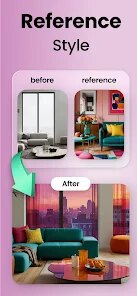
- 🖌️ The app offers a huge range of style presets—from industrial loft to tropical paradise. You can also upload a reference image of a room you like, and the AI will try to match the vibe. This is great if you're looking to replicate a specific aesthetic you saw on Pinterest or Instagram.
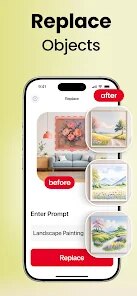
- 🖌️ Another standout feature is the ability to isolate specific elements in the room, like just the sofa or the bookshelf. You can select an object and ask the AI to change only that item's style or color, which gives you more control than just redesigning the whole room at once.
pros
- ✅ The biggest strength is how beginner-friendly the app feels. Unlike more complex platforms like SketchUp or Sweet Home 3D, you don't need any tutorial or prior design knowledge. You just tap and see results.
- ✅ It saves a ton of time. Reimagining a room manually on a design app would take hours, but Home AI does it in under 20 seconds. For someone just testing out ideas, that speed is a game-changer.
- ✅ The app's ability to work with your actual space makes the suggestions feel more relevant. When you use apps like Pinterest or Houzz, you're often looking at rooms that don't match your layout. Home AI works on your specific photo, so the designs feel tailored.
- ✅ The biggest strength is how beginner-friendly the app feels. Unlike more complex platforms like SketchUp or Sweet Home 3D, you don't need any tutorial or prior design knowledge. You just tap and see results.
- ✅ It saves a ton of time. Reimagining a room manually on a design app would take hours, but Home AI does it in under 20 seconds. For someone just testing out ideas, that speed is a game-changer.
- ✅ The app's ability to work with your actual space makes the suggestions feel more relevant. When you use apps like Pinterest or Houzz, you're often looking at rooms that don't match your layout. Home AI works on your specific photo, so the designs feel tailored.
cons
>
Home AI is an AI-powered interior design app that lets you reimagine your living spaces just by snapping a photo. You snap a picture of any room, pick a style you like (modern, bohemian, minimalist, you name it), and the app generates a redesigned version in seconds. It's pretty straightforward for a normal user: you download it from the Play Store or App Store, open it up, and the interface is clean and inviting. The app asks for camera access right away, but the onboarding is quick and doesn't bog you down with tutorials. First impression is that it feels almost like a magic trick—you point your phone at a cluttered corner, tap a few buttons, and suddenly you're looking at a sleek, furnished version of the same space. There's no forced registration, which is a huge plus. The app is free to download, but you do hit a paywall after a few free generations unless you subscribe. Ads pop up occasionally, but they're not too aggressive.
After you get past the initial wow factor, the actual hands-on experience is pretty smooth. The home screen has a big "Start a New Design" button, and you just take or upload a photo of the room you want to work on. The app then uses AI to detect the room's layout and objects in it. You can choose from a bunch of style presets or even upload a reference image for inspiration. Once you hit generate, it takes about 10 to 15 seconds to process, and you can swipe between the original and the AI-generated version to compare. It's very satisfying seeing your messy living room turned into a cozy Scandinavian space. One small tip: the AI sometimes misinterprets furniture or shadows, so the best results come from well-lit, straight-on shots of a room. The app can also handle design challenges like odd angles or rooms with a lot of clutter, though the accuracy dips a bit in those cases. Overall, the flow feels intuitive, but the constant reminder that you have limited free generations can be a bit of a buzzkill.
After using Home AI for a while, I can see how some people would really love it—especially renters who want to visualize changes to a space without spending a dime on actual furniture, or anyone planning a renovation. It's not something you'll use every day, but it's a genuinely fun tool for brainstorming ideas. What sets it apart from similar apps like Houzz or Reimagine Home is the sheer ease of use: you don't need any design knowledge or to upload a floor plan. The AI does all the heavy lifting. That said, the limited free usage and subscription model might push someone to uninstall after they've had their fun with a couple of rooms. It's a great way to kill time on a Sunday and get some inspiration, but unless you actively need to redesign multiple rooms, it stays as a tool you open maybe once a month.
- 🖌️ What makes Home AI stand out from tools like Houzz is that it works directly from a regular photo. You don't need to draw floor plans or measure walls. You just take a picture, pick a style, and the AI redesigns the room in seconds. It's perfect for people who want quick visual inspiration without any technical hassle.
- 🖌️ The app offers a huge range of style presets—from industrial loft to tropical paradise. You can also upload a reference image of a room you like, and the AI will try to match the vibe. This is great if you're looking to replicate a specific aesthetic you saw on Pinterest or Instagram.
- 🖌️ Another standout feature is the ability to isolate specific elements in the room, like just the sofa or the bookshelf. You can select an object and ask the AI to change only that item's style or color, which gives you more control than just redesigning the whole room at once.
- ✅ The biggest strength is how beginner-friendly the app feels. Unlike more complex platforms like SketchUp or Sweet Home 3D, you don't need any tutorial or prior design knowledge. You just tap and see results.
- ✅ It saves a ton of time. Reimagining a room manually on a design app would take hours, but Home AI does it in under 20 seconds. For someone just testing out ideas, that speed is a game-changer.
- ✅ The app's ability to work with your actual space makes the suggestions feel more relevant. When you use apps like Pinterest or Houzz, you're often looking at rooms that don't match your layout. Home AI works on your specific photo, so the designs feel tailored.
- ✅ The biggest strength is how beginner-friendly the app feels. Unlike more complex platforms like SketchUp or Sweet Home 3D, you don't need any tutorial or prior design knowledge. You just tap and see results.
- ✅ It saves a ton of time. Reimagining a room manually on a design app would take hours, but Home AI does it in under 20 seconds. For someone just testing out ideas, that speed is a game-changer.
- ✅ The app's ability to work with your actual space makes the suggestions feel more relevant. When you use apps like Pinterest or Houzz, you're often looking at rooms that don't match your layout. Home AI works on your specific photo, so the designs feel tailored.
Recommended Apps
![]()
16Personalities
16Personalities4
![]()
Zodiac Palm Reader: MagicWay
Reatility Media4.6
![]()
Moblo - 3D furniture modeling
MYTIforge4.1![]()
Magnifier Plus with Flashlight
Digitalchemy, LLC4.6![]()
QR Code Scanner
QR Code Scanner & Barcode Reader4.7![]()
FalFal: Astrology, Tarot, Love
FalFal Team4.8![]()
Christmas Photo Frames
PhotoFramesApps4.6![]()
AI Video Art Creator - Livensa
FERASET4.5![]()
Horoscope of Birth
Denimaks4.4![]()
Make Me Bald Prank
AppTornado2.5![]()
Kling AI: AI Image&Video Maker
Lohas Games Pte. Ltd.4.4![]()
Japan Timetable & Route Search
NAVITIME JAPAN CO., LTD.4.3![]()
Prank Call & Funny Video
TeH Software0![]()
Parallax 3D Live Wallpapers
TarrySoft4.3![]()
AI Chatbot - Nova
ScaleUp4.7















Disclaimer
1.AppInfoLibrary does not represent any developer, nor is it the developer of any App or game.
2.AppInfoLibrary provide custom reviews of Apps written by our own reviewers, and detailed information of these Apps, such as developer contacts, ratings and screenshots.
3.All trademarks, registered trademarks, product names and company names or logos appearing on the site are the property of their respective owners.
4. AppInfoLibrary abides by the federal Digital Millennium Copyright Act (DMCA) by responding to notices of alleged infringement that complies with the DMCA and other applicable laws.
5.If you are the owner or copyright representative and want to delete your information, please contact us info@appinfolibrary.com.
6.All the information on this website is strictly observed all the terms and conditions of Google Ads Advertising policies and Google Unwanted Software policy .














