
AR Drawing: Sketch & Paint

10M+
Installs
AR Drawing
Developer
-
Art & Design
Category
-
Everyone
Content Rating
-
app@ar-drawing.com
Developer Email
-
https://ar-drawing.com/privacy/
Privacy Policy
Screenshots


editor reviews
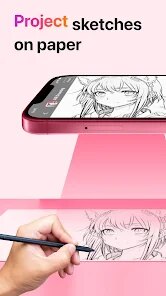
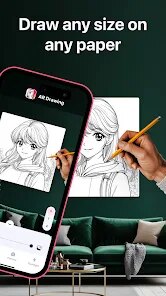
AR Drawing: Sketch & Paint is one of those apps that turns your phone into a tracing lightbox. It belongs to the creative tool category, specifically for artists or hobbyists who want to draw more accurately. The main idea is simple: you pick an image, the app overlays it on your camera feed, and you trace the outlines onto paper. I downloaded it after seeing a friend use something similar for a sketchbook project. First impression after launching was honestly a bit cluttered, with lots of pop-ups asking for permissions and a quick tutorial that felt rushed. The install count seems healthy, and it's free to download, though you quickly notice in-app purchases for removing ads or unlocking extra templates. No forced registration, which I appreciated, so you can start tracing almost right away.
Once I got past the initial screen, the actual use is fairly straightforward. You pick a photo from your gallery or choose one of their built-in templates, then adjust the transparency and lock it on your screen. You place your phone on a stand or prop it up, put your paper over it, and start tracing. The interface is not the prettiest, but functional. Main buttons are clear for loading images, adjusting brightness, and flipping the image horizontally. I had a few moments where the app froze when loading a high-res photo, but restarting fixed it. A small tip I found useful is to lower the screen brightness to save battery, since tracing can take a while. The app also has a measurement tool, which helps if you want to scale the image to your paper size. For daily use, it feels like a digital stencil more than a full drawing app.
After using it for a couple of weeks, I think it's a decent tool for beginners who struggle with proportions or for anyone wanting to transfer complex images onto paper without freehanding. It's not for experienced artists who want to develop their own style, since tracing doesn't teach you anatomy or shading. Compared to apps like SketchAR or Da Vinci Eye, AR Drawing feels less polished but more flexible with custom images. What kept me from uninstalling was the ability to trace my own photos, like portraits or landscapes, which those other apps might limit behind paywalls. Still, the constant ads and occasional lag make me think twice about keeping it long-term.
features
- 📸 Image Trace Precision: The app lets you import any photo from your gallery and adjust its transparency and size. This stands out against apps like SketchAR, which mostly offer pre-made templates. You get full control over exactly what you want to trace, whether it's a selfie or a complex illustration.
- 🖼️ Real-Time Camera Overlay: Instead of just showing a static image, the app uses your camera feed to overlay the picture onto real paper. This feels more natural than using a separate screen, as you can see your hand and pencil positions in real time. Competitors like Da Vinci Eye also do this, but AR Drawing's response time is slightly smoother on mid-range phones.
- 📏 Scale and Measurement Tool: You can set the exact dimensions of your paper, and the app adjusts the image size accordingly. This is a huge time-saver because you don't have to manually guess or resize. Many tracing apps ignore this, leaving you to figure out scale on your own.
- 🔄 Flip and Mirror Functions: For symmetrical drawings, the app allows you to flip the image horizontally or vertically. This is great for tracing faces or patterns, and it's a feature often locked behind premium subscriptions in other apps like Let's Trace.
pros
- 👍 Free Core Features: You can trace your own images without paying a penny. SketchAR, for example, limits custom imports to premium users. AR Drawing gives you full access to the basic tracing tools for free, which is rare in this category.
- 👍 No Registration Required: Unlike Da Vinci Eye, which pushes you to create an account, AR Drawing lets you start tracing immediately. This lowers the barrier for casual users who just want to try it out without sharing personal data.
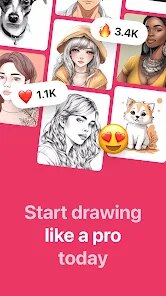
- 👍 Wide Template Library: While not as extensive as some paid apps, the built-in templates cover animals, anime, and landscapes. They update occasionally, so you always have fresh options. For a free app, that is solid value.
cons
- 👎 Heavy Ad Interruption: Every few minutes, a full-screen ad pops up, especially right after you finish a trace. It breaks focus badly. SketchAR has fewer ads even in its free version, so this is a clear downside.
- 👎 Occasional Freezes on High Res Photos: When I loaded a 12MP photo, the app stuttered and once crashed. Da Vinci Eye handles large files more smoothly, likely due to better optimization.
- 👎 Limited Drawing Assistance: The app only helps with tracing outlines. It offers no guidance on shading, blending, or coloring. If you want a teaching tool, apps like How to Draw step by step are more comprehensive.
- 👎 No Cloud Backup or Sync: Your imported images and templates are saved only on device. If you switch phones or reinstall, everything is gone. Competitors often offer basic cloud saves for free users.
Recommended Apps
![]()
16Personalities
16Personalities4
![]()
Zodiac Palm Reader: MagicWay
Reatility Media4.6
![]()
Moblo - 3D furniture modeling
MYTIforge4.1![]()
Magnifier Plus with Flashlight
Digitalchemy, LLC4.6![]()
QR Code Scanner
QR Code Scanner & Barcode Reader4.7![]()
FalFal: Astrology, Tarot, Love
FalFal Team4.8![]()
Christmas Photo Frames
PhotoFramesApps4.6![]()
AI Video Art Creator - Livensa
FERASET4.5![]()
Horoscope of Birth
Denimaks4.4![]()
Make Me Bald Prank
AppTornado2.5![]()
Kling AI: AI Image&Video Maker
Lohas Games Pte. Ltd.4.4![]()
Japan Timetable & Route Search
NAVITIME JAPAN CO., LTD.4.3![]()
Prank Call & Funny Video
TeH Software0![]()
Parallax 3D Live Wallpapers
TarrySoft4.3![]()
AI Chatbot - Nova
ScaleUp4.7















Disclaimer
1.AppInfoLibrary does not represent any developer, nor is it the developer of any App or game.
2.AppInfoLibrary provide custom reviews of Apps written by our own reviewers, and detailed information of these Apps, such as developer contacts, ratings and screenshots.
3.All trademarks, registered trademarks, product names and company names or logos appearing on the site are the property of their respective owners.
4. AppInfoLibrary abides by the federal Digital Millennium Copyright Act (DMCA) by responding to notices of alleged infringement that complies with the DMCA and other applicable laws.
5.If you are the owner or copyright representative and want to delete your information, please contact us info@appinfolibrary.com.
6.All the information on this website is strictly observed all the terms and conditions of Google Ads Advertising policies and Google Unwanted Software policy .














