
Prisma3D - Animation, Modeling

10M+
Installs
Prisma3D
Developer
-
Art & Design
Category
-
Everyone
Content Rating
-
info@prisma3d.net
Developer Email
-
https://prisma3d.net/privacy-policy/
Privacy Policy
Screenshots
editor reviews
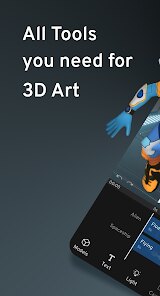
Prisma3D is a 3D modeling and animation app designed specifically for mobile devices, sitting squarely in the creative tools category. People download it mainly to build simple 3D objects, rig characters, and create basic animations right from their phone or tablet. I grabbed it off Google Play because I wanted to mess around with 3D art without sitting at a computer. The first launch was surprisingly straightforward. It asks you to sign up or skip, and I chose to skip, which let me jump straight into a blank scene. The interface feels clean but dense. It doesn't hold your hand much, so the first few minutes were a mix of curiosity and mild confusion. Given its install count sits in the millions and it's free to download, it clearly fills a niche for mobile creators who want something more than a toy app.
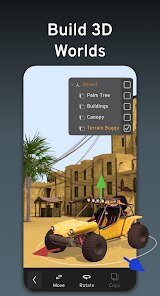
Once you get past the initial setup, the hands-on experience is where Prisma3D shines and stumbles. The screen is dominated by a viewport where you can pinch to orbit, zoom, and pan around your scene. The toolbar along the bottom has tools for selecting, moving, scaling, and rotating objects. I started by adding a cube, then tapped the "Edit" mode to pull out faces and vertices. The touch gestures feel fairly responsive, but lining up edges with your finger can be fiddly. Creating a simple low-poly character took me about an hour, mostly because the bone rigging and animation timeline are tucked away in menus. A small tip: long-pressing any tool icon brings up a quick help popup, which saved me a lot of tapping around. The app doesn't have a proper undo history, so I quickly learned to save versions manually. For daily use, it works best for blocking out shapes or making short looping animations, but complex scenes slow down noticeably on older devices.
After spending a couple of weeks with Prisma3D, I have mixed feelings. It's great for beginners who want to learn 3D concepts without the steep curve of desktop software like Blender or Maya. The fact that it runs entirely offline and has no subscription fee is a huge plus. But it's not for someone who needs precision modeling or professional-level rendering. The export options are limited to OBJ and FBX, which feels restrictive. Compared to Nomad Sculpt, which focuses on sculpting with much finer brush control, Prisma3D feels more like a polygon pusher. I keep it installed for quick ideas when I'm away from my computer, but I can see someone uninstalling it if they hit the wall of its feature set. It's a solid entry-level tool, but it made me appreciate what Blender's mobile version or a full desktop setup can do.
features
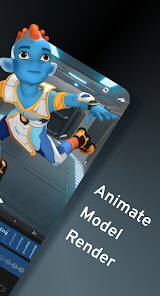
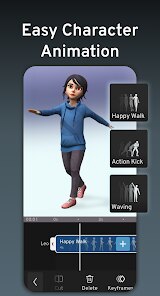
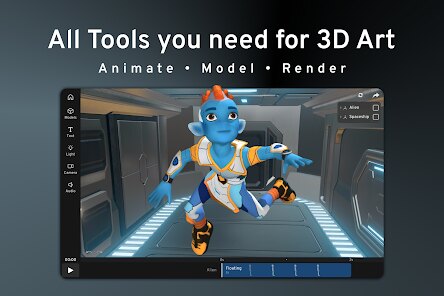
- 🔧 Prisma3D's standout feature is its dedicated animation timeline. Unlike Nomad Sculpt, which focuses purely on sculpting with no built-in rigging, Prisma3D lets you set keyframes, adjust curves, and create walk cycles directly on your phone. This makes it a proper animation tool rather than just a modeler.
- 🔧 The vertex and face editing mode feels very Blender-like. You can select individual points, extrude faces, and even use a knife tool to cut geometry. This is rare on mobile apps. For example, Shapr3D is more for CAD-style precision modeling and doesn't offer this kind of direct mesh manipulation.
- 🔧 Prisma3D supports bone rigging with weight painting. While somewhat basic compared to desktop software, this sets it apart from apps like Modeler for iPad, which often require separate rigging tools. Being able to parent a mesh to bones and animate it all in one app is a real timesaver.
pros
- 👍 Prisma3D runs completely offline. Unlike Nomad Sculpt or Shapeyard, which need a connection for certain features or purchases, this app lets you model and animate anywhere without worrying about Wi-Fi or data.
- 👍 The app is free to download with no subscription trap. Many competitors, including Modeler for iPad, lock advanced tools behind a monthly fee. Prisma3D gives you the core modeling and animation tools without asking for a recurring payment.
- 👍 It has a very active user community on Discord and YouTube. While Blender has more tutorials overall, Prisma3D's community is extremely helpful for beginners who are just starting out on mobile and need guidance specific to touch controls.
cons
- 👎 The app lacks a proper undo history. If you make ten edits and then want to go back five steps, you have to undo one by one. Nomad Sculpt handles this much better with a full history panel.
- 👎 Export options are very limited. Only OBJ and FBX are available. Blender's mobile-friendly versions or even Shapr3D let you export to STL, 3MF, and other formats useful for 3D printing. Prisma3D doesn't support these, which makes sharing models harder.
- 👎 Performance drops quickly with high-poly models. Something with over 100k vertices starts to lag on my iPhone 12. Nomad Sculpt handles similar poly counts much more smoothly due to its optimized sculpting engine.
Recommended Apps
![]()
16Personalities
16Personalities4
![]()
Zodiac Palm Reader: MagicWay
Reatility Media4.6
![]()
Moblo - 3D furniture modeling
MYTIforge4.1![]()
Magnifier Plus with Flashlight
Digitalchemy, LLC4.6![]()
QR Code Scanner
QR Code Scanner & Barcode Reader4.7![]()
FalFal: Astrology, Tarot, Love
FalFal Team4.8![]()
Christmas Photo Frames
PhotoFramesApps4.6![]()
AI Video Art Creator - Livensa
FERASET4.5![]()
Horoscope of Birth
Denimaks4.4![]()
Make Me Bald Prank
AppTornado2.5![]()
Kling AI: AI Image&Video Maker
Lohas Games Pte. Ltd.4.4![]()
Japan Timetable & Route Search
NAVITIME JAPAN CO., LTD.4.3![]()
Prank Call & Funny Video
TeH Software0![]()
Parallax 3D Live Wallpapers
TarrySoft4.3![]()
AI Chatbot - Nova
ScaleUp4.7















Disclaimer
1.AppInfoLibrary does not represent any developer, nor is it the developer of any App or game.
2.AppInfoLibrary provide custom reviews of Apps written by our own reviewers, and detailed information of these Apps, such as developer contacts, ratings and screenshots.
3.All trademarks, registered trademarks, product names and company names or logos appearing on the site are the property of their respective owners.
4. AppInfoLibrary abides by the federal Digital Millennium Copyright Act (DMCA) by responding to notices of alleged infringement that complies with the DMCA and other applicable laws.
5.If you are the owner or copyright representative and want to delete your information, please contact us info@appinfolibrary.com.
6.All the information on this website is strictly observed all the terms and conditions of Google Ads Advertising policies and Google Unwanted Software policy .














