

Peachy - AI Face & Body Editor

5M+
Installs
InShot Video Editor
Developer
-
Generative AI
Category
-
Everyone 10+
Content Rating
-
peachy.android@inshot.com
Developer Email
-
https://inshot.cc/peachy/android/terms/privacy_policy.html
Privacy Policy
Screenshots

editor reviews
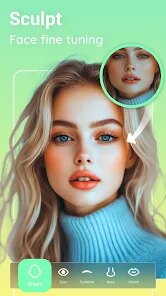
Peachy is an AI-powered face and body editing app developed by InShot, the same team behind the popular video editor. It's designed for anyone who wants to touch up selfies or photos without pulling out a full desktop editing suite. You can use it to reshape your face, slim your body, smooth skin, or even change your hairstyle with just a few taps. When I first scrolled through the Play Store and saw it had over 10 million downloads and no mandatory registration, I figured it was worth a shot. The app is free to download, though like most free tools, there are in-app purchases if you want to unlock everything. After launching it, the initial screen was surprisingly clean — no obnoxious splash ads, just a simple “Upload a photo” button right at the center. I uploaded a candid selfie within seconds, and it immediately loaded into the editing dashboard with all the tools laid out at the bottom. Coming from heavy apps like Photoshop Express, I was honestly relieved that I didn't have to hunt for basic features. There were a few prompts suggesting I try the AI body feature first, which felt pushy but not unbearable. Overall, my first impression was that it's a polished, no-nonsense editing tool that knows exactly what casual users want.
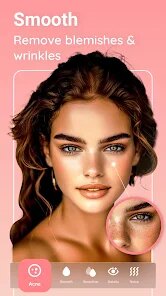
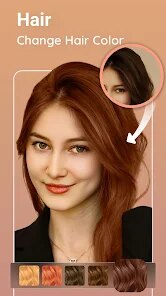
Going through the actual experience, Peachy surprised me with how smoothly it handled each edit. Once you upload a photo, the app automatically detects your face and body outlines, and you can tap on tools like “Face Slim,” “Waist,” or “Height” to adjust with a slider. There's no confusing layer system or masking needed — you just slide left or right, and the app previews the change instantly. I tried the “Skin Smooth” feature on a vacation photo where the lighting was harsh, and it smoothed out imperfections without making me look like a wax figure, which I appreciated. The app also has a “Hairstyle” tool where you can swap your hair color or add a virtual haircut, though that one sometimes glitched and made the hair blending look fuzzy at the edges. A tip I picked up: if you zoom in slightly, the AI handles finer details like necklines and jawlines much better. The editing process rarely stuttered on my three-year-old phone, which was unexpected. The only friction point was when I wanted to edit the background — the app didn't offer that option at all, which felt limiting. For daily use, I found myself spending about 3-4 minutes per image, mostly scrolling through the resize features for Instagram stories. It's a straightforward, step-by-step journey that feels intuitive once you've done it once.
After using Peachy for about two weeks, I can say it's a solid pick for social media users who obsess over quick touch-ups before posting. If you're someone who snaps a lot of mirror selfies or group shots and wants to adjust proportions slightly, this app will save you time compared to manually modifying in Lightroom. However, if you're looking for a full-featured editor with layers, masks, or professional-grade color grading, you'll hit a wall pretty fast. It's different from apps like FaceApp because it focuses more on body reshaping rather than just face filters, but it lacks the aging or gender-swap gimmicks that made FaceApp go viral. I've considered keeping it installed because it genuinely handles waist slimming and height adjustment better than any free app I've tried, but I also know I'll uninstall it once I stop feeling self-critical about photos. For the price of free and the ease of use, it's hard to complain — but it's more of a “sometimes tool” than a daily driver for me.
features
- 🎯 One-Tap Face Reshaping: You can adjust cheekbones, jawline, and chin width with a single slider. It feels much smoother than the manual point-based editing in YouCam Perfect, where you have to drag nodes around, which often looks unnatural.
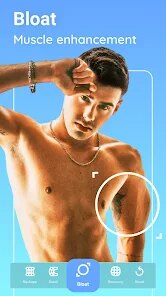
- 🎯 Smart Body Slimming: Unlike Facetune's body tool which sometimes warps the background or stretches furniture, Peachy uses AI to only target the person's silhouette. I tested it on a photo with a bookshelf behind me, and the shelf stayed perfectly straight.
- 🎯 Automatic Skin Restoration: The skin smoothing tool is surprisingly good at preserving pores and texture while reducing blemishes. It's less heavy-handed than the “airbrushed” effect in BeautyPlus, which can make skin look plastic.
- 🎯 Quick Export Without Watermark: You can save high-resolution images directly to your gallery without a watermark, even on the free tier. That's a win compared to Picsart, which slaps a watermark unless you pay.
pros
- ✅ Ease of Use: Everything is literally one tap away. I've used FaceTune 2 and found the menus layered and confusing for beginners, especially when finding crop versus resize. Peachy has all body tools in a single row at the bottom.
- ✅ AI Accuracy: The app rarely misinterprets what you want to edit. In Remini, the enhancement sometimes adds random wrinkles; Peachy's body slimming specifically targets the waist without accidentally thinning your arms.
- ✅ No Account Required: You can start editing right away without signing up. This puts it ahead of Adobe Photoshop Express, which forces you to log in even just to crop a photo.
cons
- ❌ Limited Creative Tools: You get face and body adjustments, but nothing for backgrounds, text overlays, or stickers. Picsart lets you change backgrounds entirely and add stickers, so Peachy feels very one-dimensional in comparison.
- ❌ Occasional Glitches on Hair Edits: The hairstyle tool sometimes leaves weird halos around the edges of your head. Facetune does a cleaner job blending virtual hair colors into your real hair strands.
- ❌ No Batch Editing: You can only edit one photo at a time, which is inefficient if you have multiple shots from an event. Snapseed allows you to copy edits and paste them onto other images quickly.
Recommended Apps
![]()
16Personalities
16Personalities4
![]()
Zodiac Palm Reader: MagicWay
Reatility Media4.6
![]()
Moblo - 3D furniture modeling
MYTIforge4.1![]()
Magnifier Plus with Flashlight
Digitalchemy, LLC4.6![]()
QR Code Scanner
QR Code Scanner & Barcode Reader4.7![]()
FalFal: Astrology, Tarot, Love
FalFal Team4.8![]()
Christmas Photo Frames
PhotoFramesApps4.6![]()
AI Video Art Creator - Livensa
FERASET4.5![]()
Horoscope of Birth
Denimaks4.4![]()
Make Me Bald Prank
AppTornado2.5![]()
Kling AI: AI Image&Video Maker
Lohas Games Pte. Ltd.4.4![]()
Japan Timetable & Route Search
NAVITIME JAPAN CO., LTD.4.3![]()
Prank Call & Funny Video
TeH Software0![]()
Parallax 3D Live Wallpapers
TarrySoft4.3![]()
AI Chatbot - Nova
ScaleUp4.7















Disclaimer
1.AppInfoLibrary does not represent any developer, nor is it the developer of any App or game.
2.AppInfoLibrary provide custom reviews of Apps written by our own reviewers, and detailed information of these Apps, such as developer contacts, ratings and screenshots.
3.All trademarks, registered trademarks, product names and company names or logos appearing on the site are the property of their respective owners.
4. AppInfoLibrary abides by the federal Digital Millennium Copyright Act (DMCA) by responding to notices of alleged infringement that complies with the DMCA and other applicable laws.
5.If you are the owner or copyright representative and want to delete your information, please contact us info@appinfolibrary.com.
6.All the information on this website is strictly observed all the terms and conditions of Google Ads Advertising policies and Google Unwanted Software policy .














