

Find Your Phone By Clap

10M+
Installs
Trusted App Global
Developer
-
Productivity
Category
-
Everyone
Content Rating
-
trustedappglobal@gmail.com
Developer Email
-
https://sites.google.com/view/trustedappglobal
Privacy Policy
Screenshots
editor reviews
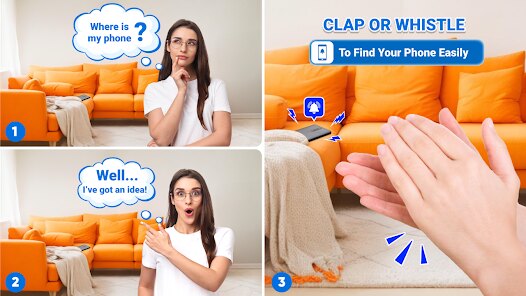
Find Your Phone By Clap is a utility app that does exactly what its name suggests: you clap your hands, and it makes your phone ring or flash. It's one of those simple tools you download when you've spent ten minutes patting down couch cushions or lifting every blanket on the bed looking for your device. The app is free on Google Play, requiring only microphone permission to listen for claps. After installing and launching it, the first screen just shows a big "Start Service" button in the middle, which feels reassuringly straightforward for a tool that should work when you're panicking. There's no registration, no unnecessary permissions beyond the mic, and no aggressive ads shoving themselves in your face immediately, which already sets a decent first impression for something you might rely on in a hurry.
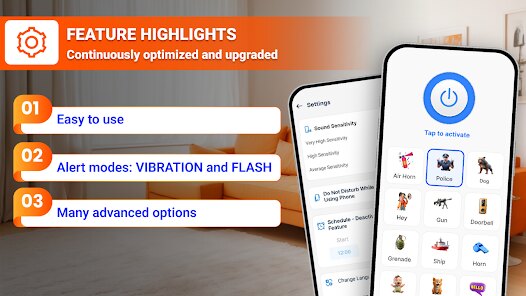
Once you tap that start button, the service runs in the background. The interface keeps things minimal: you can adjust clap sensitivity and choose between a ringtone, a flashlight blink, or both as the response. I tested it by tossing my phone under a pillow and walking into the next room. The first clap didn't trigger anything, so I clapped harder and it worked. After that, I adjusted the sensitivity slider to "Low" and subsequent claps were picked up even at a normal volume. There's a short learning curve in finding the right clap volume for your environment. A small tip: if you're in a quiet room, lowering sensitivity prevents false triggers from things like a door slamming. The app also includes a "Whistle" detection option, which is handy when your hands are full with groceries or laundry.
After using it for a couple of weeks, I think this app is great for forgetful people, parents who constantly misplace their phones while chasing kids, or anyone who hates shouting "Hey Siri" only to realize their phone is on silent. It's less useful if you always keep your phone in your pocket or have a smartwatch that does the same job more reliably. Compared to similar apps like "Find My Phone by Clap" or "Clap To Find My Phone," this one feels slightly more polished in sensitivity options and doesn't nag you with constant ads. However, it drains battery noticeably when left running all day, so I only enable it at home. I kept it installed because it genuinely saves me a few minutes of frustration each week, though I might uninstall it if my next phone has a built-in "Hey Siri" feature that works even on silent mode.
features
- 👏 Clap detection sensitivity: The app lets you adjust from "Very Low" to "Very High," which actually matters. In "Find My Phone by Clap," the sensitivity is binary and often either too sensitive or not enough. Here, you can fine-tune it to your room's noise level, so it won't trigger every time someone sneezes nearby.
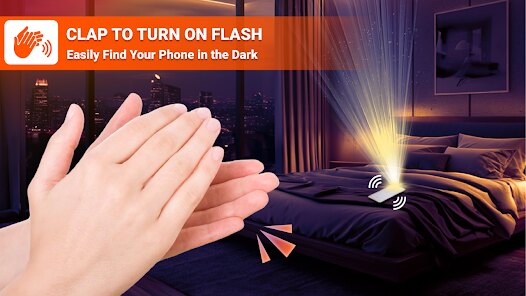
- 🔦 Dual response modes: Instead of just playing a ringtone, it can also flash the flashlight in strobe pattern. This is a lifesaver when your phone is under a dark couch or in a shadowy corner. Other similar apps usually only offer sound, which is useless if your phone is on silent.
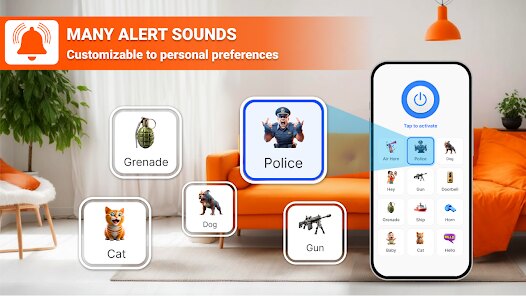
- 🎵 Custom notification tones: You can pick any audio file from your device as the alarm sound. Most competitors force you to use their preset ringtone, which can be too soft or generic. I set mine to a repetitive high-pitched beep that cuts through background noise better.
- 🆓 Completely free without hidden upsells: The app has no premium tier or subscription nagging you to unlock features. Every option is accessible from the start. Many alternative apps lock sensitivity or custom tones behind a paywall, which defeats the purpose of a quick-fix tool.
pros
- 👏 No registration required: You download it, grant mic permission, and it works. Apps like "Phone Finder by Clap" force you to create an account or watch a 30-second ad before the first use. This one respects your time.
- 🔦 Works even when Do Not Disturb is active: The flashlight and alarm override your phone's silent mode. With "Clap to Find Phone," I've had it fail because the ringer was off. Here, the flash is always guaranteed to work, making it more reliable in quiet libraries or theaters.
- 🆓 Minimal ad interference: Ads only appear as a small banner at the bottom, not full-screen video interstitials every time you change settings. "Find My Phone Sound" throws a full-screen ad after each successful clap, which defeats the purpose of a quick-find tool. This app stays out of your way.
cons
- 👏 Battery drain is noticeable: With the service running constantly in the background, my battery dropped about 8% more over a full day compared to using "Google Find My Device." It's not a dealbreaker, but I have to remember to turn off the service when I leave home, otherwise it's listening all day.
- 🔦 No smartwatch integration: Competing apps like "Wear OS Clap Finder" let you trigger the phone from your watch, which is even more convenient when your phone is truly buried under laundry. This app relies purely on your clap being heard, so if you're outside and noisy, it's useless.
- 🆓 No history or location logging: Once you find your phone, there's no record of where it was found. Apps like "SmartThings Find" at least show the last known location on a map, which helps if your phone isn't just misplaced but actually left at a cafe. This app only helps within earshot range.
Recommended Apps
![]()
16Personalities
16Personalities4
![]()
Zodiac Palm Reader: MagicWay
Reatility Media4.6
![]()
Moblo - 3D furniture modeling
MYTIforge4.1![]()
Magnifier Plus with Flashlight
Digitalchemy, LLC4.6![]()
QR Code Scanner
QR Code Scanner & Barcode Reader4.7![]()
FalFal: Astrology, Tarot, Love
FalFal Team4.8![]()
Christmas Photo Frames
PhotoFramesApps4.6![]()
AI Video Art Creator - Livensa
FERASET4.5![]()
Horoscope of Birth
Denimaks4.4![]()
Make Me Bald Prank
AppTornado2.5![]()
Kling AI: AI Image&Video Maker
Lohas Games Pte. Ltd.4.4![]()
Japan Timetable & Route Search
NAVITIME JAPAN CO., LTD.4.3![]()
Prank Call & Funny Video
TeH Software0![]()
Parallax 3D Live Wallpapers
TarrySoft4.3![]()
AI Chatbot - Nova
ScaleUp4.7















Disclaimer
1.AppInfoLibrary does not represent any developer, nor is it the developer of any App or game.
2.AppInfoLibrary provide custom reviews of Apps written by our own reviewers, and detailed information of these Apps, such as developer contacts, ratings and screenshots.
3.All trademarks, registered trademarks, product names and company names or logos appearing on the site are the property of their respective owners.
4. AppInfoLibrary abides by the federal Digital Millennium Copyright Act (DMCA) by responding to notices of alleged infringement that complies with the DMCA and other applicable laws.
5.If you are the owner or copyright representative and want to delete your information, please contact us info@appinfolibrary.com.
6.All the information on this website is strictly observed all the terms and conditions of Google Ads Advertising policies and Google Unwanted Software policy .














