

Suno - AI Music & Songs Maker

10M+
Installs
Suno, Inc
Developer
-
Generative AI
Category
-
Teen
Content Rating
-
support@suno.com
Developer Email
-
https://suno.com/privacy
Privacy Policy
Screenshots


editor reviews
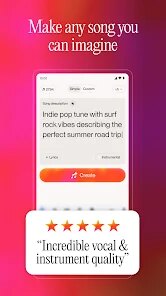
So I stumbled across this app called Suno while browsing through the Google Play store because I've been getting into music production as a hobby. It's basically an AI music generator, which lets you create original songs just by typing in lyrics or a simple description. You download it, sign up for free, and within a few minutes you're picking genres and generating full tracks. The install count is pretty high for a newer utility app, and the first time I launched it, I was honestly surprised at how clean and focused the main screen is. No clutter, just a simple prompt bar and some examples to get you started. There are in-app purchases for extra generation credits, but you get enough free tries to really test it out.
Once you start using it, the workflow feels natural. You type in something like "upbeat synth pop about rainy mornings," and the AI kicks out a short track in maybe fifteen seconds. The interface guides you through selecting vocals or instrumental only, and you can even upload your own audio snippets for style reference. I found the onboarding quick because it offers a sample prompt right away. A common usage step would be tweaking the lyrics after hearing the first output, then regenerating until you get a version you like. Honestly, it's smooth but sometimes the vocals sound a bit robotic on certain genres, which can be a bit jarring. I learned that picking "instrumental" first to test the vibe saves a lot of credits.
After a few weeks, I feel like this app is perfect for people who want quick demo tracks or fun song ideas without touching a DAW. But if you need polished, album-ready production, you'll hit limits fast. Compared to something like Udio, Suno feels more beginner-friendly and faster, but the output quality lags behind. I kept it installed because it's great for brainstorming hooks or just goofing around with friends. I can see someone uninstalling it if they're serious about audio engineering, but for a casual creator like me, it's a fun tool that stays on my phone.
features
- 🎵 Generate full songs from simple text prompts: Type a mood, genre, or lyric snippet, and Suno immediately outputs a complete track with vocals and instrumentation. This beats most rivals like AIVA that only do instrumental scoring.
- 🎵 Upload custom audio references: You can feed the AI your own melody or beat snippet, and it adapts the style. No other free-tier music app I've tried offers this level of personalization without heavy manual tweaking.
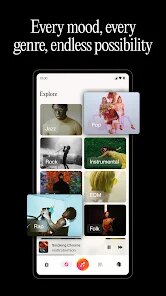
- 🎵 Fast turnaround with genre variety: From lo-fi hip hop to orchestral rock, Suno generates in under 20 seconds. Apps like Mubert take longer and offer fewer genre tags, making Suno feel more responsive for exploration.
pros
- 👍 Super easy for non-musicians: No music theory knowledge needed. You just type and listen, which makes it way more accessible than tools like FL Studio Mobile.
- 👍 Generous free tier: You get around 5-10 free generations daily, which is rare compared to apps like BeatStars which lock most features behind a subscription.
- 👍 Great for creative blocks: When I'm stuck writing lyrics, Suno can turn simple phrases into full choruses fast. Apps like Endlesss require more input and aren't as spontaneous.
cons
- 👎 Vocal quality is inconsistent: Sometimes the AI singing sounds muffled or robotic, especially on fast pop tracks. Udio tends to handle vocal clarity better in my experience.
- 👎 Limited fine-tuning: You can't edit individual instruments or adjust mixing afterward. Apps like BandLab give you full multi-track control, which Suno lacks entirely.
- 👎 Credit system can feel stingy: Once you use up free generations, the paid credits run out fast if you're experimenting. Compared to Soundraw's unlimited monthly plan, it's less cost-effective for heavy users.
Recommended Apps
![]()
16Personalities
16Personalities4
![]()
Zodiac Palm Reader: MagicWay
Reatility Media4.6
![]()
Moblo - 3D furniture modeling
MYTIforge4.1![]()
Magnifier Plus with Flashlight
Digitalchemy, LLC4.6![]()
QR Code Scanner
QR Code Scanner & Barcode Reader4.7![]()
FalFal: Astrology, Tarot, Love
FalFal Team4.8![]()
Christmas Photo Frames
PhotoFramesApps4.6![]()
AI Video Art Creator - Livensa
FERASET4.5![]()
Horoscope of Birth
Denimaks4.4![]()
Make Me Bald Prank
AppTornado2.5![]()
Kling AI: AI Image&Video Maker
Lohas Games Pte. Ltd.4.4![]()
Japan Timetable & Route Search
NAVITIME JAPAN CO., LTD.4.3![]()
Prank Call & Funny Video
TeH Software0![]()
Parallax 3D Live Wallpapers
TarrySoft4.3![]()
AI Chatbot - Nova
ScaleUp4.7















Disclaimer
1.AppInfoLibrary does not represent any developer, nor is it the developer of any App or game.
2.AppInfoLibrary provide custom reviews of Apps written by our own reviewers, and detailed information of these Apps, such as developer contacts, ratings and screenshots.
3.All trademarks, registered trademarks, product names and company names or logos appearing on the site are the property of their respective owners.
4. AppInfoLibrary abides by the federal Digital Millennium Copyright Act (DMCA) by responding to notices of alleged infringement that complies with the DMCA and other applicable laws.
5.If you are the owner or copyright representative and want to delete your information, please contact us info@appinfolibrary.com.
6.All the information on this website is strictly observed all the terms and conditions of Google Ads Advertising policies and Google Unwanted Software policy .














