

AI Kiss & Hug Video - DreamVid

500K+
Installs
Shenzhen iMyfone Technology Co., Ltd.
Developer
-
Generative AI
Category
-
Rated for 12+
Content Rating
-
ultrarepair@imyfone.com
Developer Email
-
https://www.imyfone.com/company/privacy-policy-2018-05/
Privacy Policy
Screenshots
editor reviews
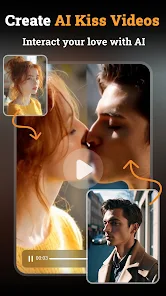
Alright, so there's this app called AI Kiss & Hug Video – DreamVid. It's made by Shenzhen iMyfone Technology, a company that churns out a lot of utility and multimedia software. This one falls squarely into the "AI photo animation" category, where you feed it a still picture and it tries to make the person in it move, usually in a romantic or affectionate way. Honestly, the hook is pretty straightforward: you take any ordinary selfie or portrait, and the app turns it into a little video of that person blowing a kiss or giving a hug. I downloaded it from Google Play out of sheer curiosity, and it feels exactly like what you'd expect from a free tool in this space. The install is quick, and you don't have to register to start messing around, but you'll quickly notice it constantly nudges you toward in-app purchases. The first launch is a bit cluttered with ads and promotional banners, which is a bit of a buzzkill. But the core gimmick is right there on the home screen, so you can at least see what all the fuss is about before deciding if it's worth the hassle.
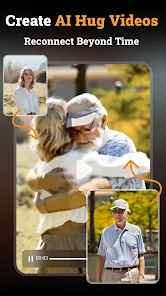
Once you actually start using it, the experience is hit or miss. You tap the big button to select a photo, and then the app automatically detects any faces. The whole process is a bit automated; you basically just pick a template like "kiss" or "hug," and it spits out a short, looping video. The interface itself is simple enough, but the app can be sluggish on older phones, and the rendering sometimes takes a good 15-20 seconds. There were times where it just crashed on me mid-processing, which was frustrating. A practical tip: if you start with a high-resolution, clear, front-facing photo, the results are noticeably better. You can also try the "hug" effect with couples' photos, but the AI sometimes only animates one person, leaving the other looking like a cardboard cutout. The daily free credits run out fast, and the watermark they slap on the free videos is huge. It feels very much like a "you get what you pay for" kind of tool that works okay for a few novelty tries.
After playing with it for a while, my honest feeling is that it's a fun little party trick but not really a keeper. People who want a laugh at a family gathering or want to create a silly animated birthday message will probably get a kick out of it for an afternoon. But if you're looking for something you'd use regularly, or that produces professional-looking social media content, this isn't it. Compared to apps like Reface or more polished AI tools that do face swaps and high-quality animations, DreamVid feels much more limited. The video quality is lower, the movements are jerky, and the face tracking isn't as accurate. It's the kind of app I can see people installing, using three or four times, and then forgetting about until a storage cleanup reminds them to delete it. Its strength is its simplicity, but its weakness is that it doesn't do enough to make you want to come back.
features
- 😐 One-click automation from photo to video. You pick a template, and the app handles the face detection and animation without much manual effort. It's a very straightforward "point and shoot" approach, which is great for quick fun.
- 😐 The output is short, looping clips (usually just a few seconds) made to look like a kiss or a hug. This is a very different approach from something like FaceApp or Reface, which offer more complex face swaps and expression changes. Here, the scope is intentionally narrow, focusing only on romantic gestures.
- 😐 The app does a decent job of preserving the original facial features, so the person still looks like themselves, just animated. This is its standout feature compared to other apps that often distort the face or change the skin tone too much. It doesn't try to turn you into a cartoon; it keeps you looking real, just a bit more active.
pros
- ✅ Really simple to use – there's no learning curve at all. You literally just upload a photo and pick an action, no fluff.
cons
- ❌ The free version slaps a massive watermark on everything, and the video quality is noticeably compressed and low-resolution.
Recommended Apps
![]()
16Personalities
16Personalities4
![]()
Zodiac Palm Reader: MagicWay
Reatility Media4.6
![]()
Moblo - 3D furniture modeling
MYTIforge4.1![]()
Magnifier Plus with Flashlight
Digitalchemy, LLC4.6![]()
QR Code Scanner
QR Code Scanner & Barcode Reader4.7![]()
FalFal: Astrology, Tarot, Love
FalFal Team4.8![]()
Christmas Photo Frames
PhotoFramesApps4.6![]()
AI Video Art Creator - Livensa
FERASET4.5![]()
Horoscope of Birth
Denimaks4.4![]()
Make Me Bald Prank
AppTornado2.5![]()
Kling AI: AI Image&Video Maker
Lohas Games Pte. Ltd.4.4![]()
Japan Timetable & Route Search
NAVITIME JAPAN CO., LTD.4.3![]()
Prank Call & Funny Video
TeH Software0![]()
Parallax 3D Live Wallpapers
TarrySoft4.3![]()
AI Chatbot - Nova
ScaleUp4.7















Disclaimer
1.AppInfoLibrary does not represent any developer, nor is it the developer of any App or game.
2.AppInfoLibrary provide custom reviews of Apps written by our own reviewers, and detailed information of these Apps, such as developer contacts, ratings and screenshots.
3.All trademarks, registered trademarks, product names and company names or logos appearing on the site are the property of their respective owners.
4. AppInfoLibrary abides by the federal Digital Millennium Copyright Act (DMCA) by responding to notices of alleged infringement that complies with the DMCA and other applicable laws.
5.If you are the owner or copyright representative and want to delete your information, please contact us info@appinfolibrary.com.
6.All the information on this website is strictly observed all the terms and conditions of Google Ads Advertising policies and Google Unwanted Software policy .














