

PawAI: AI Cartoon Pet Filter

1M+
Installs
Now Tech
Developer
-
Generative AI
Category
-
Rated for 3+
Content Rating
-
quantumtech2021@gmail.com
Developer Email
-
https://nowtechpro.github.io/Privacy/Privacy.html
Privacy Policy
Screenshots
editor reviews
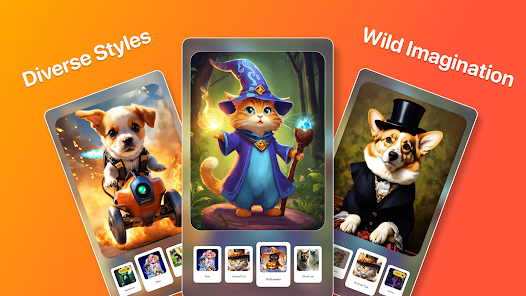
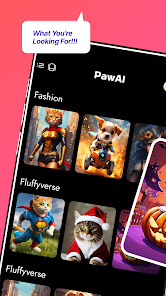
You know those apps that turn your pet into a cartoon character? That's exactly what PawAI: AI Cartoon Pet Filter does. It's a niche photo-editing tool that uses AI to transform pictures of your dog, cat, or even your hamster into stylized cartoon versions. I downloaded it from the Google Play Store after seeing a friend's cartoon cat on social media—it looked way too cute to pass up. The app has over a million installs and is free to download, though you'll find in-app purchases and ads once you start editing. My first impression after launching it was mixed: the interface looks clean and modern, but there's an immediate push to subscribe or watch an ad before you even see what the filter can do.
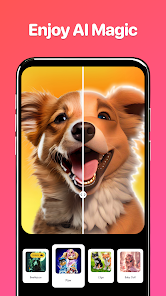
Once you get past that initial hurdle, the actual experience is pretty straightforward. You either snap a fresh photo of your pet or pick one from your gallery. The AI processes it in about ten seconds, and the result pops up as a cartoon version of your furry friend. The smoothing is pleasant and the colors stay vibrant, which I appreciated. But not every photo works well—if your pet is moving or the lighting is dim, the output can look blurry or weirdly distorted. I had to try three different shots of my cat before getting one that actually looked like him. After you get a result you like, you can save it, share it, or apply a few bonus filters, though most extras are locked behind a paywall.
After using PawAI for a few days, I'd say it's a fun little app for pet owners who love sharing cute content on social media. If you're the type who posts your dog's photo every week, this will give you something fresh. But if you're just curious and not big on sharing, you'll probably uninstall it after a few tries. Compared to Meitu or ToonMe, PawAI is more limited—it only works on pets, not humans—but that focus makes the pet results actually better. It's not a tool you'll use daily, and the ads get annoying fast. Still, for a quick laugh or a unique profile picture, it delivers exactly what it promises.
features
- 🖼️ The core AI filter is surprisingly accurate when the input is good. Unlike general cartoon apps like ToonMe, this one only works on animals, so the algorithm is trained specifically on pet fur, eyes, and shapes. My golden retriever came out looking like a Disney character, complete with glossy fur and big expressive eyes.
- 🖼️ The processing speed is decent. Most photos are converted within ten seconds, which is faster than apps like Prisma that can take up to thirty seconds. You won't be staring at a loading spinner forever, which keeps the experience snappy.
- 🖼️ The app includes a gallery tab where you can see other users' creations. It's a small social touch that makes it feel less isolated. You can like or comment on other people's cartoon pets, which is oddly satisfying and keeps you browsing longer than you intended.
pros
- 🦴 The pet-only focus gives better quality results. Apps like Meitu try to handle humans and animals together, so the animal outputs often look off. PawAI nails fur textures and animal expressions more consistently.
- 🦴 The app is very easy to pick up. No tutorials or complex settings—just point, shoot, and get a cartoon. It's more straightforward than something like Painnt, which has a million filter options that can overwhelm casual users.
- 🦴 The cartoon style is consistent and appealing. Unlike some AI generators that produce random weird faces, PawAI sticks to a friendly, Disney-like aesthetic that makes every pet look cute and huggable.
cons
- 🦴 The ads are intrusive. After every export, you're hit with a fullscreen video ad. Competing apps like ToonMe let you export without ads if you wait a few seconds, but PawAI forces the ad on you every time.
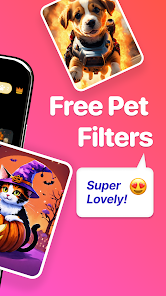
- 🦴 The free version is very limited. You only get a handful of filters before hitting a paywall. Meitu gives more free content, so if you're not planning to spend money, you'll run out of options quickly.
- 🦴 The app struggles with non-cat-or-dog pets. I tried it on a rabbit, and the result looked like a deformed cat. It's clearly trained mostly on common pets, so exotic animal owners will be disappointed.
Recommended Apps
![]()
16Personalities
16Personalities4
![]()
Zodiac Palm Reader: MagicWay
Reatility Media4.6
![]()
Moblo - 3D furniture modeling
MYTIforge4.1![]()
Magnifier Plus with Flashlight
Digitalchemy, LLC4.6![]()
QR Code Scanner
QR Code Scanner & Barcode Reader4.7![]()
FalFal: Astrology, Tarot, Love
FalFal Team4.8![]()
Christmas Photo Frames
PhotoFramesApps4.6![]()
AI Video Art Creator - Livensa
FERASET4.5![]()
Horoscope of Birth
Denimaks4.4![]()
Make Me Bald Prank
AppTornado2.5![]()
Kling AI: AI Image&Video Maker
Lohas Games Pte. Ltd.4.4![]()
Japan Timetable & Route Search
NAVITIME JAPAN CO., LTD.4.3![]()
Prank Call & Funny Video
TeH Software0![]()
Parallax 3D Live Wallpapers
TarrySoft4.3![]()
AI Chatbot - Nova
ScaleUp4.7















Disclaimer
1.AppInfoLibrary does not represent any developer, nor is it the developer of any App or game.
2.AppInfoLibrary provide custom reviews of Apps written by our own reviewers, and detailed information of these Apps, such as developer contacts, ratings and screenshots.
3.All trademarks, registered trademarks, product names and company names or logos appearing on the site are the property of their respective owners.
4. AppInfoLibrary abides by the federal Digital Millennium Copyright Act (DMCA) by responding to notices of alleged infringement that complies with the DMCA and other applicable laws.
5.If you are the owner or copyright representative and want to delete your information, please contact us info@appinfolibrary.com.
6.All the information on this website is strictly observed all the terms and conditions of Google Ads Advertising policies and Google Unwanted Software policy .














