
Drawify - Pencil Photo Sketch

1M+
Installs
Waitos AI
Developer
-
Video Players & Editors
Category
-
Rated for 3+
Content Rating
-
waitosapps@gmail.com
Developer Email
-
https://waitos.github.io/drawify/privacy
Privacy Policy
Screenshots
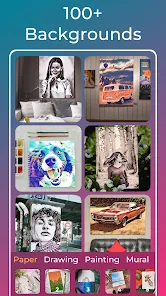
editor reviews
I first stumbled across Drawify – Pencil Photo Sketch when I was looking for a quick way to turn some travel photos into something I could frame without paying for a professional edit. It's essentially an AI-powered photo-to-sketch app that lives in the stylized art niche, sitting somewhere between a basic filter tool and a full-on digital drawing suite. You download it for free from Google Play or the App Store, and the install count suggests quite a few people have given it a shot. No forced registration when you first launch it, which I appreciated, though the free version does nudge you toward in-app purchases and shows the occasional ad. My first impression after opening it was that the interface looked clean and approachable, but the abundance of sketch styles and adjustment sliders hinted at a steeper learning curve than most free sketch apps I've tried.
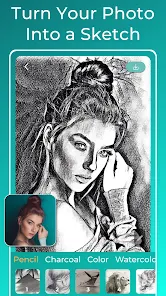
Going through the actual hands-on experience, the app starts with a simple prompt to pick a photo from your gallery or take a new one. After selecting an image, you land on a preview screen where you can choose from styles like pencil drawing, charcoal sketch, or line art. Swiping through these previews didn't feel sluggish even on my older phone, which was a relief. The real work begins when you tap into the fine-tuning panel – there you can tweak stroke intensity, edge sharpness, and even shadow depth. The first time I tried it, I spent a few minutes sliding these bars back and forth, trying to get my dog's portrait to look less like a blurred ink blot and more like a recognizable sketch. A small practical tip I discovered: reducing the shadow depth slider by about 20% usually yields a cleaner result on landscapes. The app also lets you crop or rotate before processing, but the actual conversion takes a handful of seconds, so you have to be patient. One confusing moment came when I tried to undo a change – the undo button only reverses the last step, not the whole session, which caught me off guard.
After using Drawify for a couple of weeks, I'd say it's a decent tool for casual users who want to create handmade-looking keepsakes without learning real sketching techniques. If you're someone who enjoys sharing stylized selfies or turning vacation pics into wall art, this app gives you a fair amount of control without overwhelming you with professional jargon. On the flip side, anyone expecting instant one-tap perfection might get frustrated – the results can sometimes look grainy or overly artificial unless you spend time tweaking. Compared to apps like Prisma or Picsart, Drawify focuses more narrowly on pencil and charcoal styles, which means it lacks the broad filter library those competitors offer. What keeps it on my phone is the deep stroke customization for portraits, but I could see myself uninstalling it if the ads become too intrusive or if another app offers better edge detection. For now, it's a fun niche tool, not a daily driver.
features
- 🎨 Auto-sketch conversion with real-time preview: Drawify lets you see how each style will look before you commit, which saves a lot of trial and error compared to Sketchify, where you often have to apply and then undo.
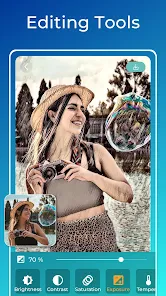
- ✏️ Stroke intensity and shadow depth sliders: These give you granular control over the final output. While SketchArt offers similar sliders, Drawify's shadow control feels more responsive, letting you dial in fine details on faces or textures without making the image look muddy.
- 📐 Built-in crop and rotate before processing: This seems small, but it means you can frame your subject right in the app rather than switching to another editing tool. Picsart's sketch filters don't offer this pre-processing step, so you have to crop beforehand.
- 🖼️ Multiple export resolutions (free and HD in paid version): The free version saves standard-resolution images fine for social media, but if you want to print, the HD unlock is worth it. Other apps like Prisma only give you one output size per style, which feels limiting.
pros
- ⚡ Processing speed is noticeably faster than Adobe Photoshop Sketch for a single photo conversion, especially on mid-range phones like mine.
- 🔧 Manual adjustments for stroke and shadow are more detailed than what you get in Picsart's sketch filter set, where sliders feel coarse and often oversharpen unintended areas.
- 💳 No subscription required for most functions – unlike Clip Studio Paint's mobile version, Drawify lets you access all core styles and sliders with just a one-time purchase for HD and no watermark.
cons
- 😕 Edge detection can be inconsistent, especially on photos with busy backgrounds or similar tones – Sketchify handles these scenes more reliably without needing manual tweaks.
- 📺 Free version ads interrupt after every few exports, which gets annoying during a long editing session; Picsart's free tier has ads too, but they pop up less frequently.
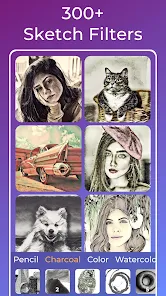
- 🎨 Limited style library compared to Prisma – you get pencil, charcoal, and line art, but nothing watercolor or oil-like, so artistic variety feels restricted.
- 🔙 Undo resets to the last step only, not the original photo – if you overshoot an adjustment, you have to reload the image and start over, a flaw SketchArt avoids with a full reset option.
Recommended Apps
![]()
16Personalities
16Personalities4
![]()
Zodiac Palm Reader: MagicWay
Reatility Media4.6
![]()
Moblo - 3D furniture modeling
MYTIforge4.1![]()
Magnifier Plus with Flashlight
Digitalchemy, LLC4.6![]()
QR Code Scanner
QR Code Scanner & Barcode Reader4.7![]()
FalFal: Astrology, Tarot, Love
FalFal Team4.8![]()
Christmas Photo Frames
PhotoFramesApps4.6![]()
AI Video Art Creator - Livensa
FERASET4.5![]()
Horoscope of Birth
Denimaks4.4![]()
Make Me Bald Prank
AppTornado2.5![]()
Kling AI: AI Image&Video Maker
Lohas Games Pte. Ltd.4.4![]()
Japan Timetable & Route Search
NAVITIME JAPAN CO., LTD.4.3![]()
Prank Call & Funny Video
TeH Software0![]()
Parallax 3D Live Wallpapers
TarrySoft4.3![]()
AI Chatbot - Nova
ScaleUp4.7















Disclaimer
1.AppInfoLibrary does not represent any developer, nor is it the developer of any App or game.
2.AppInfoLibrary provide custom reviews of Apps written by our own reviewers, and detailed information of these Apps, such as developer contacts, ratings and screenshots.
3.All trademarks, registered trademarks, product names and company names or logos appearing on the site are the property of their respective owners.
4. AppInfoLibrary abides by the federal Digital Millennium Copyright Act (DMCA) by responding to notices of alleged infringement that complies with the DMCA and other applicable laws.
5.If you are the owner or copyright representative and want to delete your information, please contact us info@appinfolibrary.com.
6.All the information on this website is strictly observed all the terms and conditions of Google Ads Advertising policies and Google Unwanted Software policy .














