

StyleLab: AI Clothes Try On

100K+
Installs
IRONTECH
Developer
-
Lifestyle
Category
-
Rated for 3+
Content Rating
-
stylelab@irontech.mobi
Developer Email
-
https://irontech.mobi/stylelab/android/privacy
Privacy Policy
Screenshots
editor reviews
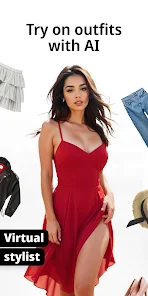
StyleLab: AI Clothes Try On is a mobile utility app that uses artificial intelligence to let users digitally try on clothing. It falls under the fashion and lifestyle category on both Google Play and the App Store. The basic idea is straightforward: you upload a photo of yourself, pick a garment from the app's catalog or your own image, and the AI generates a preview of how it might look on your body. The app has a decent install count, sitting in the hundreds of thousands, and it's free to download. That's the first thing that pulls you in—the curiosity of whether it can actually work. After launching it, the first impression is a clean, modern interface with a simple prompt: upload or take a photo. There's no immediate registration wall, which is nice, though some features like saving high-resolution images or removing watermarks require a subscription. Ads pop up occasionally, but they're not aggressive enough to ruin the initial experience.
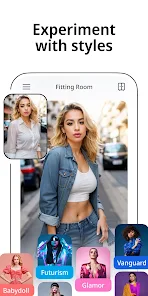
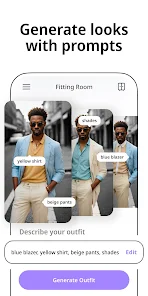
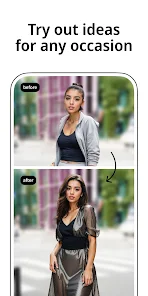
Once you start using it, the app walks you through a step-by-step process. First, you upload a full-body photo, ideally with good lighting and a plain background—otherwise, the AI gets confused around edges and accessories. Then, you browse through their clothing catalog, which includes tops, bottoms, dresses, and outerwear. The selection isn't huge, maybe a few hundred items, but it covers basic styles. The trickiest part is the fit preview: it takes about 10 to 15 seconds for the AI to process, and the result varies. On a clean photo, the blending looks surprisingly natural around the torso, but sleeves and necklines can sometimes look slightly warped. There's also a “style transfer” option where you can upload an image of a dress from the web and see it on your model, which is handy. During onboarding, there's a quick tutorial that explains these steps, but I found the best results came from manually adjusting the cropping guide to match body proportions. The interface is responsive, though switching between menus occasionally lags on older phones.
After spending a few days with StyleLab, I'd say it's a solid tool for anyone tired of guessing if an online purchase will flatter their body shape. It's not a replacement for physical try-ons, but it gives a decent rough idea, especially for solid colors and simple silhouettes. The subscription, around $7 a month for full quality exports, feels steep compared to some rivals like Zyler or Vue.ai, which often offer more free uses. What keeps it on my phone is the “wardrobe” feature where you can save multiple body photos and try different clothes on them—great for planning outfits for events. However, you'll likely uninstall it if you're only shopping occasionally, because the free version's watermark and limited catalog get old fast. It's best for serial online shoppers or people experimenting with personal style, but anyone expecting perfection from the AI will be let down by occasional sleeve distortions.
features
- 📸 Virtual Try-On Accuracy: You upload a body photo and pick a garment, and the AI maps it onto your shape with decent precision for flat-front items like t-shirts or straight skirts. Compared to Zeekit (popular for its real-time fit), StyleLab handles side angles worse, but it excels at adjusting fabric patterns to match body contours without weird stretching, which Zeekit sometimes fails at.
- 📸 Custom Image Upload: A standout feature is letting you import any clothing image from the web, not just the in-app catalog. This beats Zyler, which restricts you to branded items. You can test a random dress from Pinterest or a thrift store find, saving size guesswork.
- 📸 Lightweight App Size: The app runs smoothly on mid-range devices and doesn't drain battery excessively during processing—rare among AI tools. Vue.ai tends to slow down after a few tries, but StyleLab keeps performance steady even after five consecutive renders.
- 📸 Body Profile Storage: You can save multiple body photos (e.g., slim, athletic, relaxed) and switch between them for comparisons. This is more flexible than most apps, which only keep one default model, allowing you to test clothes across different simulated sizes.
pros
- ✅ Simple Onboarding: No registration required to start trying clothes, unlike Zyler which forces you to create an account before any preview. This lowers the barrier for first-time users who just want a quick test.
- ✅ Clean, Non-Intrusive Ads: Ads appear only after a successful try-on, not before or during processing. Zeekit bombards you with pop-ups between every step, which StyleLab avoids by keeping them to the results screen only.
- ✅ Fast Processing Time: Most renders finish in under 15 seconds on standard Wi-Fi. Vue.ai can take up to 30 seconds per try-on for similar accuracy, so StyleLab feels snappier for casual browsing.
- ✅ Multi-Garment Testing: You can layer items like a jacket over a dress in a single preview, a feature missing from many rivals. This gives a more realistic outfit look without needing separate renders.
cons
- ❌ Limited Catalog by Brand: The in-app clothing selection is generic and doesn't link to real retailers. Zeekit partners with actual stores, letting you buy directly. StyleLab feels like a standalone tool, not a shopping bridge, so you can't act on the try-on in one tap.
- ❌ AI Struggles with Complex Textures: Patterns like plaid or detailed lace often blur or misalign after rendering. Zyler handles intricate textures more smoothly because of better edge detection, leaving StyleLab behind for dressy wear.
- ❌ Subscription Lock for Full Quality: The free version saves previews in lower resolution with a persistent watermark. Vue.ai offers one free high-res export per day, which feels more generous for casual users who don't want to commit to paying.
- ❌ No Real-Time Camera Preview: Unlike some AR-based try-on apps, you can't see clothes on yourself live through the camera. StyleLab only works with uploaded photos, making it less interactive for impatient shoppers who want instant feedback.
Recommended Apps
![]()
16Personalities
16Personalities4
![]()
Zodiac Palm Reader: MagicWay
Reatility Media4.6
![]()
Moblo - 3D furniture modeling
MYTIforge4.1![]()
Magnifier Plus with Flashlight
Digitalchemy, LLC4.6![]()
QR Code Scanner
QR Code Scanner & Barcode Reader4.7![]()
FalFal: Astrology, Tarot, Love
FalFal Team4.8![]()
Christmas Photo Frames
PhotoFramesApps4.6![]()
AI Video Art Creator - Livensa
FERASET4.5![]()
Horoscope of Birth
Denimaks4.4![]()
Make Me Bald Prank
AppTornado2.5![]()
Kling AI: AI Image&Video Maker
Lohas Games Pte. Ltd.4.4![]()
Japan Timetable & Route Search
NAVITIME JAPAN CO., LTD.4.3![]()
Prank Call & Funny Video
TeH Software0![]()
Parallax 3D Live Wallpapers
TarrySoft4.3![]()
AI Chatbot - Nova
ScaleUp4.7















Disclaimer
1.AppInfoLibrary does not represent any developer, nor is it the developer of any App or game.
2.AppInfoLibrary provide custom reviews of Apps written by our own reviewers, and detailed information of these Apps, such as developer contacts, ratings and screenshots.
3.All trademarks, registered trademarks, product names and company names or logos appearing on the site are the property of their respective owners.
4. AppInfoLibrary abides by the federal Digital Millennium Copyright Act (DMCA) by responding to notices of alleged infringement that complies with the DMCA and other applicable laws.
5.If you are the owner or copyright representative and want to delete your information, please contact us info@appinfolibrary.com.
6.All the information on this website is strictly observed all the terms and conditions of Google Ads Advertising policies and Google Unwanted Software policy .














