
AI Nature Photo Frame & Editor

10M+
Installs
ClickLab Technology
Developer
-
Video Players & Editors
Category
-
Rated for 3+
Content Rating
-
clicklab7@gmail.com
Developer Email
-
https://clicklabprivacypolicy.blogspot.com/
Privacy Policy
Screenshots
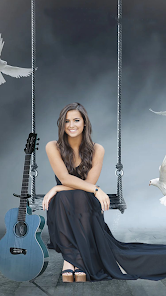

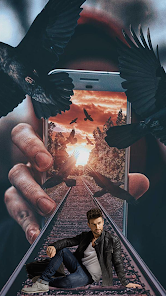
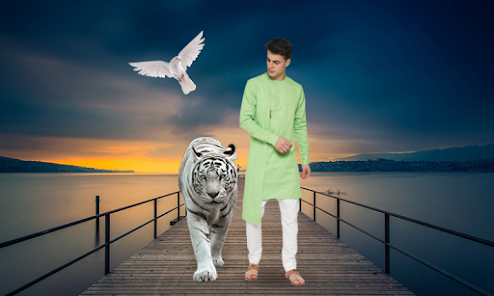
editor reviews
AI Nature Photo Frame & Editor is one of those apps you find on Google Play when you're looking to spice up your photos without much effort. It's a photo editing tool focused specifically on nature-themed frames and backgrounds. People download it mostly to turn ordinary pictures of landscapes, flowers, or even selfies into something that looks like it belongs on a nature calendar. After installing it—free of charge, by the way—the first thing you notice is the clean layout. There's no overwhelming flood of options. You pick a photo from your gallery, choose a frame style, and you're basically ready to go. The app also includes some basic editing tools like brightness and contrast sliders, which feel natural to have. It doesn't force you to create an account right away, which I appreciate. There are ads, but they don't pop up every few seconds, so it's bearable for a free app.
Once you start actually using it, the experience is pretty straightforward. After launching the app, you're greeted with a simple interface that says "Select Photo" right in the center. Tapping that brings up your gallery, and you choose an image. Then you browse through frame categories like "Forest," "Ocean," "Sunset," and so on. Each category has about ten to fifteen frame designs. Some are subtle borders, others are full overlays with effects like falling leaves or snow. You tap a frame to preview it on your photo, and you can pinch to resize or reposition the image behind the frame. The response is fast, no lag. A small thing I noticed is that the app remembers your last used frame, which saves time if you're batch editing photos from the same trip. The editing tools are basic—crop, rotate, adjust brightness—but they get the job done. For someone who just wants quick results without fiddling with layers or masks, this flow works well.
After using it for a few weeks, I'd say it's good for casual users who enjoy sharing nature-themed photos on social media but don't want to learn complex software like Photoshop or Lightroom. The app's main appeal is that it keeps things simple and focused. You won't find advanced features like selective color adjustments or text overlays. That might be a letdown if you're used to apps like PicsArt or Snapseed, which offer way more control. But for its niche—adding nature frames to photos—it does the job cleanly. I kept it installed because it's handy for quickly framing vacation photos. Some friends uninstalled it because they wanted more versatility. So it really depends on what you're after. If you want a specialized tool for nature-themed edits, this is fine. If you want an all-in-one editor, look elsewhere.
features
- 🌲 Frame variety: The app offers over 50 nature-themed frames, from gentle floral borders to dramatic mountain overlays. In comparison, Canva has plenty of frames but they're mostly graphic designs, not real photographic overlays. What makes this app stand out is that many frames include animated effects like drifting clouds or falling rain, which you don't get in standard photo editors.
- 🖼️ One-tap preview: You can tap any frame and see it applied to your photo instantly. There's no loading screen or lag. Most similar apps, like PhotoDirector, require you to confirm selections before seeing the result. This app's live preview feature feels more intuitive and saves time when you're trying out different looks.
- ✨ Background removal assistance: When a frame covers part of your subject, the app helps blend the edges automatically. It's not perfect, but it works well enough for portraits with simple backgrounds. PicsArt requires manual masking for similar effects, which is more time-consuming.
- 💾 Batch save option: After editing multiple photos, you can save them all at once instead of exporting one by one. This is a huge time-saver. Most competitors, like Adobe Express, make you save each image individually.
pros
- 🌿 No learning curve: You open the app, pick a photo, choose a frame, and you're done. Apps like InShot or Snapseed have more features but also steeper learning curves. This one is designed for instant results, which is great for non-techy users.
- 🌅 High-quality art assets: The frames and backgrounds look professionally made, not like cheap clip art. Some free alternatives on Google Play use low-resolution textures. Here, even the free frames are sharp and realistic.
- 🌻 Lightweight and fast: The app takes up little storage space and runs smoothly on older phones. VSCO, for instance, is heavier and can lag on mid-range devices. This app feels snappy even after extended use.
cons
- 🌧️ Limited editing tools: Beyond frames, you get only basic adjustments like brightness and contrast. No curves, no selective color, no text. Snapseed gives you infinitely more control. If you need to fix exposure or add text, you'll need a second app.
- 🌪️ Ads can be repetitive: Although not intrusive, the same ad appears frequently. Other free apps like PicsArt rotate their ads more, so it feels less repetitive.
- 🍂 Frame duplication: Some frames look very similar, just with slightly different color tones. There are about 50 frames, but maybe 30 feel truly distinct. Canva's frame library is more diverse in style.
- 🌫️ No social sharing integration: You have to save the photo to your gallery and then manually upload to Instagram or Facebook. Apps like Adobe Express let you share directly from the editor, which saves a step.
Recommended Apps
![]()
16Personalities
16Personalities4
![]()
Zodiac Palm Reader: MagicWay
Reatility Media4.6
![]()
Moblo - 3D furniture modeling
MYTIforge4.1![]()
Magnifier Plus with Flashlight
Digitalchemy, LLC4.6![]()
QR Code Scanner
QR Code Scanner & Barcode Reader4.7![]()
FalFal: Astrology, Tarot, Love
FalFal Team4.8![]()
Christmas Photo Frames
PhotoFramesApps4.6![]()
AI Video Art Creator - Livensa
FERASET4.5![]()
Horoscope of Birth
Denimaks4.4![]()
Make Me Bald Prank
AppTornado2.5![]()
Kling AI: AI Image&Video Maker
Lohas Games Pte. Ltd.4.4![]()
Japan Timetable & Route Search
NAVITIME JAPAN CO., LTD.4.3![]()
Prank Call & Funny Video
TeH Software0![]()
Parallax 3D Live Wallpapers
TarrySoft4.3![]()
AI Chatbot - Nova
ScaleUp4.7















Disclaimer
1.AppInfoLibrary does not represent any developer, nor is it the developer of any App or game.
2.AppInfoLibrary provide custom reviews of Apps written by our own reviewers, and detailed information of these Apps, such as developer contacts, ratings and screenshots.
3.All trademarks, registered trademarks, product names and company names or logos appearing on the site are the property of their respective owners.
4. AppInfoLibrary abides by the federal Digital Millennium Copyright Act (DMCA) by responding to notices of alleged infringement that complies with the DMCA and other applicable laws.
5.If you are the owner or copyright representative and want to delete your information, please contact us info@appinfolibrary.com.
6.All the information on this website is strictly observed all the terms and conditions of Google Ads Advertising policies and Google Unwanted Software policy .














