

ParkMobile: Park. Pay. Go.

10M+
Installs
Parkmobile, LLC
Developer
-
Productivity
Category
-
Rated for 3+
Content Rating
-
+18777275457
Developer Email
-
http://parkmobile.io/privacy-policy
Privacy Policy
Screenshots
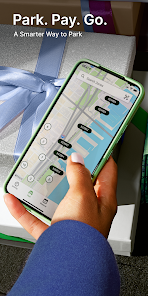
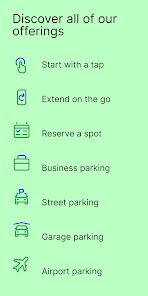
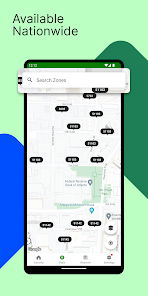
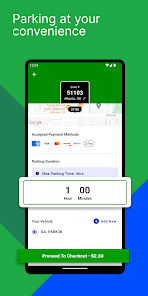
editor reviews
ParkMobile is a parking payment app that lets you pay for street parking and lots right from your phone, instead of fumbling for coins or cards at a meter. It's basically a digital parking meter that covers hundreds of cities across the US and some other countries. A lot of people end up downloading it because they get a ticket once, realize they never have change, or their city starts using it as the only payment option in certain zones. The first time you open it, the interface looks clean enough, though you'll immediately have to create an account and add a payment method before you can even check if your spot is covered. It's free to download on Google Play and the App Store, and it has over 5 million installs. There's no upfront subscription required, but you do have to register with your phone number and license plate. In-app purchases exist for extending time, and there are no annoying ads popping up while you park.
Once you're in the app and actually using it, the main flow is straightforward. You open it, allow location access, and the map shows nearby zones. You pick your zone number or let the app detect it, enter how long you want to stay, and pay. The confirmation screen shows your session timer, which updates in real time. It takes maybe thirty seconds once you're familiar. A nice touch is the push notification that reminds you before your time runs out, so you can extend from wherever you are. The onboarding shows a quick tutorial, but I still found the map a bit laggy when zooming in dense downtown areas. One practical tip: always double-check the zone number on the sign, because the GPS can be off by a block. If you move your car, you have to end the current session and start a new one, which is slightly clunky but makes sense from a billing standpoint.
After using ParkMobile for a few weeks, I think it's genuinely handy if you park in busy downtown areas or near stadiums where meters are annoying. It saves you the stress of rushing back to feed the meter, and the extension feature has saved me more than once. But it's not perfect. If your city has a parking app built into the municipal system (like Portland's or New York's specific apps), ParkMobile might feel redundant or even charge small convenience fees that those don't. It also drains battery quicker than I'd like, probably from constant location tracking. Students or occasional parkers might download it, use it twice, and uninstall. But for anyone who drives into a big city weekly, it stays on my phone. Compared to PayByPhone, it's very similar, but ParkMobile tends to have better coverage in more mid-sized cities, while PayByPhone feels stronger on the East Coast.
features
- 🗺️ Zone detection and map – You open the app and it instantly pulls up your location, showing nearby zones with clear boundaries. Unlike SpotHero, which often requires you to reserve a specific lot ahead of time, ParkMobile is designed for on-the-spot parking. The map isn't perfect (sometimes slow), but the zone-based system means you don't need to search for a parking garage address.
- ⏱️ Live session timer with reminders – Once you pay, the app shows a countdown of exactly how long you have left. It sends a notification when you're about to expire, and you can tap to extend without going back to the car. That's something meters obviously can't do, and even Passport Parking doesn't always make extending this fluid in my experience.
- 🔍 License plate lookup – You register your plate once, and the app ties every session to that plate. If you get a ticket anyway, you can pull up the session receipt immediately. PayByPhone has a similar feature, but ParkMobile's receipt format is simpler and easier to screenshot for dispute emails. No need to dig through emails.
pros
- 🛠️ Wide coverage across smaller cities – ParkMobile is in a ton of mid-sized cities where other apps like PayByPhone don't show up. I've used it in towns where the only other option was a broken meter. That alone makes it worth keeping if you travel regionally.
- 🛠️ No physical meter needed – In zones with digital-only signs, ParkMobile is the only game in town. It completely removes the need for coins or cash. Compared to old meters, it's obviously faster, and compared to SpotHero, you don't have to plan ahead.
- 🛠️ Session flexibility – You can end a session early and only pay for exactly the time you used, which is a small money saver. Some other apps don't refund unused time, or they make you jump through hoops. ParkMobile makes it a simple “end session” button.
cons
- 💸 Convenience fees add up – ParkMobile charges a small fee on top of the parking rate, usually around $0.25–$0.45 per transaction. Over a month of daily parking, that's noticeable. PayByPhone has similar fees, but some city-run apps like Portland's own app have none.
- 💸 No offline mode – If you're in a parking garage with a weak signal, the app can fail to load or process payment. You're stuck. Meanwhile, Passport Parking sometimes caches previous sessions and lets you work around poor connectivity.
- 💸 Clunky multi-vehicle handling – Switching between cars requires you to manually update your plate in the profile. If you share a car or rent occasionally, it's a hassle. SpotHero lets you save multiple vehicles easily, which I wish ParkMobile would copy.
- 💸 Map accuracy issues – The GPS pin isn't always precise in denser areas, leading to the wrong zone suggestion. You have to confirm with physical signs or risk a ticket. For a paid app, that feels sloppy when free street signs do the same job.
Recommended Apps
![]()
16Personalities
16Personalities4
![]()
Zodiac Palm Reader: MagicWay
Reatility Media4.6
![]()
Moblo - 3D furniture modeling
MYTIforge4.1![]()
Magnifier Plus with Flashlight
Digitalchemy, LLC4.6![]()
QR Code Scanner
QR Code Scanner & Barcode Reader4.7![]()
FalFal: Astrology, Tarot, Love
FalFal Team4.8![]()
Christmas Photo Frames
PhotoFramesApps4.6![]()
AI Video Art Creator - Livensa
FERASET4.5![]()
Horoscope of Birth
Denimaks4.4![]()
Make Me Bald Prank
AppTornado2.5![]()
Kling AI: AI Image&Video Maker
Lohas Games Pte. Ltd.4.4![]()
Japan Timetable & Route Search
NAVITIME JAPAN CO., LTD.4.3![]()
Prank Call & Funny Video
TeH Software0![]()
Parallax 3D Live Wallpapers
TarrySoft4.3![]()
AI Chatbot - Nova
ScaleUp4.7















Disclaimer
1.AppInfoLibrary does not represent any developer, nor is it the developer of any App or game.
2.AppInfoLibrary provide custom reviews of Apps written by our own reviewers, and detailed information of these Apps, such as developer contacts, ratings and screenshots.
3.All trademarks, registered trademarks, product names and company names or logos appearing on the site are the property of their respective owners.
4. AppInfoLibrary abides by the federal Digital Millennium Copyright Act (DMCA) by responding to notices of alleged infringement that complies with the DMCA and other applicable laws.
5.If you are the owner or copyright representative and want to delete your information, please contact us info@appinfolibrary.com.
6.All the information on this website is strictly observed all the terms and conditions of Google Ads Advertising policies and Google Unwanted Software policy .














