

Magic Voice Changer

100K+
Installs
PerryLeeGame3
Developer
-
Productivity
Category
-
Rated for 12+
Content Rating
-
perryleegame3@gmail.com
Developer Email
-
http://perrylegame.com/privacy.html
Privacy Policy
Screenshots
editor reviews
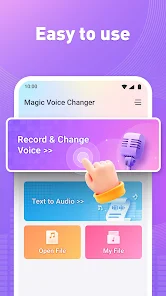
Magic Voice Changer by PerryLeeGame3 is exactly what it sounds like—a real-time voice modulation tool that lets you tweak your voice during calls, recordings, or live streams. It's a utility app, not a game, despite the developer's name hinting at gaming roots. Download and install it from Google Play or the App Store, and you'll find it's free to install, though some deeper features or voice packs might need a small in-app purchase. The first impression after launching is straightforward—there's a clean mic interface, a list of preset voice effects like robot, helium, or monster, and a big record button that makes you want to test it right away. You don't need to sign up, which is nice if you just want to mess around without commitment.
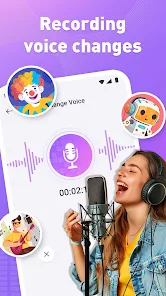
Using it is pretty intuitive. When I fired it up, I could pick a voice effect, hit the mic icon, and start speaking. It processed my voice in real time with no noticeable lag, which was surprising for a free tool. The interface felt simple—no cluttered menus. I tried a few presets like “Chipmunk” for laughs and “Deep Bass” for a more serious tone. The app lets you save recordings as audio files, which I used to prank a friend via text message. One small tip: adjust the background noise filter in settings before a call, or people might hear static. The only confusing moment was figuring out how to apply effects to live calls—turns out you need to enable the “Voice Changer” mode in the main screen, not the record section. That's a minor friction point, but once you know, it's second nature.
After a week, I think Magic Voice Changer hits a sweet spot for casual users. If you're into role-playing games, streaming, or just goofing off with friends, it's a solid pick. It stands out from apps like Voicemod or Clownfish because it's free and doesn't require a desktop setup—it runs on mobile, which is rare for real-time voice changers. But it's not for professionals; the effects can sound a bit cartoony, and the lack of advanced pitch editing bugs serious content creators. I kept it installed because it adds fun to Discord calls, but I could see someone uninstalling if they wanted more polish or were tired of the limited library. Compared to VoiceFX, it's lighter but less feature-rich. Overall, it's a nice novelty app that can become a habit if you value laughs over depth.
features
- 🎭 Real-time voice modulation with zero lag: You can chat live through apps like Discord or WhatsApp without delays, which sets it apart from many mobile tools that only post-process audio.
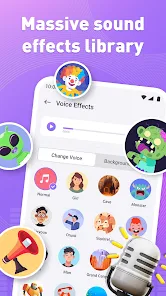
- 🎭 20+ voice presets, from animals to robots: Unlike Voicemod, which hides premium options, this app gives most free effects upfront. The “Alien” preset sounds crisp and fun, perfect for prank calls.
- 🎭 Simple audio recording and sharing: Tap save to generate an MP3 file instantly, then send it via messaging apps. This is more direct than Clownfish's complex export steps.
- 🎭 No account or sign-up required: You can use it right after install, bypassing the friction of premium competitors like Voice Changer Plus, which nags you to register before anything.
pros
- 🌟 It's completely free for basic usage, while Voicemod charges a subscription for real-time effects on desktop. This makes it a budget-friendly option for mobile users.
- 🌟 Lightweight app size (under 50 MB) doesn't hog phone storage, unlike VoiceFX which can bloat to 200 MB due to unnecessary graphics.
- 🌟 Offline mode works perfectly for voice effects, so you don't need Wi-Fi or data—a big plus over cloud-dependent tools like Magic Mic.
cons
- ⚠️ Limited advanced editing features: You can't adjust pitch or formant manually, which serious YouTubers might miss compared to VoiceChanger.io's sliders.
- ⚠️ Occasional audio clipping on older phones: During high-pitched effects, the sound can distort, while Clownfish handles it gracefully on low-end devices.
- ⚠️ No built-in integration with streaming platforms: To use it on Twitch, you need external workarounds, unlike Voicemod's native OBS support.
- ⚠️ The free version shows a brief ad after each recording, which gets annoying quickly versus Magic Vox's ad-free trial period.
Recommended Apps
![]()
16Personalities
16Personalities4
![]()
Zodiac Palm Reader: MagicWay
Reatility Media4.6
![]()
Moblo - 3D furniture modeling
MYTIforge4.1![]()
Magnifier Plus with Flashlight
Digitalchemy, LLC4.6![]()
QR Code Scanner
QR Code Scanner & Barcode Reader4.7![]()
FalFal: Astrology, Tarot, Love
FalFal Team4.8![]()
Christmas Photo Frames
PhotoFramesApps4.6![]()
AI Video Art Creator - Livensa
FERASET4.5![]()
Horoscope of Birth
Denimaks4.4![]()
Make Me Bald Prank
AppTornado2.5![]()
Kling AI: AI Image&Video Maker
Lohas Games Pte. Ltd.4.4![]()
Japan Timetable & Route Search
NAVITIME JAPAN CO., LTD.4.3![]()
Prank Call & Funny Video
TeH Software0![]()
Parallax 3D Live Wallpapers
TarrySoft4.3![]()
AI Chatbot - Nova
ScaleUp4.7















Disclaimer
1.AppInfoLibrary does not represent any developer, nor is it the developer of any App or game.
2.AppInfoLibrary provide custom reviews of Apps written by our own reviewers, and detailed information of these Apps, such as developer contacts, ratings and screenshots.
3.All trademarks, registered trademarks, product names and company names or logos appearing on the site are the property of their respective owners.
4. AppInfoLibrary abides by the federal Digital Millennium Copyright Act (DMCA) by responding to notices of alleged infringement that complies with the DMCA and other applicable laws.
5.If you are the owner or copyright representative and want to delete your information, please contact us info@appinfolibrary.com.
6.All the information on this website is strictly observed all the terms and conditions of Google Ads Advertising policies and Google Unwanted Software policy .














