
LINE Sticker Maker

5M+
Installs
LINE (LY Corporation)
Developer
-
Video Players & Editors
Category
-
Rated for 3+
Content Rating
-
line-support@line.me
Developer Email
-
https://line.me/terms/policy/
Privacy Policy
Screenshots
editor reviews
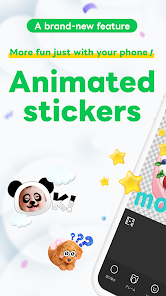
LINE Sticker Maker is a utility app from LINE Corporation that lets you turn your own photos and drawings into custom stickers for use in the LINE messaging platform. If you are a LINE user who wants to add a personal touch to your chats beyond the official sticker packs, this is the tool for you. It is a free download on both Google Play and the App Store, though you will need a LINE account to use it. Upon launching the app, the first thing I noticed was how clean and straightforward the interface is. There is no confusing onboarding or flashy graphics. It asks you to create a sticker set, and you can jump right in. You can see the install count is in the millions, which makes sense given how many people use LINE daily. There are in-app purchases for extra sticker sets and some premium features, but the core functionality is free. You will also see ads occasionally, but they are not intrusive enough to ruin the experience.
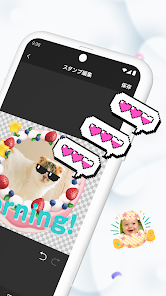
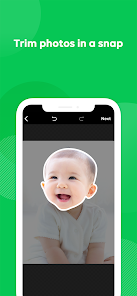
My hands-on experience with the app was mostly smooth. After you log in with your LINE ID, the main screen shows your existing sticker sets and a big plus button to start a new one. You pick a blank slot in a set and then either snap a photo, import one from your gallery, or draw something with the built-in drawing tools. The app provides a simple cropping tool and a transparent background option, which is nice for creating proper stickers that do not have a big white square around them. The order of operations is logical: create, crop, adjust, then assign a text tag for sticker search. There is a small learning curve with the eraser tool if you want to perfectly remove a background, but nothing a few tries cannot solve. One tip: if you plan to make face stickers, use a selfie with good lighting to get the best cutout. The app handles simple shapes well but struggles with fine details like hair strands.
After using LINE Sticker Maker for a while, I can see why it has a dedicated user base. For someone who loves personalizing conversations or wants to make inside jokes visual, this app is perfect. You can make a sticker of your pet's funny face, a drawing of your friend's reaction, or even a small note you want to reuse. It stands out from something like WhatsApp's built-in sticker creator because it integrates directly into LINE's sticker ecosystem and also lets you export stickers to use elsewhere. However, if you are not a heavy LINE user, this app is pointless since the stickers only work inside LINE. Compared to apps like Sticker Studio, which are more general-purpose, LINE Sticker Maker feels more locked into its parent platform. I kept it installed because I send a lot of LINE messages to family, but I can see someone uninstalling it after making a few sets if they get tired of the limited editing tools or the ads. It is a good app for its specific purpose, just not for everyone.
features
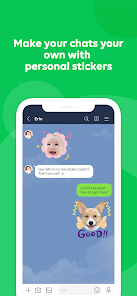
- 🤳 Custom Photo Stickers: Unlike WhatsApp's sticker creator, which only does basic cutouts, LINE Sticker Maker lets you create stickers from your own photos with a more refined background eraser. You can also draw directly on the app, so if you want a fully hand-drawn sticker, you can do that too. It is not as powerful as a full image editor, but for making a quick sticker, it is fast and straightforward. The best part is that these stickers sync directly to your LINE account, so they are ready to use in any chat immediately.
pros
- 👍 Seamless LINE Integration: The biggest strength of LINE Sticker Maker is that it is made by LINE themselves. Stickers you create instantly become available in your LINE sticker keyboard, everywhere on the app. Other apps like Sticker Studio require you to manually export and import each file, which is way more hassle. It just works out of the box.
cons
- 👎 Limited to LINE Only: The most obvious weakness is that stickers you make in this app only work within LINE. If you have friends who use Telegram or WhatsApp, you cannot share these stickers there. Apps like Sticker Studio let you export stickers as PNGs, so you can use them anywhere. If you switch messaging apps, your custom stickers are stuck.
Recommended Apps
![]()
16Personalities
16Personalities4
![]()
Zodiac Palm Reader: MagicWay
Reatility Media4.6
![]()
Moblo - 3D furniture modeling
MYTIforge4.1![]()
Magnifier Plus with Flashlight
Digitalchemy, LLC4.6![]()
QR Code Scanner
QR Code Scanner & Barcode Reader4.7![]()
FalFal: Astrology, Tarot, Love
FalFal Team4.8![]()
Christmas Photo Frames
PhotoFramesApps4.6![]()
AI Video Art Creator - Livensa
FERASET4.5![]()
Horoscope of Birth
Denimaks4.4![]()
Make Me Bald Prank
AppTornado2.5![]()
Kling AI: AI Image&Video Maker
Lohas Games Pte. Ltd.4.4![]()
Japan Timetable & Route Search
NAVITIME JAPAN CO., LTD.4.3![]()
Prank Call & Funny Video
TeH Software0![]()
Parallax 3D Live Wallpapers
TarrySoft4.3![]()
AI Chatbot - Nova
ScaleUp4.7















Disclaimer
1.AppInfoLibrary does not represent any developer, nor is it the developer of any App or game.
2.AppInfoLibrary provide custom reviews of Apps written by our own reviewers, and detailed information of these Apps, such as developer contacts, ratings and screenshots.
3.All trademarks, registered trademarks, product names and company names or logos appearing on the site are the property of their respective owners.
4. AppInfoLibrary abides by the federal Digital Millennium Copyright Act (DMCA) by responding to notices of alleged infringement that complies with the DMCA and other applicable laws.
5.If you are the owner or copyright representative and want to delete your information, please contact us info@appinfolibrary.com.
6.All the information on this website is strictly observed all the terms and conditions of Google Ads Advertising policies and Google Unwanted Software policy .














