

Gallery - photo gallery, album

10M+
Installs
4th floor apps
Developer
-
Video Players & Editors
Category
-
Rated for 3+
Content Rating
-
4thfloorapps.help@gmail.com
Developer Email
-
https://4thfloorapps.com/gallery-privacy-policy.html
Privacy Policy
Screenshots
editor reviews
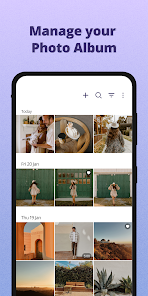
I stumbled upon Gallery - photo gallery, album by 4th Floor Apps after getting tired of the messy file management on my phone. It's basically a lightweight photo gallery app that focuses on organizing your pictures without the bloatware most default galleries come with. You can download it for free on both Google Play and the App Store, and it's been installed over 10 million times. When I first launched it, the interface felt clean, with no ads screaming for attention right away. You don't even need to sign up or log in; it instantly scans your device's media and shows everything in a simple grid view. That first impression was refreshing, because I could already see my photos sorted by date and album without any annoying pop-ups.
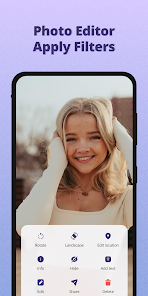
After using it for a few days, the experience was mostly smooth, though not perfect. When you open the app, it asks for storage permissions, which is fair, and then you're dropped into your camera roll. You can swipe between albums, zoom in with a pinch gesture, or tap an image to edit it. The editing tools are basic, just crop, rotate, and some filters, but I found them enough for quick touch-ups. One cool thing is the “hidden folder” feature that lets you lock private photos behind a PIN, which I set up right away for personal shots. On the downside, scrolling through hundreds of photos sometimes felt laggy on my older phone, especially when loading thumbnails quickly. There's also a “sort by size” option, which helped me find huge screenshots I wanted to delete, a nice practical touch.
After a week, I think Gallery works best for people who just want a no-fuss organizer. It's not trying to be Google Photos, which has cloud backup and smart search, but it does a solid job at local storage management. I'd recommend it to anyone whose default gallery app is too cluttered or ad-heavy. However, power users might miss features like cloud syncing or advanced editing, so they'd probably prefer something like Simple Gallery or Google Photos. For me, I kept it installed mainly for the privacy folder, but I still use Google Photos for backups. If 4th Floor Apps adds a cloud option later, I might switch fully, but for now, it's a decent sidekick.
features
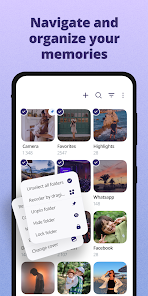
- 📂 Folder-based sorting – Unlike Google Photos, which relies heavily on AI grouping, Gallery keeps it old-school by letting you sort media by folders exactly as they're stored on your device. This makes it easier to find downloaded files or WhatsApp images without digging through endless auto-generated albums.
- 🔒 Private vault – The hidden folder with PIN protection feels much tighter than what you get in most default galleries. Google Photos doesn't offer local vaults without third-party add-ons, so this is a standout for privacy-conscious users who want to lock personal snaps without cloud uploads.
- 🖼️ Lightweight performance – It takes up less than 20MB on my phone, compared to over 100MB for Google Photos. This makes it pop open faster and drain less battery, especially on older devices where every megabyte counts.
- 🗑️ Bulk cleanup tools – You can select images by date, size, or format, then batch delete or move them. Google Photos has similar options but buries them in menus, while Gallery keeps it upfront with a simple “select all” toggle.
pros
- 🚀 No ads or bloatware – Unlike Simple Gallery, which may prompt you to buy the pro version, Gallery runs completely free with zero pop-ups. This made my experience feel pure and distraction-free.
- 🔍 Instant local search – It searches file names and folders instantly, which beats Google Photos' cloud-dependent search when you're offline or dealing with old photos.
- 🎯 Cleaner UI – Compared to the flashy animations in F-Stop Gallery, Gallery sticks to a bare-bones design. This might turn off users who want aesthetics, but for quick browsing, it's much more efficient.
cons
- 📉 No cloud backup – Unlike Google Photos, Gallery doesn't sync to the cloud, so if you lose your phone, you lose your local edits and hidden albums. That's a major drawback for anyone who relies on auto-backup.
- 🐌 Laggy with large libraries – When I loaded 5,000+ photos, scrolling became choppy. F-Stop Gallery handles big libraries smoother thanks to its caching improvements.
- 🔧 Limited editing tools – You only get basic crop and filters. Apps like Snapseed offer way more control, so photo enthusiasts will settle elsewhere.
- 🔄 No cloud import – You can't directly import from Google Drive or Dropbox, while Simple Gallery supports cloud mounts. This felt limiting when I wanted to edit cloud-stored images.
Recommended Apps
![]()
16Personalities
16Personalities4
![]()
Zodiac Palm Reader: MagicWay
Reatility Media4.6
![]()
Moblo - 3D furniture modeling
MYTIforge4.1![]()
Magnifier Plus with Flashlight
Digitalchemy, LLC4.6![]()
QR Code Scanner
QR Code Scanner & Barcode Reader4.7![]()
FalFal: Astrology, Tarot, Love
FalFal Team4.8![]()
Christmas Photo Frames
PhotoFramesApps4.6![]()
AI Video Art Creator - Livensa
FERASET4.5![]()
Horoscope of Birth
Denimaks4.4![]()
Make Me Bald Prank
AppTornado2.5![]()
Kling AI: AI Image&Video Maker
Lohas Games Pte. Ltd.4.4![]()
Japan Timetable & Route Search
NAVITIME JAPAN CO., LTD.4.3![]()
Prank Call & Funny Video
TeH Software0![]()
Parallax 3D Live Wallpapers
TarrySoft4.3![]()
AI Chatbot - Nova
ScaleUp4.7















Disclaimer
1.AppInfoLibrary does not represent any developer, nor is it the developer of any App or game.
2.AppInfoLibrary provide custom reviews of Apps written by our own reviewers, and detailed information of these Apps, such as developer contacts, ratings and screenshots.
3.All trademarks, registered trademarks, product names and company names or logos appearing on the site are the property of their respective owners.
4. AppInfoLibrary abides by the federal Digital Millennium Copyright Act (DMCA) by responding to notices of alleged infringement that complies with the DMCA and other applicable laws.
5.If you are the owner or copyright representative and want to delete your information, please contact us info@appinfolibrary.com.
6.All the information on this website is strictly observed all the terms and conditions of Google Ads Advertising policies and Google Unwanted Software policy .














