

Customuse: Skins Maker Roblox

5M+
Installs
Customuse
Developer
-
Art & Design
Category
-
Everyone
Content Rating
-
admin@customuse.com
Developer Email
-
https://customuse.notion.site/Customuse-Privacy-Policy-4499481dc31d40099b17d064369dda2b
Privacy Policy
Screenshots
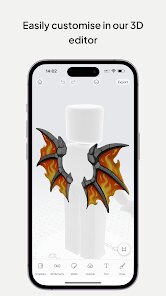
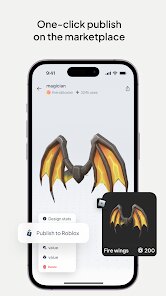
editor reviews
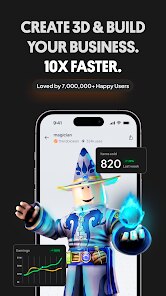
I first stumbled upon Customuse: Skins Maker Roblox while scrolling through the Play Store, bored out of my mind during a long train ride. It's basically a mobile sandbox for creating custom character skins and outfits, specifically tailored for Roblox players who want more control over their avatar's look without booting up the actual game. The app sits in that weird space between a design tool and a fashion game, and honestly, I didn't expect much from it at first glance. It's free to download, though there's a ton of in-app purchases and ads that pop up every few minutes. The install count is pretty high, so clearly I'm not the only one curious about making my own skins on the go. After launching it for the first time, I was hit with a flashy tutorial that felt a bit overwhelming, but the sheer variety of templates and color options kept me tapping around for a good twenty minutes before I even made anything.
Once I got past the initial shock of all those buttons, the actual hands-on experience was pretty smooth. The interface is laid out like a mini workshop: you pick a blank template or a pre-made base, then start tweaking everything from the hat to the shoes. I found myself messing with the color sliders and pattern tools, layering textures onto a hoodie and adding some glow effects to the pants. The onboarding walks you through the basics, but there's a moment where you just have to start swiping and tapping to figure out what each icon does. A small tip I picked up is that you can rotate the model by dragging your finger, which helps you see how the back of the skin looks. The most confusing part was figuring out how to export the finished design back into Roblox, since the app doesn't sync automatically. You have to save the image and manually upload it through the Roblox website, which feels like an extra step that could be simpler.
After using it for a few days, I think this app is great for Roblox fans who love customizing their look but don't want to spend hours learning actual design software. It's not for someone who just wants a quick outfit change, because the process takes some patience. What makes it different from apps like Skins Creator for Roblox is the sheer amount of templates and the ability to mix textures and patterns in a more flexible way. I almost deleted it after the third ad interruption, but the creative freedom kept me around. I can see myself keeping it installed for lazy Sunday afternoons when I want to experiment with neon colors and weird combos. It's not perfect, but it fills a niche that other skin makers don't really touch.
features
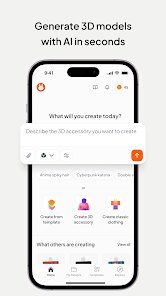
- 🧩 Template Library – Unlike Skins Creator for Roblox, which gives you a handful of basic shapes, Customuse throws a massive catalog of pre-made outfits and accessories at you. You can start from a full hoodie or a pair of futuristic boots and tweak every detail, which saves time and sparks ideas you wouldn't have thought of otherwise.
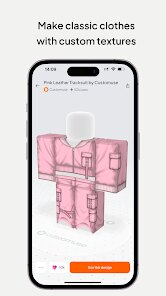
- 🎨 Layered Texture Tool – The standout feature here is how you can stack different patterns and colors onto the same piece of clothing. For example, you can add a camo print onto a jacket, then overlay a gradient on top of that, something most similar apps either don't support or make way too complicated.
- 📱 Mobile-Optimized Interface – While other skin makers often feel like a desktop tool crammed onto a phone, this app's layout is built for touch gestures. Swiping to rotate the model, pinching to zoom in on details, and tapping to select parts all feel natural, even if the buttons are a bit small sometimes.
- ⚡ Quick Export to PNG – The export process is fast, spitting out a high-quality image that you can throw into Roblox Studio or upload via the website. Other apps occasionally compress the image or add watermarks, but Customuse keeps it clean and ready to use.
pros
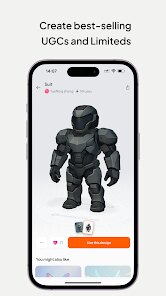
- 👍 Massive Template Variety – Compared to Skins Creator for Roblox, this app has way more starting points. You get everything from casual streetwear to sci-fi armor, so you never feel stuck staring at a blank canvas.
- 👍 Smooth Layering System – The way it handles overlapping patterns and colors feels intuitive. Apps like Roblox Skin Maker often limit you to one texture per item, but Customuse lets you build complex looks without confusion.
- 👍 No Account Required to Create – You can start designing immediately without signing up, which is a huge plus over some alternatives that force you to log in before even touching the tools.
- 👍 Regular Content Updates – The team seems to drop new templates and patterns every few weeks, keeping the creative possibilities fresh compared to more static apps in the same space.
cons
- 👎 Intrusive Ads Every Few Actions – The constant video ads break the flow badly. Skins Creator for Roblox shows ads too, but Customuse pops them up after almost every save or export, which makes a simple project drag on forever.
- 👎 No Direct Roblox Sync – Exporting skins means saving an image and uploading it manually. Other tools like Roblox Skin Maker at least offer a guide or a one-click option, but here you're left to figure out the process yourself.
- 👎 Limited Undo Functionality – If you mess up a color or accidentally delete a layer, there's no proper undo button. You have to start the whole piece over, which is frustrating when you're deep into a complex design.
- 👎 Premium Features Behind Paywall – The best templates and premium patterns are locked behind a subscription or coins. Free users get a solid experience, but it feels like half the library is teasing you to spend money.
Recommended Apps
![]()
16Personalities
16Personalities4
![]()
Zodiac Palm Reader: MagicWay
Reatility Media4.6
![]()
Moblo - 3D furniture modeling
MYTIforge4.1![]()
Magnifier Plus with Flashlight
Digitalchemy, LLC4.6![]()
QR Code Scanner
QR Code Scanner & Barcode Reader4.7![]()
FalFal: Astrology, Tarot, Love
FalFal Team4.8![]()
Christmas Photo Frames
PhotoFramesApps4.6![]()
AI Video Art Creator - Livensa
FERASET4.5![]()
Horoscope of Birth
Denimaks4.4![]()
Make Me Bald Prank
AppTornado2.5![]()
Kling AI: AI Image&Video Maker
Lohas Games Pte. Ltd.4.4![]()
Japan Timetable & Route Search
NAVITIME JAPAN CO., LTD.4.3![]()
Prank Call & Funny Video
TeH Software0![]()
Parallax 3D Live Wallpapers
TarrySoft4.3![]()
AI Chatbot - Nova
ScaleUp4.7















Disclaimer
1.AppInfoLibrary does not represent any developer, nor is it the developer of any App or game.
2.AppInfoLibrary provide custom reviews of Apps written by our own reviewers, and detailed information of these Apps, such as developer contacts, ratings and screenshots.
3.All trademarks, registered trademarks, product names and company names or logos appearing on the site are the property of their respective owners.
4. AppInfoLibrary abides by the federal Digital Millennium Copyright Act (DMCA) by responding to notices of alleged infringement that complies with the DMCA and other applicable laws.
5.If you are the owner or copyright representative and want to delete your information, please contact us info@appinfolibrary.com.
6.All the information on this website is strictly observed all the terms and conditions of Google Ads Advertising policies and Google Unwanted Software policy .














