

Perplexity - Ask Anything

5M+
Installs
PerplexityAI
Developer
-
Generative AI
Category
-
Rated for 3+
Content Rating
-
+16284007772
Developer Email
-
https://www.perplexity.ai/privacy
Privacy Policy
Screenshots
editor reviews
I first downloaded Perplexity - Ask Anything from the Google Play store after seeing a friend use it on his phone. It's an AI-powered search assistant app that blends traditional web search with conversational answers, so you can ask questions naturally and get summarized responses with sources attached. The app is free to download, though there's a Pro subscription for extra features. After installation, the first impression is clean and minimal — a simple search bar at the bottom, a few suggested topics, and no overwhelming clutter. It immediately feels different from Google or a general chatbot because it responds with real-time citations and links, making it more trustable for fact-based queries.
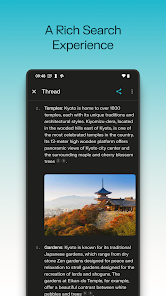
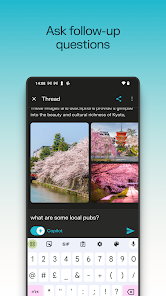
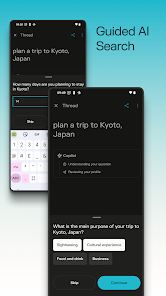
Once you start using the app, the flow is pretty straightforward. You type or speak a question, and within seconds it pulls together information from multiple websites, presents a short summary, and numbers the sources so you can tap to verify. The interface has a typical chat-style layout, with your questions on one side and AI responses on the other. Navigating between follow-up questions is smooth, and the app remembers context within a session, which is super helpful for research. One small thing I noticed: the free version limits you to a handful of Pro searches per day, but the standard model is more than enough for everyday use. I also liked how you can tap on any source link to open the original article right in the app's browser, avoiding the need to switch apps.
After using Perplexity for a couple of weeks, I can see why it stands out. It's not trying to replace Google completely, but it fills a specific gap: getting direct answers with evidence, instead of browsing through ten blue links. Students and curious folks who often fact-check, work on research, or just want quick explanations will find it more useful than a standard chatbot. However, if you just need to look up a restaurant address or a weather update, Google Search is still faster and more direct. What keeps me from uninstalling it is the transparency — knowing exactly where each piece of information comes from. Compared to ChatGPT or Bing AI, Perplexity feels more like a search companion than a conversational partner, which actually makes it more practical for daily information gathering.
features
- 🔍 Perplexity shows numbered sources right under every answer, so you can tap to verify or read the original page. Google and ChatGPT don't do this as clearly — Google sometimes hides sources deep in search results, while ChatGPT may answer without any citations at all.
- 📄 The app lets you upload PDFs, images, or text files and ask questions about them. For example, you can drop a research paper and get a summary or specific data points. Google doesn't natively support file-based Q&A, and even paid tools like ChatGPT Plus handle it differently.
- 📂 Perplexity includes a library feature where your past searches are organized into collections. You can revisit entire threads without losing context. Google search history is just a raw list of queries, and other AI apps often lack this kind of structured recall.
- 📱 The mobile app has a voice input option that's surprisingly accurate. You can ask complex questions by speaking, and the app parses them well. Google Assistant can do voice search, but it rarely provides the same depth of summarized answers with sources.
pros
- ✅ Real-time citations make it more trustworthy than ChatGPT, which sometimes generates outdated or unsourced information. With Perplexity, you can always check the source before believing the answer.
- ✅ It handles follow-up questions within a session context very naturally. Unlike Google, which treats every new search as isolated, Perplexity remembers your previous question and refines answers accordingly — great for deep dives.
- ✅ The app loads faster than many AI chatbots and doesn't require an account to start using, which lowers the barrier compared to Microsoft Copilot or Claude that often push sign-ups first.
- ✅ Perplexity updates its knowledge base more frequently than some competitors, so current events and recent news appear in answers sooner than on ChatGPT or Gemini.
cons
- ❌ The free tier limits you to a handful of Pro searches per day. If you're a heavy user, the free version can feel restrictive compared to Google's unlimited search or even ChatGPT's free tier.
- ❌ Sometimes the AI misunderstands ambiguous questions and picks the wrong context. Google handles vague queries better by showing multiple possible interpretations on its results page.
- ❌ There's no built-in image generation or creative writing mode. If you want to generate content or images, ChatGPT or Gemini are more versatile. Perplexity is purely for research and information retrieval.
- ❌ The app occasionally returns answers from less authoritative sources. Since it crawls the open web, you need to double-check the source rankings yourself, unlike Google which already filters through PageRank and quality signals.
Recommended Apps
![]()
16Personalities
16Personalities4
![]()
Zodiac Palm Reader: MagicWay
Reatility Media4.6
![]()
Moblo - 3D furniture modeling
MYTIforge4.1![]()
Magnifier Plus with Flashlight
Digitalchemy, LLC4.6![]()
QR Code Scanner
QR Code Scanner & Barcode Reader4.7![]()
FalFal: Astrology, Tarot, Love
FalFal Team4.8![]()
Christmas Photo Frames
PhotoFramesApps4.6![]()
AI Video Art Creator - Livensa
FERASET4.5![]()
Horoscope of Birth
Denimaks4.4![]()
Make Me Bald Prank
AppTornado2.5![]()
Kling AI: AI Image&Video Maker
Lohas Games Pte. Ltd.4.4![]()
Japan Timetable & Route Search
NAVITIME JAPAN CO., LTD.4.3![]()
Prank Call & Funny Video
TeH Software0![]()
Parallax 3D Live Wallpapers
TarrySoft4.3![]()
AI Chatbot - Nova
ScaleUp4.7















Disclaimer
1.AppInfoLibrary does not represent any developer, nor is it the developer of any App or game.
2.AppInfoLibrary provide custom reviews of Apps written by our own reviewers, and detailed information of these Apps, such as developer contacts, ratings and screenshots.
3.All trademarks, registered trademarks, product names and company names or logos appearing on the site are the property of their respective owners.
4. AppInfoLibrary abides by the federal Digital Millennium Copyright Act (DMCA) by responding to notices of alleged infringement that complies with the DMCA and other applicable laws.
5.If you are the owner or copyright representative and want to delete your information, please contact us info@appinfolibrary.com.
6.All the information on this website is strictly observed all the terms and conditions of Google Ads Advertising policies and Google Unwanted Software policy .














