

Chatbot AI & Smart Assistant

10M+
Installs
Codespace Dijital
Developer
-
Generative AI
Category
-
Rated for 3+
Content Rating
-
aichat@codespaceapps.co
Developer Email
-
https://static.chatbotaiapp.co/privacy-en.html
Privacy Policy
Screenshots


editor reviews
I've been using Chatbot AI & Smart Assistant by Codespace Dijital for a while now, and it's basically a general-purpose AI companion app, not tied to one specific model. You download it from the Play Store, it's free to install with a few million downloads, and after launching, you get a clean, modern-looking chat window. The whole point is having a single app where you can jump between different AI models, ask questions, get help writing, or just have a conversation. First impression was pretty solid – the interface is minimal and not cluttered with ads right away, which honestly made me want to stick around longer than most AI apps I've tested. Registration was quick, and there are some in-app purchases for extra features, but the basic functions work fine without spending anything.
Actually using it day-to-day feels smoother than I expected. When you open it, you're dropped straight into a chat interface with a text input bar at the bottom, and you pick which model you want from a small dropdown or menu at the top. The onboarding didn't bother me – just a quick tour and then you're free to type whatever. I found myself using it for quick things like summarizing articles or drafting emails, but also for longer, more creative stuff like brainstorming ideas or getting feedback on writing. There are a few hiccups, though. Sometimes switching between models takes a second longer than I'd like, and the response quality varies depending on which model you choose. A tip I picked up: if you're working on something that needs deeper reasoning, stick with the GPT-based option, but for quick, casual chat, the lighter models are fine and save a bit of time.
After a few weeks, my honest take is that it's a handy tool but not a must-have for everyone. If you're the kind of person who likes experimenting with different AI models without juggling multiple apps, this is perfect. But if you only ever use one specific chatbot, sticking with that standalone app might be better – less friction, fewer menus. What makes it stand out from things like ChatGPT or Claude is the all-in-one approach, but honestly, that also means you're trading some depth for flexibility. I've kept it installed because it's useful when I want to quickly compare answers from different models, but I can see someone uninstalling it if they never really use that feature. It's a decent middle ground in the crowded AI assistant space, not revolutionary but genuinely practical for curious users.
features
- 🤖 Multi-model access: You can switch between GPT, Claude, Gemini, and other AI models right inside one app. Most competitors lock you into a single provider, so this feels like having a Swiss Army knife for AI conversations without needing separate subscriptions.
- 📝 Context memory that actually works: The app remembers what you talked about earlier in a session, even after switching models. That's surprisingly rare – even dedicated apps sometimes lose track of the conversation history when you jump between tasks.
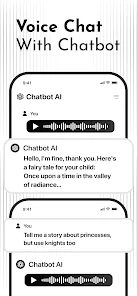
- 🎙️ Voice input option: You can speak your queries instead of typing. It's not the flashiest feature, but when you're cooking or driving, it makes a real difference. Some other assistants bury voice input behind menus, but here it's front and center.
- 🔗 Shareable chat links: You can export a conversation as a link and send it to someone else. This is great for work collaboration or just showing off a funny exchange – something most standalone chatbots don't offer natively.
pros
- 💪 Free tier is genuinely useful: Unlike ChatGPT which eventually nudges you toward a paid plan, this app gives you solid access to multiple models without hitting a paywall immediately. You can handle most daily tasks without spending a cent.
- 🚀 Model-switching speed: The transitions between different AI engines are faster than I expected. Compare this to trying to run separate apps for each model – you'd waste time opening and closing them. Here, it's a quick tap.
- 🧠 Unified chat history: All your conversations across different models are stored in one place, with search. That might sound small, but if you use Poe or Bing Chat, you know how annoying it is when history gets split or lost between sessions.
cons
- 🐢 Occasional lag spikes: Sometimes switching models takes noticeably longer, especially when the internet connection is weak. During those moments, I'd rather just open a dedicated app that's already loaded and snappy.
- 📊 Inconsistent response quality: The results vary a lot depending on which model you pick. If you're not careful, you might end up with a shallow answer when you needed depth. Dedicated apps usually maintain more uniform quality within their own ecosystem.
- 📱 Interface feels a bit cramped on smaller phones: The model selection menu and extra features can crowd the screen on a compact device. Competing apps like Perplexity or ChatGPT tend to have cleaner, more spacious layouts on mobile.
- 🔄 Update frequency is hit or miss: Some models get updated quickly, others feel left behind. If you rely on the absolute latest version of a specific AI, you might find this app trailing behind the official releases by a few weeks.
Recommended Apps
![]()
16Personalities
16Personalities4
![]()
Zodiac Palm Reader: MagicWay
Reatility Media4.6
![]()
Moblo - 3D furniture modeling
MYTIforge4.1![]()
Magnifier Plus with Flashlight
Digitalchemy, LLC4.6![]()
QR Code Scanner
QR Code Scanner & Barcode Reader4.7![]()
FalFal: Astrology, Tarot, Love
FalFal Team4.8![]()
Christmas Photo Frames
PhotoFramesApps4.6![]()
AI Video Art Creator - Livensa
FERASET4.5![]()
Horoscope of Birth
Denimaks4.4![]()
Make Me Bald Prank
AppTornado2.5![]()
Kling AI: AI Image&Video Maker
Lohas Games Pte. Ltd.4.4![]()
Japan Timetable & Route Search
NAVITIME JAPAN CO., LTD.4.3![]()
Prank Call & Funny Video
TeH Software0![]()
Parallax 3D Live Wallpapers
TarrySoft4.3![]()
AI Chatbot - Nova
ScaleUp4.7















Disclaimer
1.AppInfoLibrary does not represent any developer, nor is it the developer of any App or game.
2.AppInfoLibrary provide custom reviews of Apps written by our own reviewers, and detailed information of these Apps, such as developer contacts, ratings and screenshots.
3.All trademarks, registered trademarks, product names and company names or logos appearing on the site are the property of their respective owners.
4. AppInfoLibrary abides by the federal Digital Millennium Copyright Act (DMCA) by responding to notices of alleged infringement that complies with the DMCA and other applicable laws.
5.If you are the owner or copyright representative and want to delete your information, please contact us info@appinfolibrary.com.
6.All the information on this website is strictly observed all the terms and conditions of Google Ads Advertising policies and Google Unwanted Software policy .














