

Face Scanner: Age Detector

100K+
Installs
EclixTech
Developer
-
Entertainment
Category
-
Rated for 3+
Content Rating
-
ukomrt@gmail.com
Developer Email
-
https://eclixtech.com/privacy-policy
Privacy Policy
Screenshots
editor reviews
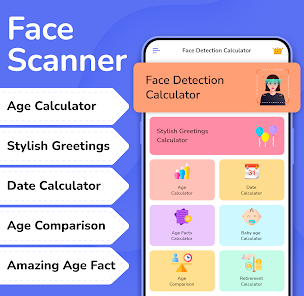
Face Scanner: Age Detector is a utility app that uses your phone's camera to estimate a person's age from a selfie or photo. It falls under the category of novelty camera and fun tools, not serious scientific measurement. Most people download it out of curiosity—maybe after seeing a friend get a surprisingly funny guess, or just to kill time. When you first open the app after installing it from Google Play or the App Store, you're greeted by a straightforward camera view with a button to snap a picture. The initial impression is clean but basic; there's no flashy intro or complicated tutorial. It's free to download, and while you can start using it immediately, you'll notice a few ads placed at the bottom of the screen. There's no mandatory sign-up or registration, which is a relief for those just wanting a quick laugh.
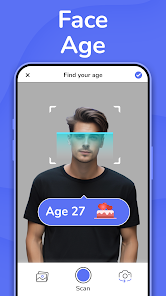
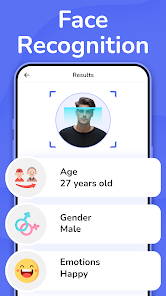
Once you start using it, the workflow is dead simple. You point the camera at someone's face, tap the capture button, and within a couple seconds the app overlays a predicted age right onto the screen. The interface shows just one large selfie frame, a capture button, and a gallery icon to load existing photos from your phone. The first time I tried it, I aimed the camera at my dog out of curiosity—it gave me a confused error, which was expected since it's trained on human faces. When I tested it on friends, the results were hit or miss; sometimes it guessed within a few years, other times it was wildly off by a decade or more. A small tip I found useful: make sure there is even lighting on the face and no sunglasses, as shadows and accessories often throw off the estimate. The app also includes a slider to manually adjust the age guess if you disagree, but that feels a bit pointless—you're just changing the number for fun. There's no history or log of past guesses, so if you forget a result, it's gone.
After using Face Scanner: Age Detector for a few days, I'd say it's a decent time-waster but not something I'd keep installed permanently. It's best for parties or when you're hanging out with friends and want a cheap laugh—kind of like those old photo booth filters. However, anyone looking for accurate age estimation will be disappointed, since the algorithm makes frequent errors, especially with different skin tones, makeup, or lighting. Compared to a more polished app like FaceApp, this one feels much less reliable and feature-rich. What makes it different from similar age-guessing tools is its minimalism: no filters, no editing, just a raw guess. That simplicity can be refreshing, but it also means there is little reason to open it again after the novelty wears off. I ended up uninstalling it after a week because I never really needed it beyond a few tests. But if you just want a quick, free laugh without signing up, it does the job.
features
- 📸 One-tap age estimation – The core feature is as simple as it gets: point, tap, and see the number. No menus, no settings, just a quick guess. Compared to an app like How Old Do I Look, Face Scanner skips the gamification and presents the result immediately without any extra fluff.
- 🖼️ Gallery import – You can load any photo from your phone, not just live camera shots. This is handy for testing old childhood photos or random celebrity pictures. It's not unique—many similar apps offer this—but it works reliably without crashing.
- 📉 Manual age adjustment slider – After the AI gives a number, you can slide it up or down to “correct” the guess. This is a little gimmick that feels more like a toy than a tool, but it adds a layer of interactivity that apps like Agescan Lite don't offer.
- 🕶️ No login required – You can use it completely anonymously, which is a plus for privacy-conscious users. Many similar apps force you to create an account or sign in with Google or Facebook, but here you just open and snap.
pros
- ✅ Fast and lightweight – The app launches in under two seconds and doesn't drain battery noticeably, unlike FaceApp which tends to hog resources.
- ✅ Zero registration – You don't need to hand over an email or phone number, while Age Calculator Pro often asks for a sign-up before letting you see a result.
- ✅ Simple UI – There are no confusing tabs or buried features; everything is on one screen. This makes it more accessible than Photo Age Pro which buries the age guess behind multiple taps.
cons
- ❌ Inconsistent accuracy – The AI often misses by a wide margin, especially on people with facial hair, glasses, or heavy makeup. FaceApp does a much better job at estimating age across diverse faces.
- ❌ No history or saving – Once you close the result, the age is lost. Age Scanner Pro automatically saves a log of past guesses so you can compare later, which Face Scanner lacks.
- ❌ Ads are intrusive – A banner ad sits at the bottom during use, and occasionally a full-screen video ad pops up after a few guesses, which breaks the flow. How Old Am I shows far fewer ads.
Recommended Apps
![]()
16Personalities
16Personalities4
![]()
Zodiac Palm Reader: MagicWay
Reatility Media4.6
![]()
Moblo - 3D furniture modeling
MYTIforge4.1![]()
Magnifier Plus with Flashlight
Digitalchemy, LLC4.6![]()
QR Code Scanner
QR Code Scanner & Barcode Reader4.7![]()
FalFal: Astrology, Tarot, Love
FalFal Team4.8![]()
Christmas Photo Frames
PhotoFramesApps4.6![]()
AI Video Art Creator - Livensa
FERASET4.5![]()
Horoscope of Birth
Denimaks4.4![]()
Make Me Bald Prank
AppTornado2.5![]()
Kling AI: AI Image&Video Maker
Lohas Games Pte. Ltd.4.4![]()
Japan Timetable & Route Search
NAVITIME JAPAN CO., LTD.4.3![]()
Prank Call & Funny Video
TeH Software0![]()
Parallax 3D Live Wallpapers
TarrySoft4.3![]()
AI Chatbot - Nova
ScaleUp4.7















Disclaimer
1.AppInfoLibrary does not represent any developer, nor is it the developer of any App or game.
2.AppInfoLibrary provide custom reviews of Apps written by our own reviewers, and detailed information of these Apps, such as developer contacts, ratings and screenshots.
3.All trademarks, registered trademarks, product names and company names or logos appearing on the site are the property of their respective owners.
4. AppInfoLibrary abides by the federal Digital Millennium Copyright Act (DMCA) by responding to notices of alleged infringement that complies with the DMCA and other applicable laws.
5.If you are the owner or copyright representative and want to delete your information, please contact us info@appinfolibrary.com.
6.All the information on this website is strictly observed all the terms and conditions of Google Ads Advertising policies and Google Unwanted Software policy .














