

Persona: Beauty Camera

5M+
Installs
TICKET TO THE MOON, INC.
Developer
-
Generative AI
Category
-
Rated for 3+
Content Rating
-
contact@persona.camera
Developer Email
-
https://persona.camera/privacy_policy_persona.html
Privacy Policy
Screenshots
editor reviews
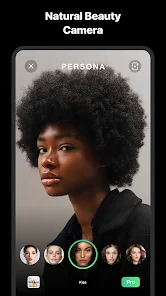
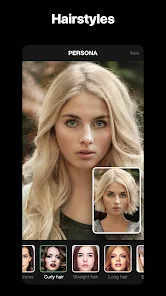
Beauty Camera is a photo editing app that focuses specifically on enhancing selfies and portraits, rather than being a full-fledged editing suite for landscapes or general photography. Developed by TICKET TO THE MOON, INC., it's the kind of tool you grab when you want a quick fix before posting to social media. I installed it from the Google Play store, and the download was free, though I spotted in-app purchases for extra filters and tools right away. The first impression after launching is pretty clean—the interface is mostly just a camera viewfinder with a few icons, so you're not overwhelmed by menus. It feels like it's made for someone who wants to snap and share fast without tinkering with layers or masks.
Getting hands-on with it was straightforward. You point the camera at your face, and the app automatically detects features like your eyes, nose, and mouth. Onboarding is just a quick swipe through some examples of what the filters can do, and then you're in. The main actions are picking a filter, adjusting the intensity with a slider, and either taking a photo or importing one from your gallery. I noticed that the smoothing effect on skin is pretty aggressive by default, but you can dial it back, which is nice. A small tip I picked up: you can tap on specific areas of your face to manually edit spots like blemishes or under-eye circles, which is more precise than just slapping a filter on. The only slightly confusing moment was finding the blemish tool—it's hidden behind a little “magic wand” icon, not labeled clearly. But once you know, it's fine.
After using Beauty Camera for a couple weeks, I think it's best for casual selfie takers who want a one-tap polish before sharing. If you're a photography buff or someone who likes manual control over every aspect of your images, you'd probably get bored fast. Compared to something like FaceTune, Beauty Camera feels quicker and more streamlined, but it lacks the advanced retouching features like reshaping or lighting adjustments. What keeps me from uninstalling it is the speed—no waiting for renders or loading screens. I can see why someone might delete it later, though, if they want more versatility or get tired of the same filter options. It's a fair trade-off for a free app that does one thing well.
features
- ✨ Real-time face tracking: Beauty Camera instantly maps your facial features as you move, so filters stay perfectly aligned even when you tilt your head or smile. In contrast, apps like YouCam Perfect require you to manually tap to lock the focus, which can be annoying for quick shots.
- 🎨 Customizable skin smoothing: Instead of a blanket blur, you can choose the intensity of the smoothing effect with a slider, or target specific areas. VSCO doesn't offer this granularity for portraits at all.
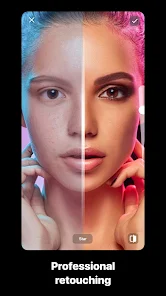
- 💧 Blemish spot fix: You can tap individual pimples or dark spots to remove them, similar to a spot healing brush in Photoshop, but simplified. FaceTune has this too, but it's a paid feature, while Beauty Camera gives a limited free version.
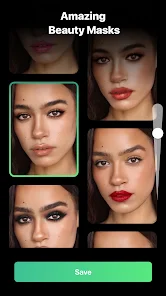
- 🖼️ One-tap filter chains: Each filter applies a combination of makeup, skin tone adjustment, and lighting change at once. This saves time compared to CyberLink PhotoDirector, where you have to layer these effects separately.
pros
- 🚀 Speed and responsiveness: The app launches and processes edits almost instantly, even on older phones like my Galaxy S10. FaceTune, on the other hand, can sometimes lag when applying heavy filters, especially after a software update.
- 🎯 Simplicity for beginners: There are no complex curves or histograms to mess with. In comparison, Adobe Lightroom can intimidate new users with its array of sliders and presets, even though it's more powerful.
- 💰 Free core features: Most of the essential tools, like skin smoothing and blemish removal, are free to use. YouCam Perfect locks many of these behind a subscription, which feels greedier.
cons
- 🔒 Limited filter variety: After using the app for a week, I felt like I was cycling through the same 10 filters. Apps like Snow or B612 regularly update their filter library, so you get fresh looks more often.
- 📱 No manual face reshaping: You can't slim your face or enlarge your eyes like you can in FaceTune. This is a bummer if you want more dramatic edits besides just skin fixes.
- 💸 In-app purchase pressure: While basic features are free, premium filters are priced individually, and there's no single subscription to unlock all of them. Meitu, for example, offers a more straightforward all-access plan.
- 📷 Only portrait-focused: You can't use it meaningfully for editing group photos, food shots, or landscapes. Snapseed or Lightroom are much better for mixed gallery editing.
Recommended Apps
![]()
16Personalities
16Personalities4
![]()
Zodiac Palm Reader: MagicWay
Reatility Media4.6
![]()
Moblo - 3D furniture modeling
MYTIforge4.1![]()
Magnifier Plus with Flashlight
Digitalchemy, LLC4.6![]()
QR Code Scanner
QR Code Scanner & Barcode Reader4.7![]()
FalFal: Astrology, Tarot, Love
FalFal Team4.8![]()
Christmas Photo Frames
PhotoFramesApps4.6![]()
AI Video Art Creator - Livensa
FERASET4.5![]()
Horoscope of Birth
Denimaks4.4![]()
Make Me Bald Prank
AppTornado2.5![]()
Kling AI: AI Image&Video Maker
Lohas Games Pte. Ltd.4.4![]()
Japan Timetable & Route Search
NAVITIME JAPAN CO., LTD.4.3![]()
Prank Call & Funny Video
TeH Software0![]()
Parallax 3D Live Wallpapers
TarrySoft4.3![]()
AI Chatbot - Nova
ScaleUp4.7















Disclaimer
1.AppInfoLibrary does not represent any developer, nor is it the developer of any App or game.
2.AppInfoLibrary provide custom reviews of Apps written by our own reviewers, and detailed information of these Apps, such as developer contacts, ratings and screenshots.
3.All trademarks, registered trademarks, product names and company names or logos appearing on the site are the property of their respective owners.
4. AppInfoLibrary abides by the federal Digital Millennium Copyright Act (DMCA) by responding to notices of alleged infringement that complies with the DMCA and other applicable laws.
5.If you are the owner or copyright representative and want to delete your information, please contact us info@appinfolibrary.com.
6.All the information on this website is strictly observed all the terms and conditions of Google Ads Advertising policies and Google Unwanted Software policy .














