
Ink AI – Tattoo design maker

500K+
Installs
RefaceEuropeUAB
Developer
-
Generative AI
Category
-
Rated for 3+
Content Rating
-
hey@ink-ai.app
Developer Email
-
https://ink-ai.app/privacy
Privacy Policy
Screenshots
editor reviews
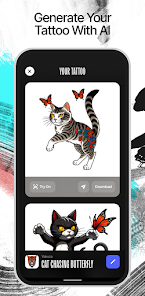
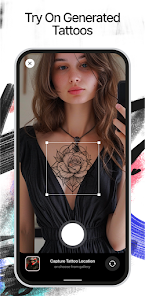
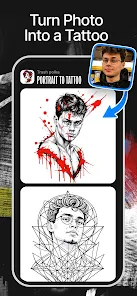
Ink AI is essentially a tattoo design generator that lives in the app store, built by the same team behind the popular face-swapping app Reface. You download it when you're stuck on what to get inked or when you want to play around with different styles without committing to a permanent piece. After installation, the app immediately asks you to describe your tattoo idea or upload a reference photo, and the first impression is surprisingly polished—clean white backgrounds, smooth transitions, and a very modern, minimalist interface. It's free to download with optional paid unlocks, though you can't actually preview realistic body placement without spending a few bucks.
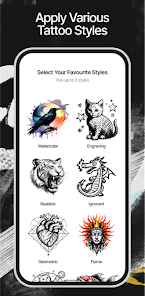
Once you dive into using it, the whole flow feels more like a creative brainstorming session than a typical design tool. You start by typing something like "a minimalist wolf with geometric patterns" or "watercolor hummingbird in blue and purple," and within seconds, the AI spits out several variations. The interface keeps things simple: a text box at the top, a gallery of generated images below, and a handful of style filters like "traditional," "tribal," or "sketch." Tapping on any design lets you adjust fine details or regenerate similar options, which is handy when you're not quite sure what you want. One minor hiccup—the app sometimes struggles with overly complex descriptions, producing weird anatomy or blurry lines, but for basic ideas it works surprisingly well. A practical tip: use short, specific keywords instead of full sentences for the best results.
After spending a couple of weeks with it, I can see why some people would love it and others would delete it within a day. If you're the type who likes to explore different tattoo concepts before walking into a shop, this app is genuinely useful—it's like having a sketchbook that never runs out of ideas. But if you already know exactly what you want, or if you're looking for a precise mockup of a specific reference photo, you'll probably be frustrated by the randomness. Compared to something like drawing your own rough sketch on paper or using a generic image editor, Ink AI feels more like a collaborator than a tool, but it doesn't replace a real artist's eye. I kept it installed because it gives me inspiration I wouldn't have thought of on my own, though I could see uninstalling it after I've settled on a design.
features
- 🎨 Style variety – Unlike basic AI image generators like DALL-E, Ink AI offers specific tattoo styles such as "old school" and "tribal," making the output more relevant for body art.
- 🖌️ Easy regeneration – If a design doesn't work, you can tweak the description slightly and get fresh options in seconds, which feels faster than starting over in Midjourney.
- 📱 Mobile-first experience – The entire interface is optimized for phone screens, so you're not pinching and zooming like you would with Adobe Firefly on mobile.
pros
- ⭐ Instant inspiration – I often sit with a blank mind, but Ink AI always gives me a starting point, something generic art apps like Canva rarely do for tattoos.
- ⚡ Quick iterations – Regenerating a design takes just a couple of taps, which beats scrolling through Pinterest for hours or asking friends for opinions.
- 🎯 Focused on tattoos – Other apps like Procreate are great for drawing but require skill; Ink AI does the heavy lifting for you if you lack artistic confidence.
cons
- ⚠️ Inconsistent quality – Complex prompts sometimes produce mangled tattoos—distorted faces or blurry text—whereas a tool like Leonardo AI handles detail better.
- 💸 Paid previews – You can't see how a design looks on an actual arm or leg without buying credits, which feels stingy compared to Reface's free face-swapping.
- 🔒 Limited customization – Unlike Stable Diffusion, you can't control fine details like line thickness or color palette precisely, leaving you with less control over the final output.
Recommended Apps
![]()
16Personalities
16Personalities4
![]()
Zodiac Palm Reader: MagicWay
Reatility Media4.6
![]()
Moblo - 3D furniture modeling
MYTIforge4.1![]()
Magnifier Plus with Flashlight
Digitalchemy, LLC4.6![]()
QR Code Scanner
QR Code Scanner & Barcode Reader4.7![]()
FalFal: Astrology, Tarot, Love
FalFal Team4.8![]()
Christmas Photo Frames
PhotoFramesApps4.6![]()
AI Video Art Creator - Livensa
FERASET4.5![]()
Horoscope of Birth
Denimaks4.4![]()
Make Me Bald Prank
AppTornado2.5![]()
Kling AI: AI Image&Video Maker
Lohas Games Pte. Ltd.4.4![]()
Japan Timetable & Route Search
NAVITIME JAPAN CO., LTD.4.3![]()
Prank Call & Funny Video
TeH Software0![]()
Parallax 3D Live Wallpapers
TarrySoft4.3![]()
AI Chatbot - Nova
ScaleUp4.7















Disclaimer
1.AppInfoLibrary does not represent any developer, nor is it the developer of any App or game.
2.AppInfoLibrary provide custom reviews of Apps written by our own reviewers, and detailed information of these Apps, such as developer contacts, ratings and screenshots.
3.All trademarks, registered trademarks, product names and company names or logos appearing on the site are the property of their respective owners.
4. AppInfoLibrary abides by the federal Digital Millennium Copyright Act (DMCA) by responding to notices of alleged infringement that complies with the DMCA and other applicable laws.
5.If you are the owner or copyright representative and want to delete your information, please contact us info@appinfolibrary.com.
6.All the information on this website is strictly observed all the terms and conditions of Google Ads Advertising policies and Google Unwanted Software policy .














